Windows Shellbags: A Practical DFIR Guide for Incident Responders and Cyber Analysts

Overview
Shellbags are Windows Registry artifacts that preserve folder-view preferences created by the Windows shell when a user browses folders through Explorer and certain common file-dialog interfaces. For defenders, the artifact is valuable because it can help reconstruct historical folder interaction, including activity involving deleted folders, removable media, and network locations, even when the underlying content is no longer readily available on the live file system.
Shellbags are powerful, but they are not absolute. They do not prove file opening, copying, or exfiltration by themselves, and they should not be described as evidence that a user accessed “every folder” or as an artifact that always survives every anti-forensic condition. In practice, Shellbags are best treated as a strong indicator of prior GUI-based folder interaction that gains evidentiary weight when correlated with supporting artifacts.
What Shellbags Can and Cannot Prove
This question belongs at the start of any serious Shellbags report because it shapes how findings should be interpreted and communicated.
What Shellbags can support
A user profile associated with a given hive likely interacted with a folder through Windows Explorer or a related shell interface.
A folder path may have existed and been rendered or navigated in the shell, even if that path no longer appears in the current file system.
A user likely browsed content on local disks, removable media, mapped or UNC network locations, and in some Windows versions and update states, certain archive types exposed through Explorer.
BagMRU and Bags relationships can strengthen the inference that a folder was not merely referenced, but actually displayed with stored view-state information.
Embedded shell item metadata and registry key times can help place folder interaction into an investigative timeline.
What Shellbags cannot prove on their own
They do not prove a specific file was opened, copied, modified, or exfiltrated.
They do not prove malicious intent.
They do not prove that a suspect manually typed commands in a console, because command-line navigation may bypass Shellbag creation entirely.
They do not prove exact user action semantics from a timestamp alone, because registry last-write activity can reflect more than one shell-related event.
They do not guarantee complete visibility into all past folder activity.
Reporting language and evidence strength
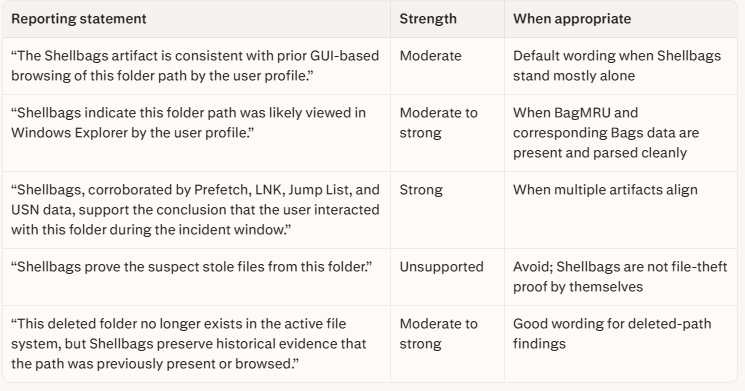
Use restrained reporting language. The goal is to describe what the artifact reasonably supports, not to overstate certainty.
What Shellbags Are
Shellbags are a set of per-user Registry structures that Windows uses to remember how folders were displayed in graphical shell interfaces. The underlying feature predates Windows 7, but Windows 7 significantly changed the artifact layout and expanded the importance of USRCLASS.DAT for analysis. That distinction matters because saying Shellbags were “introduced” in Windows 7 is inaccurate; a more precise statement is that Windows 7 brought a major format and storage change that modern investigators still account for.
Forensically, Shellbags matter because Windows persists folder-view state in the Registry. When investigators parse those structures, they can often reconstruct historical folder paths, infer shell-based browsing, and recover path evidence for locations that have since been deleted, disconnected, or are otherwise unavailable.
Where Shellbags Live
Shellbags are user-specific and normally must be reviewed per account. On modern Windows systems, the primary hives are:
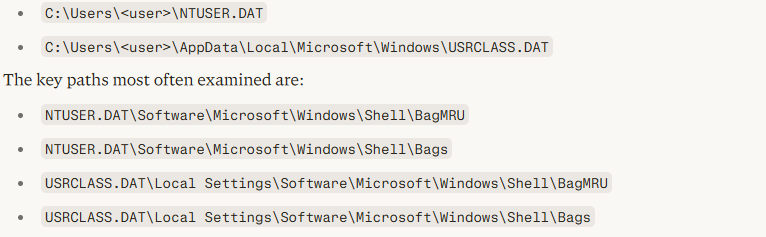
A practical rule is that analysts should parse both hives for every relevant user rather than assuming one hive is sufficient. On Windows 7 and later, failing to include USRCLASS.DAT can leave meaningful Shellbag evidence behind.
BagMRU and Bags
The two structures most analysts rely on are BagMRU and Bags.
BagMRU
BagMRU stores a navigational tree of shell items that can be used to reconstruct folder paths and shell traversal. Numbered values, MRUListEx, and NodeSlot relationships are central to understanding what was visited and how it maps to the companion Bags structure.
Bags
Bags stores view-state configuration such as folder display preferences, window characteristics, sort settings, and similar shell presentation details. When correlated with BagMRU, the presence of related Bags data can strengthen the interpretation that the folder was actually rendered in the shell rather than merely appearing as part of a path traversal or failed access attempt.
Acquisition and Preservation
Acquisition quality has a direct impact on Shellbags reliability. Registry hives can be “dirty” or mid-transaction, and responders can easily contaminate evidence if they interact with the system carelessly.
Collect the hive family, not just the main hive files
For each relevant user, collect:
NTUSER.DATNTUSER.DAT.LOG1NTUSER.DAT.LOG2USRCLASS.DATUSRCLASS.DAT.LOG1USRCLASS.DAT.LOG2
Those transaction logs matter because they may be needed to replay pending writes and recover the most accurate hive state. If a parser does not automatically handle transaction logs well, replaying them first with an appropriate Registry utility may be necessary before analysis.
Live-response contamination warnings
During live response, avoid browsing the target user’s folders in Windows Explorer. Doing so can create or modify Shellbags and other shell artifacts, weakening the integrity of later findings. The same caution applies to opening file-picker dialogs, launching user-context Explorer windows, or interactively navigating suspect paths from the desktop.
Safer practices include:
Prefer collection tools that can acquire locked hives without interactive browsing.
Minimize GUI interaction in the suspect user context.
Record whether acquisition occurred live, offline, or from a mounted image.
Document any responder actions that may have touched shell artifacts.
Preserve original hives before replaying transaction logs or normalizing them for analysis.
Offline and image-based handling
When working from a disk image or triage package, export the hive files and their transaction logs together. If the hives appear dirty, replay the logs into working copies rather than altering the original evidence set. This keeps the forensic chain cleaner and preserves re-analysis options.
Parsing and Tooling
For current practice, priority should be given to mature DFIR references and tooling from SANS, GIAC-aligned training material, and Eric Zimmerman’s utilities.
Primary tools
ShellBags Explorerfor interactive review of shellbag structures.SBECmdfor command-line parsing and CSV export.Registry Explorerfor lower-level hive inspection.RLAor equivalent transaction-log replay tooling when hive state must be normalized.Timeline Explorerfor reviewing exported CSV output at scale.KAPEfor collection and workflow integration.
A strong workflow is to collect the full hive family, parse with SBECmd or ShellBags Explorer, review the resulting paths and timestamps, then correlate the findings against other timeline artifacts.
Timestamps and Interpretation
Shellbags can contain several time-related signals, but they require careful language.
Investigators may encounter registry last-write times, estimated first or last interaction fields produced by parsers, and embedded timestamps associated with shell item metadata. These values can be useful for narrowing an incident window, but they should not be treated as exact user-action timestamps without corroboration. Registry last-write changes can reflect view-state changes and related shell behavior, not just the act of opening a target folder.
For reporting, it is safer to say that Shellbags are consistent with folder interaction within a time window than to claim they capture the exact moment a user opened a folder.
Windows 11 Archive Support
Archive-related Shellbag interpretation should be written carefully. It is reasonable to note that Windows 11 expanded native Explorer support for additional archive types beyond traditional ZIP handling, but analysts should tie any such statement to the system’s build and update level rather than generalizing across all Windows 11 installations.
In practice, support for additional formats such as RAR and 7-Zip was rolled out through Windows 11 22H2-era updates rather than existing uniformly across every Windows 11 system from day one. Before making an archive-browsing claim, confirm the target OS version, cumulative update state, and whether Explorer on that host actually exposed the archive type in question. If that cannot be established, report the point as a possibility, not a certainty.
Investigative Use Cases
Deleted folders and staging paths
Shellbags are especially valuable when a suspicious directory has been deleted before acquisition. A deleted staging folder may no longer exist in the active file system, but historical path evidence in Shellbags can still help establish that the user profile previously browsed or rendered the location in the shell.
Removable media
Shellbags can preserve historical path information for folders on removable media after the device is disconnected. This makes the artifact useful in insider-risk and data-theft investigations, especially when combined with USB device artifacts and file-system evidence.
Network shares
Paths associated with UNC or other network browsing can help show that a user profile navigated shared resources. On their own, those artifacts still do not prove file theft, but they can materially strengthen a narrative of reconnaissance, staging, or sensitive-folder awareness.
Encrypted or transient containers
If a mounted volume, removable device, or container is no longer available, Shellbags may still preserve evidence of shell-based path exposure. This can be particularly useful when investigating temporary mounts or encrypted containers that are later unmounted.
Correlation Strategy
Shellbags become much more persuasive when paired with supporting artifacts. Priority correlates include:
Prefetch for program execution.
LNK files and Jump Lists for recent file-level interaction clues.
$MFTand$UsnJrnlfor file-system activity.USB-related Registry artifacts for removable-media attribution.
Event logs for logon sessions, share access, and process activity.
Browser and PowerShell artifacts when exploring possible Shellbag bypass behavior.
The most defensible approach is to treat Shellbags as one layer in a multi-artifact timeline, not as a standalone conclusion engine.
Anti-Forensics and Limits
Shellbags are resilient in many investigations, but not invulnerable. It is better to say they often persist after deletion of folders or removal of media than to say they always survive formatting, wiping, or all cleanup scenarios. Registry cleaning, transaction loss, hive damage, profile resets, reimaging, or targeted anti-forensic activity can alter what remains available.
Analysts should also remember that Shellbags are primarily about shell-mediated folder interaction. Command-line navigation, alternate file managers, scripted access, or deliberate registry tampering may reduce or bypass Shellbag creation. An empty or incomplete Shellbag picture therefore does not automatically mean no activity occurred.
Recommended Reporting Language
For formal reports, use language that is accurate, measured, and easy to defend:
“The artifact is consistent with prior shell-based browsing of the path.”
“The user profile likely viewed this folder through Windows Explorer.”
“Historical Registry evidence indicates the path was previously present or rendered in the shell.”
“This finding should be interpreted alongside corroborating artifacts before drawing conclusions about file access or exfiltration.”
Avoid phrases such as:
“Shellbags prove the suspect opened the file.”
“Windows records every folder the user has ever opened.”
“The evidence survives formatting.”
“This artifact alone proves exfiltration.”
Source Priority for Analysts
For practitioner use, the strongest starting references are:
SANS and GIAC material on Shellbags and Windows forensic artifacts.
Eric Zimmerman documentation and tool pages for current parser capabilities and transaction-log handling notes.
Vendor and practitioner articles used only to supplement, not anchor, analytical claims.
Social posts and informal writeups as further reading only.
Further Reading
Use these categories for deeper study when expanding an internal playbook:
SANS writeups on Windows 7 and modern Shellbag analysis.
GIAC papers covering Shellbag parsing and timeline construction.
Eric Zimmerman tool documentation for
SBECmd,ShellBags Explorer,Registry Explorer, andRLA.Supplemental practitioner blogs for examples and edge cases.
Social posts only for discovery of topics, not as primary authority.
Final Assessment
Shellbags remain one of the most useful Windows artifacts for reconstructing historical GUI-based folder interaction. Their strength is historical context: they can preserve path and view-state evidence that helps analysts understand what a user profile likely browsed, including paths no longer visible in the current file system.
Their limitation is equally important: Shellbags are rarely dispositive on their own. The best investigative use of Shellbags is careful acquisition, preservation of transaction logs, contamination-aware live response, version-aware interpretation, and disciplined correlation with other artifacts before making strong attribution or exfiltration claims.