Windows Registry Forensics Field Guide
Practitioner-ready publication for DFIR investigators, SOC analysts, incident responders, and CTI teams

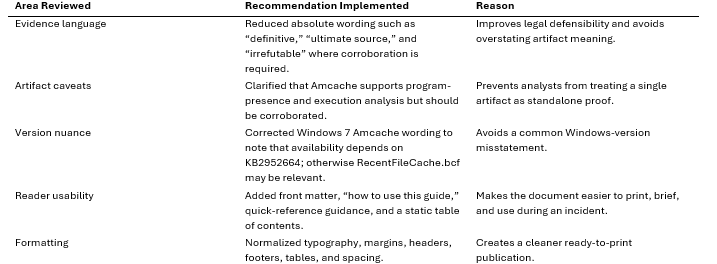
Editorial Review and Implemented Recommendations
The source guide already contains strong practitioner value: it covers core Windows Registry hives, user attribution artifacts, execution artifacts, USB forensics, persistence paths, Last Write Time analysis, and recommended tooling. The publication pass below keeps the technical core intact while improving readability, evidentiary caution, and print usability.
How to Use This Guide in an Investigation
Use this publication as a field reference, not as a single-artifact decision tree. Registry artifacts should be acquired with their transaction logs, parsed offline whenever possible, normalized to UTC, and correlated with event logs, Prefetch, Amcache, BAM, Shimcache, SRUM, MFT, USN Journal, LNK files, Jump Lists, and EDR telemetry.
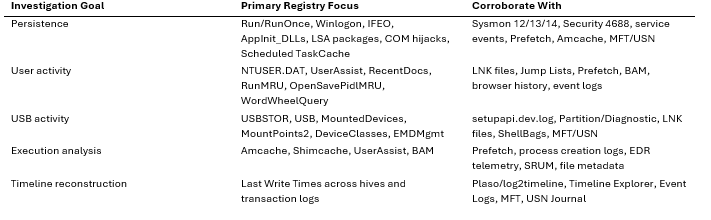
Windows Registry Forensics Field Guide
A practitioner-ready publication for DFIR investigators, SOC analysts, incident responders, and cyber threat intelligence teams
Introduction: What Is the Windows Registry and Why Does It Matter to Investigators?
The Windows Registry is not a single file, nor is it merely a repository for user preferences. It is a hierarchical, binary database composed of multiple hive files stored in specific locations on disk—and it quietly records almost everything that happens on a Windows machine. System configurations, user preferences, application installations, connected USB devices, recently opened documents, and even which programs were launched by a specific user at a specific time: all of it flows through the Registry.
For a Digital Forensics and Incident Response (DFIR) analyst, this makes the Registry one of the single richest sources of forensic evidence on any Windows endpoint. Registry artifacts are often the fastest path to establishing who used the machine and when, what executed and when, how a device connected to external media or networks, and what configuration was active at boot—all critical inputs for accurate timeline reconstruction. In fact, the SANS Institute’s authoritative Windows Forensic Analysis methodology classifies the Registry as a Tier 1 evidence source, essential for identifying computer intrusion, intellectual property theft, and system misuse [1].
The Evolution of Configuration Management
To understand the Registry’s forensic value, one must understand its origins. In early versions of Windows (such as Windows 3.1), system and application configurations were stored in plain-text Initialization (.INI) files scattered across the file system. This approach suffered from severe limitations: .INI files lacked a centralized structure, offered no granular security controls, and were prone to corruption and parsing inefficiencies as applications grew more complex [2].
With the introduction of Windows NT 3.1, Microsoft fundamentally redesigned configuration management by introducing the Registry. This centralized, binary database was designed to solve the performance and security issues of .INI files. It introduced a hierarchical structure (keys and values), strong access controls via Security Descriptors, and a robust transaction logging mechanism to prevent corruption during system crashes [3].
Cross-Platform Forensic Context
When comparing Windows to other major operating systems, the Registry’s monolithic, binary nature stands out.
• macOS (.plist files): Apple’s macOS relies on Property List (.plist) files, typically stored in XML or binary formats within /Library/Preferences or ~/Library/Preferences. While functionally similar to the Registry, .plist files are decentralized. Forensic analysts investigating macOS must often parse hundreds of individual files to build a comprehensive system profile [4].
• Linux (/etc directory): Linux and Unix-like systems traditionally use plain-text configuration files stored in the /etc directory and hidden dotfiles in user home directories. This decentralized, text-based approach is highly transparent but lacks the unified, queryable structure of the Windows Registry.
The centralized nature of the Windows Registry means that a single acquisition of the hive files can yield a near-complete picture of the system’s state and history, making it uniquely powerful for forensic analysis.
The Registry Binary Format: Under the Hood
Forensic analysts must look beyond the graphical interface of regedit.exe and understand the underlying binary structure of the Registry. The Registry is stored on disk in a proprietary binary format known as regf. Understanding this format is crucial for parsing offline hives, recovering deleted keys, and detecting anti-forensics tampering.
The regf Header and Hive Bins
Every Registry hive file begins with a 4KB base block (header) identified by the magic bytes regf (0x66676572) at offset 0x00. This header contains critical metadata, including: * Primary Sequence Number: Used to verify the integrity of the hive against its transaction logs. * Secondary Sequence Number: Must match the primary sequence number for the hive to be considered clean. * Last Written Timestamp: A Windows FILETIME timestamp indicating the last time the hive was modified. * Major and Minor Version Numbers: Indicating the format version.
Following the base block, the hive data is organized into 4KB blocks called Hive Bins (hbin). Each hbin begins with the signature hbin (0x6E696268) and contains one or more variable-length cells [5].
Registry Cells: nk, vk, and sk Records
The actual data within the Registry—the keys, values, and security settings—are stored within these cells using specific record types:
• Key Node (nk): Represents a Registry key (analogous to a folder). It contains the key’s name, a Last Write Time timestamp, and offsets pointing to its subkeys, values, and security descriptor. The signature is nk (0x6B6E) or kn (0x6E6B).
• Key Value (vk): Represents a Registry value (analogous to a file). It contains the value’s name, data type (e.g., REG_SZ, REG_BINARY), and an offset pointing to the actual data. The signature is vk (0x6B76).
• Security Descriptor (sk): Contains the access control list (ACL) for a key, defining which users or processes have permission to read, write, or delete it. The signature is sk (0x6B73).
When a key or value is deleted, the OS does not immediately overwrite the data. Instead, the cell is marked as unallocated by changing its size value to a positive integer (allocated cells have negative size values). Forensic tools can often carve these unallocated cells to recover deleted Registry artifacts, a technique vital for uncovering attacker activity [6].
The Registry in the MITRE ATT&CK Framework
The Registry is heavily targeted by Advanced Persistent Threats (APTs) and commodity malware alike. Its role in system configuration makes it an ideal location for establishing persistence, escalating privileges, and evading defenses.
The MITRE ATT&CK framework extensively documents these techniques. A prime example is T1547.001: Boot or Logon Autostart Execution: Registry Run Keys / Startup Folder [7]. Attackers frequently modify keys such as HKCU\Software\Microsoft\Windows\CurrentVersion\Run to ensure their malicious payloads execute automatically when a user logs in.
Real-World Case Studies
• APT37 (Reaper): This North Korean threat actor has been observed using Registry Run keys to maintain persistence for their initial stage implants, ensuring the malware survives system reboots.
• APT41: This Chinese state-sponsored group is known for sophisticated Registry manipulation, including storing encrypted payloads directly within Registry values (fileless malware) to evade traditional file-based antivirus scanning.
• Stuxnet: The infamous Stuxnet worm utilized the Registry to store configuration data and track its infection status across targeted systems.
Windows Version-Specific Differences
While the core regf format has remained relatively stable since Windows NT, the specific artifacts and their locations have evolved across Windows versions. Analysts must be aware of these differences:
• Windows 7: May contain Amcache.hve if KB2952664 is installed; otherwise, rely on RecentFileCache.bcf and corroborating execution artifacts.
• Windows 8/8.1: Introduced the BAM (Background Activity Moderator) and DAM (Desktop Activity Moderator) keys within the SYSTEM hive, providing new ways to track process execution.
• Windows 10/11: Expanded the use of the Amcache.hve and introduced new artifacts related to Universal Windows Platform (UWP) apps and telemetry. The structure of certain keys, such as UserAssist, has also seen minor updates to track focus time in addition to execution counts.
Anti-Forensics and Tampering Detection
Adversaries are acutely aware of the Registry’s forensic value and frequently employ anti-forensics techniques to hide their tracks. Common methods include:
• Timestomping: Altering the Last Write Time of a Registry key to blend in with legitimate system activity.
• Key Deletion: Removing Run keys or evidence of execution after a payload has been loaded into memory.
• Null Byte Injection: Inserting null bytes into Registry key names to hide them from standard API calls and tools like regedit.exe.
To detect such tampering, analysts must rely on offline parsing tools that bypass the Windows API and read the raw regf structure. By examining unallocated space for deleted nk and vk records, and cross-referencing Registry timestamps with other artifacts, investigators can often reconstruct the attacker’s actions [8].
Correlation Guidance: The Power of Cross-Referencing
The true power of Registry forensics lies in correlation. A single Registry artifact is rarely enough to build a complete narrative; it must be cross-referenced with other evidence sources:
Registry Artifact
Correlating Evidence Source
Purpose of Correlation
Run Keys (T1547.001)
Event Log 4688 (Process Creation), Prefetch, Amcache
Verify if the persistence mechanism actually executed the payload.
USBSTOR (Device Connection)
Event Log 20001/20003 (DriverFrameworks), SetupAPI logs
Confirm the exact time of connection and driver installation.
UserAssist (Execution)
Prefetch, MFT ($LogFile, $UsnJrnl), BAM/DAM
Corroborate execution timestamps and identify associated file system activity.
Last Write Time
USN Journal, Sysmon Event ID 12/13/14 (Registry Event)
Build a high-resolution timeline of system modifications.
For example, if a suspicious executable is found in a Run key, the analyst should immediately check the Prefetch folder (C:\Windows\Prefetch) to confirm execution and examine the Master File Table (MFT) to determine when the executable was created on disk [9].
Legal and Evidentiary Considerations
Because Registry analysis often forms the backbone of a forensic investigation, the findings must be legally defensible. This requires strict adherence to chain of custody and documentation procedures.
1. Acquisition: Registry hives are locked by the OS while running. They must be acquired using forensically sound methods, such as offline imaging (e.g., booting from a forensic USB) or using specialized tools (e.g., KAPE, FTK Imager) that utilize Volume Shadow Copies (VSS) or raw disk access to bypass OS locks.
2. Hashing: Cryptographic hashes (MD5, SHA-1, SHA-256) of the acquired hive files must be calculated immediately and documented to prove the evidence has not been altered.
3. Documentation: Every step of the analysis, including the tools used, the specific Registry paths examined, and the interpreted results, must be meticulously documented. The analyst must be prepared to explain the underlying binary structure and how the tool parsed the data if called to testify in court [10].
By treating the Registry not just as a configuration database, but as a complex, binary timeline of system activity, DFIR professionals can unlock the critical evidence needed to resolve even the most sophisticated incidents.
References: [1] SANS Institute. (2023). Windows Forensic Analysis Poster. [2] VirtualDub. (2010). The Windows registry vs. INI files. [3] Microsoft Learn. (2026). Windows registry information for advanced users. [4] Forensic Focus. (2020). Apple Property List: Comparing the Mac OS X Property List to the Windows Registry. [5] Suhanov, M. (n.d.). Windows registry file format specification. GitHub. [6] Project Zero. (2024). The Windows Registry Adventure #5: The regf file format. [7] MITRE ATT&CK. (n.d.). T1547.001: Boot or Logon Autostart Execution: Registry Run Keys / Startup Folder. [8] Cynet. (2026). Anti-Forensics Techniques. [9] Windows IR. (2020). “Hidden” Prefetch File Analysis and Alternate Data Sources. [10] National Institute of Justice. (2023). Law 101: Legal Guide for the Forensic Expert | Chain of Custody.
Section 2: System Registry Hives (SAM, SYSTEM, SOFTWARE, SECURITY, DEFAULT)
Location on disk: C:\Windows\System32\Config\
System hives are loaded during Windows boot and contain critical system-wide configuration and security information. Because they are loaded by the OS kernel early in the boot process, they are locked during normal system operation. Analysts must use offline acquisition methods or specialized tools to parse them cleanly.
Internal Binary Structure of Registry Hives
To truly understand registry forensics, an analyst must look beyond the logical keys and values presented by tools like Registry Editor and understand the underlying binary structure. The Windows Registry is not a simple text file; it is a complex, hierarchical database stored in a proprietary binary format known as the regf format [1].
At the lowest level, a registry hive file begins with a Base Block (or file header), which is exactly 4096 bytes (0x1000) in length. This block contains critical metadata about the hive, including: - Signature: The ASCII string regf at offset 0x00. - Sequence Numbers: Primary and secondary sequence numbers at offsets 0x04 and 0x08, which are used to ensure the integrity of the hive during write operations. - Last Written Timestamp: A FILETIME structure at offset 0x0C indicating the last time the hive was modified. - Hive Bins Data Size: The total size of the data contained in the hive at offset 0x28.
Following the Base Block, the actual data is organized into Hive Bins (hbins). Each hive bin is a container of variable size (always a multiple of 4096 bytes) that holds one or more Cells. A hive bin starts with a 32-byte header containing the hbin signature.
Cells are the fundamental storage units within a hive bin and contain the actual registry records. The most important cell types for forensic analysis include: - Key Node (nk) Record: Represents a registry key. It contains the key’s name, timestamps, and pointers to its subkeys and values. - Value Key (vk) Record: Represents a registry value. It contains the value’s name, data type, and a pointer to the actual data. - Subkey List (lf, lh, ri, li) Records: Arrays of pointers used to locate subkeys. - Security Descriptor (sk) Record: Contains the security descriptor (permissions) for a key.
Understanding this structure is crucial when dealing with corrupted hives or when attempting to carve deleted registry keys from unallocated space or memory dumps. When a key or value is deleted, the operating system marks the corresponding cell as unallocated by changing its size field to a positive value (allocated cells have negative size values). The data itself remains intact until it is overwritten by new registry activity, making registry carving a viable technique for recovering historical artifacts.
Acquisition Challenges and Methodologies
Because system hives are locked by the kernel while Windows is running, acquiring them from a live system requires specialized techniques. Attempting to simply copy the files using standard Windows API calls will result in a sharing violation error.
Forensic investigators typically employ one of the following methods to acquire locked registry hives:
1. Volume Shadow Copies (VSS): This is often the safest and most reliable method. By creating or accessing an existing Volume Shadow Copy, an analyst can extract a snapshot of the registry hives as they existed at the time the shadow copy was created. The vssadmin utility or specialized forensic tools can be used to mount and extract files from VSS.
2. Raw Disk Access: Tools like FTK Imager, KAPE, or specialized scripts can bypass the Windows API and read the raw NTFS volume directly. By parsing the Master File Table (MFT), these tools can locate the physical clusters on the disk where the registry hives are stored and extract the data, even while the files are locked by the OS.
3. Memory Forensics: In scenarios where disk acquisition is not possible or when investigating advanced in-memory threats, registry hives can be extracted from a physical memory dump. Tools like Volatility can parse the memory structures used by the Configuration Manager (the kernel component responsible for the registry) to reconstruct the hives.
The SAM Hive: Credential Extraction and Detection
The Security Account Manager (SAM) hive is a primary target for adversaries seeking to escalate privileges or move laterally within a network. It stores local user account information, including usernames, Relative Identifiers (RIDs), last logon timestamps, failed authentication counts, and, most importantly, NTLM password hashes.
Extraction Techniques
Adversaries frequently attempt to extract the SAM hive to perform offline password cracking or Pass-the-Hash attacks. This activity maps directly to MITRE ATT&CK technique T1003.002 (OS Credential Dumping: Security Account Manager) [2].
The extraction process typically involves obtaining both the SAM hive and the SYSTEM hive. The SYSTEM hive is required because it contains the BootKey (also known as the SysKey), which is used to encrypt the sensitive data within the SAM hive.
Common tools and techniques used for SAM extraction include: - Mimikatz: A ubiquitous post-exploitation tool that can extract credentials directly from memory (LSASS) or parse offline registry hives. - Impacket’s secretsdump.py: A Python script that can remotely extract SAM hashes, LSA secrets, and NTDS.dit data using DCERPC protocols. - Native Windows Utilities: Attackers often use built-in tools like reg.exe to save copies of the hives: cmd reg save HKLM\SAM C:\temp\sam.save reg save HKLM\SYSTEM C:\temp\system.save
Detection and Anti-Forensics
Detecting SAM hive extraction requires robust endpoint monitoring. Security teams should monitor for: - Execution of reg.exe with the save or export arguments targeting the SAM or SYSTEM hives. - Process creation events (Event ID 4688 or Sysmon Event ID 1) involving known credential dumping tools. - File creation events in unusual directories containing files named sam, system, or similar variations. - Access to the SAM registry keys by unexpected processes (Sysmon Event ID 12/13/14).
From an anti-forensics perspective, attackers may attempt to delete the exported hive files after extraction. Investigators should analyze the Master File Table (MFT), USN Journal, and unallocated space for evidence of deleted hive files or the execution of wiping utilities.
The SYSTEM Hive: ControlSets and Configuration
The SYSTEM hive contains critical configuration data required for the system to boot and operate. This includes device drivers, services, network configurations, and timezone settings.
ControlSet Selection Logic
A key concept within the SYSTEM hive is the use of ControlSets. A ControlSet is a complete copy of the system’s configuration. Windows maintains multiple ControlSets to provide a fallback mechanism in case a configuration change prevents the system from booting.
When analyzing the SYSTEM hive, investigators will typically see keys named ControlSet001, ControlSet002, and CurrentControlSet. It is crucial to understand that CurrentControlSet is not a physical key on disk; it is a volatile symbolic link created in memory when the system boots.
To determine which ControlSet was actually used during the last boot, an analyst must examine the Select key located at SYSTEM\Select. This key contains several values: - Current: The ControlSet that was used to boot the system. - Default: The ControlSet that the system will attempt to use on the next boot. - Failed: The ControlSet that failed to boot previously. - LastKnownGood: The ControlSet that successfully booted the system and allowed a user to log on.
For example, if the Current value is 1, the analyst should focus their investigation on ControlSet001. Analyzing the wrong ControlSet can lead to incorrect conclusions about the system’s state at the time of an incident.
Key Forensic Artifacts in SYSTEM
The SYSTEM hive is rich with forensic artifacts: - USBSTOR: Records the connection history of USB storage devices, including vendor, product, and serial number. - MountedDevices: Maps volume GUIDs to drive letters, essential for correlating USB devices to specific drive letters. - ComputerName: Identifies the hostname of the system. - TimezoneInformation: Crucial for normalizing timestamps across different evidence sources. - Services: Details the configuration of all installed services, a common persistence mechanism for malware.
The SOFTWARE Hive: Application Metadata and Growth Patterns
The SOFTWARE hive stores system-wide configuration settings for installed applications and the Windows operating system itself.
Size Growth Patterns as Forensic Indicators
An often-overlooked forensic indicator is the overall size and growth pattern of the SOFTWARE hive. Under normal circumstances, the SOFTWARE hive grows gradually as new applications are installed and updated. However, sudden or abnormal growth can be indicative of malicious activity.
For example, some malware variants or advanced persistent threats (APTs) use the registry as a covert storage mechanism (fileless malware). They may store large payloads, encrypted configurations, or exfiltrated data within registry values in the SOFTWARE hive to evade file-based detection mechanisms.
An analyst observing an unusually large SOFTWARE hive (e.g., significantly larger than the typical 50-100 MB range for a standard workstation) should investigate further. Tools like Registry Explorer can be used to identify keys with unusually large values or a massive number of subkeys.
Key Forensic Artifacts in SOFTWARE
• Run and RunOnce Keys: The classic autostart execution points (ASEPs) used for persistence.
• MicrosoftNT: Contains the OS version, build number, and installation date.
• Classes: Stores file extension associations and COM object registrations.
The SECURITY Hive: LSA Secrets and Policies
The SECURITY hive contains local security policies, user rights assignments, and cached credentials known as LSA (Local Security Authority) Secrets.
LSA Secrets Decryption Methodology
LSA Secrets are used by the operating system to store sensitive data, such as service account passwords, cached domain credentials, and the default password for auto-logon configurations.
Like the SAM hive, the data within the SECURITY hive is encrypted. The decryption methodology involves a chain of keys: 1. The BootKey (SysKey) is extracted from the SYSTEM hive. 2. The BootKey is used to decrypt the LSA Key, which is stored within the SECURITY hive (specifically in the Policy\PolSecretEncryptionKey value). 3. The LSA Key is then used to decrypt the individual LSA Secrets stored under the Policy\Secrets key.
Extracting LSA Secrets is a common objective for attackers (MITRE ATT&CK T1003.004) [3]. Tools like Mimikatz and secretsdump.py automate this decryption process. Forensic analysts must be aware of this methodology to understand how attackers escalate privileges and to identify the specific secrets that may have been compromised.
The DEFAULT Hive: System Profile
The DEFAULT hive (often confused with the default user profile) actually represents the registry settings for the Local System account (S-1-5-18). It is loaded when the system boots and is used by services running under the Local System context before any user logs on.
While less frequently analyzed than the other system hives, the DEFAULT hive can contain valuable artifacts, particularly related to system-level services or malware that executes before user logon.
Correlation and Timeline Reconstruction
No single registry hive provides a complete picture of an incident. The true power of registry forensics lies in correlation.
Every registry key contains a Last Write Time, which is updated whenever the key or its values are modified. This timestamp is the pivot point for timeline reconstruction.
A comprehensive forensic timeline should integrate registry Last Write Times with other evidence sources: - Event Logs: Correlate registry modifications with process creation events (Event ID 4688) or service installation events (Event ID 7045). - NTFS Artifacts: Cross-reference registry timestamps with the Master File Table (MFT) and USN Journal to track file creation and deletion associated with registry changes. - Prefetch and Amcache: Link application execution evidence with registry configuration changes.
By weaving these disparate data points together, an analyst can reconstruct a detailed and accurate narrative of the events that occurred on the system.
References
[1] M. Suhanov, “Windows registry file format specification,” GitHub, [Online]. Available: https://github.com/msuhanov/regf/blob/master/Windows%20registry%20file%20format%20specification.md. [2] MITRE, “OS Credential Dumping: Security Account Manager,” MITRE ATT&CK, [Online]. Available: https://attack.mitre.org/techniques/T1003/002/. [3] Synacktiv, “Windows secrets extraction: a summary,” Synacktiv, Apr. 20, 2023. [Online]. Available: https://www.synacktiv.com/en/publications/windows-secrets-extraction-a-summary.
Section 3: USER REGISTRY HIVES (NTUSER.DAT and USRCLASS.DAT)
The user registry hives, primarily NTUSER.DAT and USRCLASS.DAT, are the absolute cornerstone of user attribution in digital forensics. Unlike system hives (SYSTEM, SOFTWARE), which record global configurations and OS-level states, user hives are uniquely tied to individual accounts. They provide a granular, time-stamped history of a specific user’s interactions with the system. For a Digital Forensics and Incident Response (DFIR) analyst, these hives are critical for establishing intent, proving knowledge, and reconstructing the precise timeline of an incident [1].
The Loading Mechanism: ProfileList and NtUserIni
When a user logs into a Windows system, the operating system does not arbitrarily load registry files. The process is strictly governed by the ProfileList registry key, located at HKLM\SOFTWARE\Microsoft\Windows NT\CurrentVersion\ProfileList. This key contains subkeys named after the Security Identifiers (SIDs) of the users who have logged into the machine. Each SID subkey contains a ProfileImagePath value, which points to the root directory of the user’s profile (e.g., C:\Users\<Username>).
During the logon sequence, the User Profile Service (ProfSvc) reads the ProfileImagePath and attempts to load the NTUSER.DAT file found in that directory into the HKEY_USERS hive, mapping it to the user’s SID. Simultaneously, the system checks for the presence of ntuser.ini. This initialization file dictates which portions of the user profile should be excluded from roaming (if roaming profiles are configured). From a forensic perspective, the ProfileList key is the definitive link between a human user (or service account), their unique SID, and the physical location of their registry artifacts on disk.
“NTUSER.DAT is a user-specific registry hive that stores configuration information, application settings, and user behavior artifacts. It is essentially a snapshot of a user’s environment and activities.” [1]
Attackers often manipulate the ProfileList to achieve persistence or hide malicious profiles. For instance, an adversary might create a hidden user account and modify the ProfileList to point to a non-standard directory, a technique documented under MITRE ATT&CK T1136 (Create Account) and T1547 (Boot or Logon Autostart Execution). Furthermore, adversaries may abuse Windows mandatory profiles by dropping a malicious NTUSER.MAN file containing pre-populated persistence-related registry keys [2].
NTUSER.DAT: The Blueprint of User Activity
Located at C:\Users\<Username>\NTUSER.DAT, this hive records the user’s preferences, application settings, and a vast array of Most Recently Used (MRU) artifacts. It is important to note that newer MSIX-based applications often have app-specific hives for NTUSER.DAT, located at %localappdata%\Packages\<APPID>\SystemAppData\Helium with a name of User.dat [1].
Detailed Breakdown of MRU Artifacts
MRU artifacts are invaluable for proving that a user interacted with specific files, folders, or applications. They often contain binary data structures that require specialized parsing.
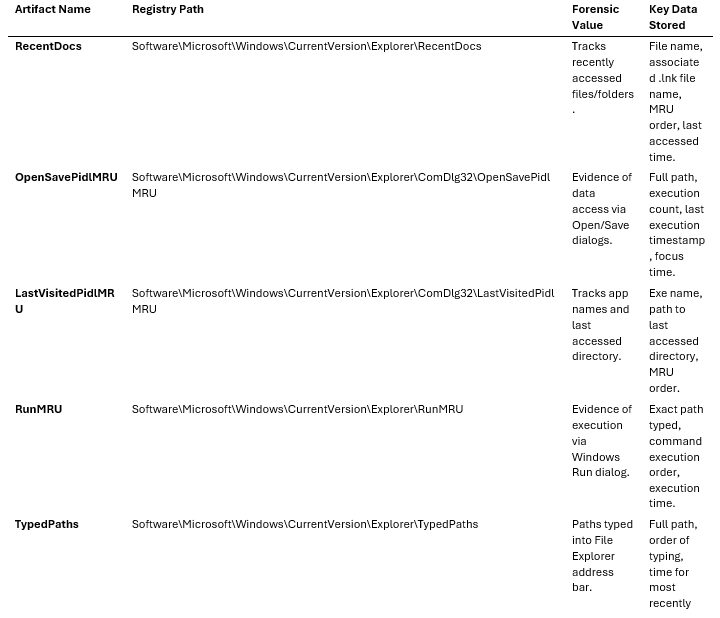
• RecentDocs: This key contains a main key with up to 150 entries and subkeys categorized by file extension (e.g., .pdf, .docx), each holding up to 20 entries on modern Windows systems. The values are binary and contain the file name and a reference to the corresponding .lnk file in the user’s Recent folder. The MRUListEx value dictates the chronological order of access, with the first four bytes representing the most recently accessed item [1].
• OpenSavePidlMRU and LastVisitedPidlMRU: These keys track files and folders accessed via standard Windows “Open” or “Save As” dialog boxes. OpenSavePidlMRU is organized by file extension. The data is stored as Shell Item ID Lists (PIDLs), a complex binary format that requires tools like Registry Explorer or RegRipper to decode [1].
• RunMRU: This key records the last 26 commands executed via the Windows Run dialog (Win + R). The values are stored as strings (e.g., cmd.exe\1), and the MRUList value determines the order of execution [1].
• TypedPaths: Records the last 26 paths manually typed into the File Explorer address bar. The values are named url1, url2, etc., with url1 being the most recent. Only paths that exist at the time of typing are recorded [1].
Search History: WordWheelQuery
The WordWheelQuery key (Software\Microsoft\Windows\CurrentVersion\Explorer\WordWheelQuery) is a goldmine for establishing user intent. It stores the search terms entered into the File Explorer search bar. The search terms are stored as binary data (Unicode strings) and ordered by the MRUListEx value [1].
In intellectual property theft or child exploitation cases, the presence of specific keywords in WordWheelQuery can definitively prove what the user was actively seeking. Note: In Windows 11 23H2 and later, Microsoft has altered how this data is populated, sometimes shifting it to SQLite databases or disabling it entirely depending on configuration, requiring analysts to adapt their collection strategies [3].
Network and Device Connections
• MapNetworkDriveMRU (Software\Microsoft\Windows\CurrentVersion\Explorer\Map Network Drive MRU): This key records the history of network drives mapped by the user. It provides the UNC path of the remote share and the drive letter assigned, which is critical for tracing lateral movement or data exfiltration to remote servers [4].
• Printers History (Software\Microsoft\Windows NT\CurrentVersion\Devices and PrinterPorts): These keys list the printers installed and used by the user, including network printers. This can be pivotal in cases involving unauthorized printing of sensitive documents.
• VPN Connection Artifacts (Software\Microsoft\RAS Phonebook or Software\Microsoft\Connection Manager): While system-wide VPN configurations exist in SYSTEM, user-specific VPN connections (like PPTP or L2TP) leave traces in NTUSER.DAT. These artifacts can confirm if a user initiated a remote access session, which is vital when investigating compromised credentials or insider threats [5].
USRCLASS.DAT and the Resilience of ShellBags
Located at C:\Users\<Username>\AppData\Local\Microsoft\Windows\USRCLASS.DAT, this hive primarily manages file extension associations and COM objects. However, its most forensically significant artifact is ShellBags.
ShellBags (Local Settings\Software\Microsoft\Windows\Shell\BagMRU and Bags) record the user’s folder viewing preferences (size, position, icon layout). Crucially, Windows creates a ShellBag entry the moment a user opens a folder in File Explorer. This includes local folders, network shares, removable drives, and even compressed archives (ZIP files) [6].
The Survival of ShellBags: The true power of ShellBags lies in their persistence. Even if a folder is deleted, the USB drive is removed, or the network share is disconnected, the ShellBag entry remains in USRCLASS.DAT. Furthermore, if a user profile is “deleted” via standard Windows GUI methods, the USRCLASS.DAT file often survives in unallocated space or within Volume Shadow Copies. Forensic analysts can carve these deleted hives and reconstruct the user’s entire directory navigation history, proving that they accessed a specific folder containing illicit material, even if the files themselves are long gone [6].
Windows 10/11 Specific Additions: Timeline and ActivityCache
With the introduction of Windows 10, Microsoft added the Timeline feature, which significantly expanded user activity tracking. While the core data is stored in an SQLite database (ActivitiesCache.db located at C:\Users\<Username>\AppData\Local\ConnectedDevicesPlatform\L.<Username>\), NTUSER.DAT contains configuration keys that dictate how this data is collected and synced to the cloud (Software\Microsoft\Windows\CurrentVersion\Privacy) [7].
The ActivitiesCache.db correlates directly with NTUSER.DAT artifacts. For example, an entry in OpenSavePidlMRU will often have a corresponding, highly detailed entry in the ActivityCache, complete with JSON payloads describing the application used, the duration of focus, and the exact time the activity occurred. Cross-referencing NTUSER.DAT with the ActivityCache provides a multi-dimensional view of user behavior that is far more robust than registry analysis alone [7].
Anti-Forensics and Correlation Guidance
Attackers are acutely aware of the evidence left in user hives. Common anti-forensics techniques include:
• Timestomping: Altering the Last Write Time of registry keys to confuse timeline analysis.
• Key Deletion: Manually deleting MRU keys or using tools like CCleaner.
• Registry Key Permissions: Modifying the ACLs of registry keys to prevent the OS from writing tracking data [1].
To detect tampering, analysts must correlate NTUSER.DAT artifacts with other evidence sources:
1. Event Logs: Cross-reference Run keys (MITRE T1547.001) with Event ID 4688 (Process Creation) to confirm execution.
2. MFT and USN Journal: If a ShellBag indicates a folder existed, check the Master File Table (MFT) and USN Journal for the creation and deletion records of that folder.
3. Prefetch and AmCache: Correlate UserAssist execution times with Prefetch file creation times and AmCache entries to build a definitive execution timeline.
Practical Investigation Workflows
When analyzing user registry hives, a structured workflow is essential to ensure no data is missed and the integrity of the evidence is maintained.
1. Acquisition: Always acquire registry hives from a live system using specialized tools (e.g., FTK Imager, KAPE) or from an offline image. Never attempt to copy active registry files directly using standard Windows commands, as they are locked by the OS.
2. Transaction Log Merging: Modern Windows systems use transaction logs (.LOG1, .LOG2) to buffer registry writes. Before analysis, these logs must be merged into the primary hive file using tools like rla.exe (Registry Log API) to ensure the hive is not “dirty” and all recent activity is visible [1].
3. Automated Parsing: Utilize tools like RegRipper or Eric Zimmerman’s Registry Explorer (RECmd) to automatically parse complex binary structures (like PIDLs in MRU keys) into human-readable formats.
4. Timeline Generation: Export the parsed data into a timeline format (e.g., CSV or bodyfile) and merge it with other system artifacts (Event Logs, file system timestamps) to create a comprehensive super-timeline.
5. Targeted Review: Focus on specific artifacts based on the case type. For instance, in an insider threat case, prioritize MapNetworkDriveMRU, RecentDocs, and USBSTOR (from the SYSTEM hive) to track data movement.
Legal Significance and Evidentiary Value
In a court of law, system hives (SYSTEM, SOFTWARE) prove what happened on the machine, but user hives (NTUSER.DAT, USRCLASS.DAT) prove who did it and what their intent was.
User-specific artifacts are the linchpin for establishing mens rea (criminal intent). For example, finding a malicious script in a system-wide directory might suggest a compromise, but finding the search term “how to bypass Windows Defender” in the WordWheelQuery of a specific user’s NTUSER.DAT, followed by the execution of that script in their UserAssist key, provides compelling evidence of deliberate, malicious action by that individual.
When presenting this evidence, strict chain of custody must be maintained. Analysts must document the exact tools used to parse the binary structures (e.g., Eric Zimmerman’s Registry Explorer, RegRipper) and explain the underlying mechanisms (like PIDL structures) in clear, non-technical terms for the jury, often relying on authoritative guidelines such as the NIST SP 800-86 (Guide to Integrating Forensic Techniques into Incident Response).
Real-World Case Studies
The forensic value of NTUSER.DAT and USRCLASS.DAT has been demonstrated in numerous high-profile investigations.
• APT Campaigns: Advanced Persistent Threat (APT) groups frequently utilize user-specific Run keys (HKCU\Software\Microsoft\Windows\CurrentVersion\Run) for persistence, as this does not require administrative privileges. In the case of APT37 (Reaper), investigators identified malicious payloads executing from the user’s AppData directory, triggered by entries in the NTUSER.DAT Run key.
• Insider Threat and Data Exfiltration: In a notable corporate espionage case, an employee attempted to steal proprietary source code before resigning. While the employee securely deleted the files from their local machine, forensic analysts recovered USRCLASS.DAT ShellBags that proved the user had navigated to the highly restricted network share containing the code. Furthermore, OpenSavePidlMRU entries in NTUSER.DAT confirmed that the user had opened specific sensitive documents, and MapNetworkDriveMRU showed the connection to an unauthorized external drive, cementing the case for data theft.
By mastering the intricacies of NTUSER.DAT and USRCLASS.DAT, DFIR analysts can unlock the most detailed and probative evidence available on a Windows system, transforming raw binary data into a compelling narrative of user activity.
References
[1] Cyber Triage. (2026). NTUSER.DAT Forensics Analysis 2026. https://www.cybertriage.com/blog/ntuser-dat-forensics-analysis-2026/
[2] Elastic. (n.d.). Potential Persistence via Mandatory User Profile. https://www.elastic.co/guide/en/security/8.19/potential-persistence-via-mandatory-user-profile.html
[3] ThinkDFIR. (2024). Windows 11 WordWheelQuery Woes. https://thinkdfir.com/2024/10/31/windows11-wordwheelquery-woes/
[4] Insider Threat Matrix. (2024). MapNetworkDriveMRU | Detection. https://insiderthreatmatrix.org/detections/DT083
[5] Synacktiv. (2023). Forensic Aspects of Microsoft Remote Access VPN. https://synacktiv.com/publications/forensic-aspects-of-microsoft-remote-access-vpn
[6] GIAC. (n.d.). Windows ShellBag Forensics in Depth. https://www.giac.org/paper/gcfa/9576/windows-shellbag-forensics-in-depth/128522
[7] Medium. (2022). Digital Forensics: Windows 10 Timeline - ActivitiesCache.db. https://medium.com/@joeforensics/digital-forensics-windows-10-timeline-activitiescache-db-82b4bc9f715a
Section 4: Amcache.hve — Durable Evidence of Program Presence and Possible Execution
The Amcache.hve registry hive is one of the most robust and technically rich Windows artifacts available to Digital Forensics and Incident Response (DFIR) analysts. Originally introduced in Windows 8 to replace the older RecentFileCache.bcf artifact from Windows 7, Amcache has evolved into a comprehensive repository of application execution metadata. Managed by the Windows Application Compatibility framework (AppCompat), its primary purpose is to ensure smooth software execution across different OS versions. However, its forensic value lies in its meticulous recording of file paths, execution timestamps, and cryptographic hashes, making it an indispensable tool for proving program existence and supporting execution analysis, even after an adversary has attempted to wipe their tracks [Kaspersky Securelist, 2025] [Magnet Forensics, 2024].
For a forensic investigator, the Amcache hive is often the key to unlocking the timeline of an intrusion. When threat actors deploy malware, execute lateral movement tools, or run data exfiltration scripts, they frequently attempt to cover their tracks by deleting the executables. While the files themselves may be gone from the disk, the metadata recorded in Amcache persists, providing a durable historical record of what was present on the system. This persistence makes Amcache a critical component in reconstructing the sequence of events during a cyberattack.
Evolution and Version-Specific Differences
The lineage of Amcache begins with Windows 7’s RecentFileCache.bcf, a rudimentary binary file that simply tracked the paths of recently executed binaries. This early iteration was limited in scope, providing only a basic list of file paths without the rich metadata needed for deep forensic analysis. With the release of Windows 8, Microsoft transitioned this functionality into a formal Registry hive format (Amcache.hve), significantly expanding the metadata collected. This capability was later backported to Windows 7 via update KB2952664, bringing the advanced tracking features to older systems [The DFIR Spot, 2024].
A critical architectural shift occurred with the release of Windows 10 (specifically starting around build 10.0.14913.1002). In earlier versions (Windows 8 and early Windows 10), executable metadata was primarily stored under the Root\File key. In modern Windows 10 and Windows 11 systems, the structure was completely overhauled. The data is now categorized into distinct subkeys, most notably Root\InventoryApplicationFile for individual executables, Root\InventoryApplication for installed software packages, and Root\InventoryDriverBinary for loaded drivers [Binary Foray, 2017]. This structural change requires analysts to ensure their parsing tools are updated to handle the specific OS version under investigation, as legacy tools may fail to locate the data in newer Windows builds.
Understanding these version-specific differences is crucial for accurate forensic analysis. An analyst examining a Windows 7 system that has not received the KB2952664 update will need to rely on RecentFileCache.bcf, whereas an analyst examining a fully patched Windows 11 system will need to navigate the complex InventoryApplicationFile structure. Failure to account for these differences can lead to missed evidence and incomplete timelines.
Internal Data Structures and Key Metadata
Located at C:\Windows\AppCompat\Programs\Amcache.hve, the hive is populated by several system DLLs (such as aeinv.dll and aepic.dll) and is periodically updated by the Microsoft Compatibility Appraiser scheduled task (\Microsoft\Windows\Application Experience\ProgramDataUpdater) [Kaspersky Securelist, 2025]. This scheduled task runs in the background, scanning the system for executables and updating the Amcache hive with their metadata.
The InventoryApplicationFile key is the cornerstone of Amcache forensics. Each executed or scanned binary is represented by a unique subkey containing a wealth of metadata. The structure of these subkeys is highly detailed, providing analysts with a comprehensive view of the file’s characteristics:
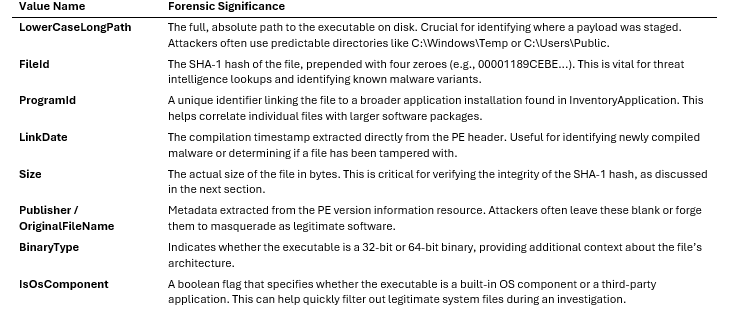
“AmCache is not a true execution log: it records files in directories scanned by the Microsoft Compatibility Appraiser, executables and drivers copied during program execution, and GUI applications that required compatibility shimming. Only the last category reliably indicates actual execution.” [Kaspersky Securelist, 2025]
This distinction is vital. While Amcache provides strong evidence of a file’s presence on the system, it does not always guarantee that the file was executed. Analysts must corroborate Amcache findings with other artifacts, such as Prefetch or Event Logs, to definitively prove execution.
The SHA-1 Hash Anomaly: A Critical Caveat
One of Amcache’s most touted features is its storage of SHA-1 hashes, allowing analysts to pivot directly from a registry artifact to threat intelligence platforms like VirusTotal. However, there is a highly specific, often misunderstood technical limitation: Amcache only calculates the SHA-1 hash for the first 31,457,280 bytes (approximately 31.4 MB) of a file [Kaspersky Securelist, 2025] [NVISO Labs, 2022].
If an executable is smaller than 31.4 MB, the FileId value will perfectly match the file’s actual SHA-1 hash. If the file exceeds this size, the hash stored in Amcache will only represent that initial 31.4 MB chunk. The Size value in the registry will still reflect the true, total size of the file [NVISO Labs, 2022].
This anomaly has profound implications for incident response. Advanced Persistent Threat (APT) actors, aware of this limitation, can intentionally pad their malicious binaries to exceed 31.4 MB. By doing so, they ensure that the hash recorded in Amcache will not match the true hash of the file, effectively blinding automated IOC (Indicator of Compromise) sweeping tools that rely solely on Amcache hashes for detection [Kaspersky Securelist, 2025]. Analysts must always cross-reference the Size value; if it exceeds 31,457,280 bytes, the hash cannot be trusted for a direct 1:1 match against external databases.
To illustrate this, consider a scenario where an analyst discovers a suspicious executable named svchost.exe in C:\Temp. The Amcache entry shows a Size of 50 MB and a FileId hash. If the analyst searches VirusTotal for this hash, they may find no results, leading them to falsely conclude the file is benign. However, if they extract the first 31.4 MB of the file and hash it manually, they will find that it matches the Amcache hash, confirming the file’s identity. This highlights the importance of understanding the technical nuances of forensic artifacts.
Differentiating Amcache, Shimcache, and Prefetch
To build an airtight timeline, analysts must understand how Amcache differs from its sibling artifacts. Each of these artifacts serves a distinct purpose and provides unique pieces of the puzzle:
1. Amcache vs. Shimcache (AppCompatCache): Shimcache tracks the presence of executables to ensure compatibility, recording the file path and the Last Modified time of the file. Crucially, Shimcache is only written to disk when the system shuts down or reboots. This means that if a system is powered off abruptly, recent Shimcache entries may be lost. Amcache, conversely, provides near real-time data, includes cryptographic hashes, and records the First Execution time (derived from the Last Write Time of the specific file’s registry key) [Magnet Forensics, 2024]. While Shimcache is excellent for identifying files that existed on the system prior to a reboot, Amcache offers a more detailed and persistent record.
2. Amcache vs. Prefetch: Prefetch (.pf files) is designed to speed up application load times. It provides definitive proof of execution, including a run count and the last eight execution timestamps (in Windows 8+). However, Prefetch files are limited in number (typically 1024 on modern Windows) and roll over quickly on busy systems. Once the limit is reached, older Prefetch files are deleted to make room for new ones. Amcache entries persist indefinitely, even after the original executable has been deleted from the disk [Magnet Forensics, 2024]. Therefore, while Prefetch is the gold standard for proving execution, Amcache is invaluable for historical analysis and recovering metadata for deleted files.
Correlation Guidance and Investigation Workflows
Amcache rarely exists in a vacuum. A premium forensic investigation requires correlating Amcache data with other system artifacts to paint a complete picture of adversarial activity. By cross-referencing multiple data sources, analysts can build a robust timeline and verify their findings.
Step-by-Step Investigation Workflow: 1. Identify Suspicious Entries: Parse Amcache.hve using tools like Eric Zimmerman’s Registry Explorer or KAPE. Filter for binaries executing from anomalous locations (e.g., C:\Users\Public, C:\Windows\Temp, or AppData\Local\Temp). Pay special attention to files with missing or forged Publisher metadata. 2. Extract and Verify Hashes: Extract the FileId (SHA-1 hash). Check the Size value to ensure the file is under 31.4 MB before querying VirusTotal or internal MISP instances. If the file is larger, manually hash the first 31.4 MB to verify the Amcache entry. 3. Establish the Timeline: Use the Last Write Time of the specific InventoryApplicationFile subkey to determine when the system first interacted with the binary. This timestamp is critical for anchoring the event in the overall intrusion timeline. 4. Correlate with SRUM: Cross-reference the executable path with the System Resource Usage Monitor (SRUM) database (SRUDB.dat). SRUM tracks network bytes sent/received and CPU cycles per application, providing context on what the malware actually did while running. For example, if an Amcache entry shows a suspicious executable, and SRUM shows that executable sending gigabytes of data over the network, this strongly suggests data exfiltration. 5. Check the MFT and USN Journal: If Amcache indicates a file existed but it is no longer on disk, parse the Master File Table ($MFT) and the Update Sequence Number ($USN) Journal to find the exact timestamps of the file’s creation and subsequent deletion. This can help determine how long the malware was active on the system. 6. Review Event Logs: Correlate the Amcache timestamp with Security Event ID 4688 (Process Creation) or Sysmon Event ID 1 to identify the parent process that spawned the malicious binary. This can reveal the initial infection vector, such as a malicious macro in a Word document spawning a PowerShell script.
Real-World Case Studies and MITRE ATT&CK Mapping
Amcache has proven decisive in numerous high-profile incident response engagements. In investigations involving ransomware operators like Conti or LockBit, threat actors routinely utilize batch scripts (.bat) to delete their initial access payloads and lateral movement tools (e.g., Cobalt Strike beacons) [Kaspersky Securelist, 2025]. Because Amcache retains metadata long after file deletion, analysts have successfully recovered the original paths, compilation timestamps, and hashes of these wiped payloads, enabling accurate attribution and the generation of enterprise-wide sweeping rules.
For example, in a recent investigation of a Ryuk ransomware deployment, the attackers used a batch script to delete all staging tools from C:\Windows\Temp before executing the final ransomware payload. While the files were unrecoverable from the disk, the Amcache hive contained complete entries for the staging tools, including their SHA-1 hashes. This allowed the incident response team to identify the specific tools used and develop custom IOCs to hunt for the attackers.
Furthermore, Amcache is instrumental in detecting Defense Evasion (T1036) and Masquerading (T1036.005). Attackers frequently rename malicious binaries to mimic legitimate Windows processes (e.g., naming a payload svchost.exe but running it from C:\Temp). Amcache’s OriginalFileName and Publisher fields will immediately expose this discrepancy, as the malicious file will lack Microsoft’s digital signature metadata. By mapping these findings to the MITRE ATT&CK framework, analysts can better understand the adversary’s tactics and develop more effective defenses.
Anti-Forensics and Evidentiary Considerations
From a legal and evidentiary standpoint, Amcache is highly reliable because it is maintained by the SYSTEM account; standard users, and even administrators without elevated privileges, cannot easily modify it. This makes it a trusted source of evidence in legal proceedings and formal investigations.
However, sophisticated adversaries are increasingly employing anti-forensics techniques. The most common method is the outright deletion of the Amcache.hve file or the clearing of the AppCompat directory. While this destroys the historical record, the act of deletion itself is highly anomalous and serves as a massive red flag for investigators. Analysts should look for Event ID 4656 (A handle to an object was requested) targeting the Amcache hive, or the execution of commands like vssadmin delete shadows which are often precursors to hive manipulation.
Another anti-forensics technique involves timestamp manipulation, or “timestomping.” Attackers may alter the creation or modification times of their malicious files to blend in with legitimate system activity. While this can confuse analysis of the file system, Amcache’s internal timestamps (such as the Last Write Time of the registry key) are much harder to manipulate and can often reveal the true timeline of events.
When presenting Amcache findings in a legal context, chain of custody is paramount. Analysts must document the exact tools used to parse the hive (e.g., “Parsed using AmcacheParser v1.5.0.0”) and explicitly state the limitations of the artifact—specifically noting that presence in Amcache proves the system interacted with the file, but must be combined with Prefetch or Event Logs to definitively prove execution by a specific user. Clear, accurate documentation is essential for ensuring the admissibility of the evidence in court.
Windows Update Entries in Amcache
An often-overlooked aspect of Amcache analysis is the presence of Windows Update entries. When Windows installs updates, the Microsoft Compatibility Appraiser scans the newly installed files and adds them to the Amcache hive. This can result in a large number of entries being created in a short period, potentially cluttering the analysis.
However, these entries can also be forensically valuable. By correlating the timestamps of these entries with known Windows Update installation times, analysts can verify the system’s update history and identify any anomalies. For example, if a large number of Amcache entries are created at a time when no Windows Updates were scheduled, this could indicate malicious activity masquerading as an update process.
Furthermore, understanding how Windows Update entries appear in Amcache can help analysts filter out legitimate system activity and focus on suspicious files. Windows Update files typically have valid Microsoft digital signatures and are located in standard system directories (e.g., C:\Windows\System32). By filtering out entries that match these criteria, analysts can significantly reduce the noise in their analysis and zero in on potential threats.
Section 5: Key Forensic Artifacts Mapped to Registry Paths
The Windows Registry serves as the central nervous system of the operating system, recording an immense volume of user activity, system configuration changes, and application execution history. For digital forensics and incident response (DFIR) professionals, mastering the specific registry paths where these artifacts reside is non-negotiable. This section expands upon foundational artifacts to include advanced persistence mechanisms, lateral movement indicators, and defense evasion techniques frequently leveraged by advanced persistent threats (APTs).
5.1 Comprehensive Artifact Reference Table
The following table maps 27 critical forensic artifacts to their respective registry paths, hives, and relevant MITRE ATT&CK® techniques. This serves as a quick-reference guide for analysts during active investigations.
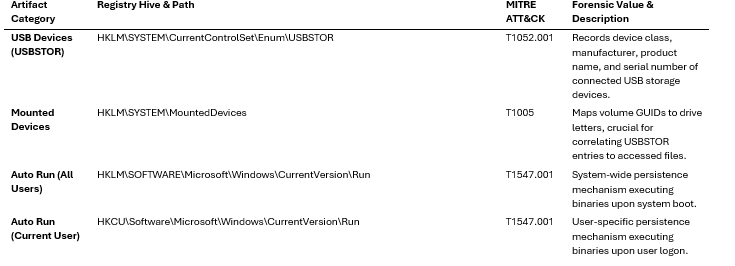
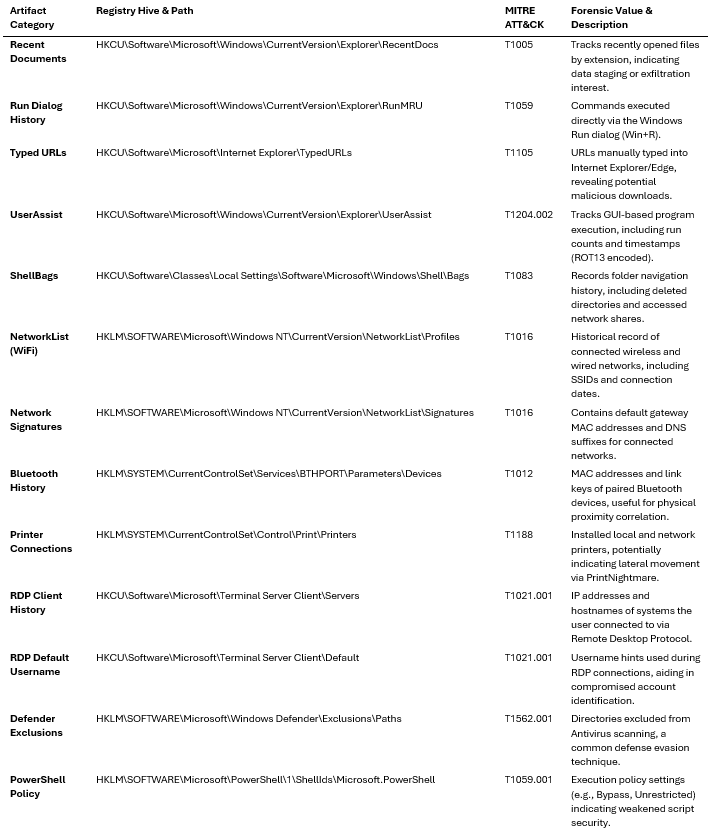

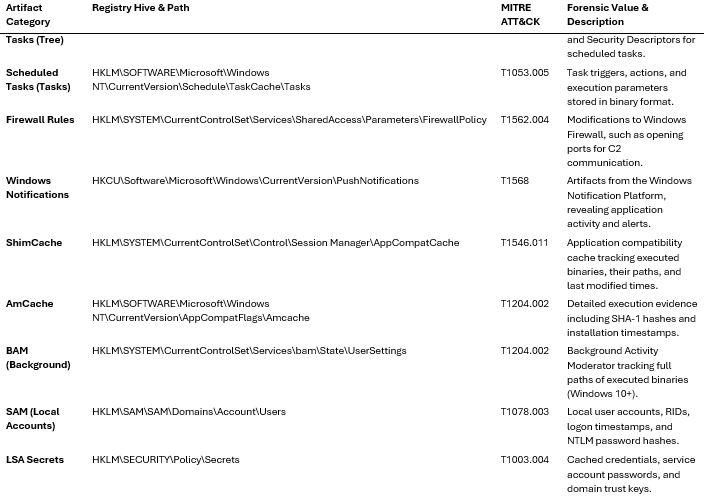
5.2 Network, Connectivity, and Lateral Movement Artifacts
Understanding a system’s connectivity history is paramount for establishing physical location, identifying lateral movement, and tracing data exfiltration routes.
NetworkList and WiFi History The NetworkList\Profiles key (HKLM\SOFTWARE\Microsoft\Windows NT\CurrentVersion\NetworkList\Profiles) maintains a historical ledger of all networks the system has joined. Each subkey is a GUID representing a network profile, containing the ProfileName (SSID for wireless networks), DateCreated (first connection), and DateLastConnected. The adjacent Signatures key stores the default gateway MAC address. Case Study: In the investigation of the DarkHotel APT campaign, analysts utilized NetworkList artifacts to prove that targeted executives’ laptops had connected to compromised luxury hotel Wi-Fi networks, establishing the initial vector of compromise [Kaspersky Lab, 2014].
Bluetooth Device History Bluetooth artifacts are located at HKLM\SYSTEM\CurrentControlSet\Services\BTHPORT\Parameters\Devices. This key stores the MAC addresses of paired devices. The LastSeen and LastConnected values (stored as FILETIME structures) provide a temporal anchor. This is particularly useful in insider threat cases to prove a specific smartphone or unauthorized peripheral was paired with a secure workstation.
RDP Connection History via Terminal Server Client When an attacker uses a compromised system to pivot via RDP, the HKCU\Software\Microsoft\Terminal Server Client\Servers key records the destination IP addresses or hostnames. The UsernameHint value within these subkeys reveals the account used for the connection. Version Differences: In Windows 10 and 11, the Default subkey also maintains an MRU (Most Recently Used) list of RDP connections (MRU0, MRU1, etc.). Correlating these registry entries with Event ID 4648 (A logon was attempted using explicit credentials) provides a definitive timeline of lateral movement.
Printer Connections The HKLM\SYSTEM\CurrentControlSet\Control\Print\Printers key lists installed printers. While seemingly benign, the PrintNightmare vulnerability (CVE-2021-34527) highlighted how attackers can exploit the print spooler service. Unexpected network printer connections pointing to external or unauthorized internal IP addresses can indicate staging for privilege escalation or lateral movement.
5.3 Defense Evasion and Persistence Mechanisms
Modern adversaries frequently manipulate the registry to blind security controls and establish stealthy persistence.
Windows Defender Exclusions Attackers routinely add exclusions to Windows Defender to prevent their malware from being scanned or quarantined. These are found at HKLM\SOFTWARE\Microsoft\Windows Defender\Exclusions\Paths and ...\Extensions. Anti-Forensics Awareness: To hide these exclusions from local administrators, attackers may set the HideExclusionsFromLocalAdmins DWORD to 1 under HKLM\SOFTWARE\Policies\Microsoft\Windows Defender. Investigators must parse the registry offline or use SYSTEM privileges to bypass this API-level cloaking [Huntress, 2024].
PowerShell Execution Policy The HKLM\SOFTWARE\Microsoft\PowerShell\1\ShellIds\Microsoft.PowerShell key dictates the script execution policy. A value of ExecutionPolicy set to Bypass or Unrestricted is a strong indicator of environment preparation for malicious script execution. Correlation Guidance: Cross-reference this registry change with Event ID 4104 (PowerShell Script Block Logging) to capture the actual payload executed after the policy was weakened.
WMI Persistence Paths Windows Management Instrumentation (WMI) event subscriptions are a favored fileless persistence mechanism (e.g., APT29). While the actual WMI repository is stored in OBJECTS.DATA, the registry key HKLM\SOFTWARE\Microsoft\Wbem\CIMOM contains configuration data. Additionally, the HKLM\SOFTWARE\Classes\CLSID key should be monitored for hijacked COM objects invoked via WMI ActiveScriptEventConsumers.
Scheduled Task Registry Entries Starting with Windows 8, scheduled tasks are stored natively in the registry rather than just as XML files. The HKLM\SOFTWARE\Microsoft\Windows NT\CurrentVersion\Schedule\TaskCache\Tree key contains the task hierarchy. Case Study: The Hafnium threat actor utilized the Tarrask malware to create scheduled tasks and subsequently deleted the Security Descriptor (SD) value within the Tree registry key. This manipulation caused the task to become invisible to the schtasks /query command and the Task Scheduler GUI, while the Task Scheduler service (which loads tasks into memory upon boot) continued to execute it [Microsoft Threat Intelligence, 2022]. Analysts must parse the registry directly to identify tasks missing their SD values.
Firewall Rule Modifications Adversaries modify the Windows Firewall to allow inbound C2 traffic or enable lateral movement (e.g., opening port 445 for SMB). These rules are stored at HKLM\SYSTEM\CurrentControlSet\Services\SharedAccess\Parameters\FirewallPolicy\FirewallRules. Technical Depth: The rules are stored as strings containing key-value pairs (e.g., v2.30|Action=Allow|Active=TRUE|Dir=In|Protocol=6|LPort=4444|). Analysts should look for newly created rules with anomalous ports or rules pointing to suspicious binaries in AppData or Temp directories.
5.4 System and Application Execution Artifacts
Windows Notification Platform Artifacts The Windows Push Notification Service (WNS) delivers toast notifications and tile updates. The HKCU\Software\Microsoft\Windows\CurrentVersion\PushNotifications key tracks applications authorized to send notifications. In forensic scenarios, this can prove that a specific application (like a secure messaging app or a malicious payload masquerading as a legitimate app) was installed and active, even if the binary was subsequently deleted.
5.5 Practical Investigation Workflows
When analyzing registry artifacts, DFIR analysts should adhere to a structured workflow to ensure comprehensive coverage and evidentiary integrity:
1. Triage and Acquisition: Never analyze the live registry using regedit. Acquire the hive files (SAM, SYSTEM, SOFTWARE, SECURITY, NTUSER.DAT, USRCLASS.DAT) and their associated transaction logs (.LOG1, .LOG2) using tools like KAPE or raw disk access (e.g., FTK Imager).
2. Transaction Log Replay: Windows uses transaction logs to ensure registry database integrity. Data written to the registry may reside in the .LOG files before being committed to the main hive. Analysts MUST use tools like rla.exe (Registry Log Analyzer) or Eric Zimmerman’s Registry Explorer to replay these logs; failing to do so can result in missing the most recent and critical artifacts.
3. Timeline Generation: Extract the Last Write Time for all relevant keys. Use tools like RegRipper or RECmd to parse specific artifacts and output them into a unified timeline format (e.g., bodyfile or CSV).
4. Contextualization: A registry key alone is rarely a smoking gun. If a suspicious Run key is found, pivot to the file system to check the binary’s creation date, examine the Prefetch file for execution counts, and query the USN Journal to see how the binary arrived on the system.
5.6 Anti-Forensics and Tampering Detection
Adversaries are acutely aware of registry forensics and actively attempt to thwart investigations.
Timestomping the Registry: While file system timestomping is common, registry timestomping is also possible via APIs like NtSetInformationKey. Detection: Investigators can detect registry timestomping by comparing the Last Write Time of a key against the creation timestamps of its subkeys or values, or by cross-referencing the registry timestamp with Event ID 4657 (A registry value was modified) if Object Access auditing is enabled.
Key Hiding via Null Characters: Attackers can create registry keys with embedded null characters (e.g., HiddenKey\0). The standard Windows API (and tools like regedit) terminate strings at the null character, rendering the key invisible to standard administrative tools. Detection: Offline parsing of the raw hive structure bypasses the Windows API, exposing these hidden keys.
5.7 Correlation Guidance
Registry artifacts achieve their maximum value when correlated with other forensic data sources:
• Registry + Event Logs: Correlate RDP registry artifacts (Terminal Server Client) with Security Event IDs 4624 (Logon) and 4625 (Failed Logon) to determine if a lateral movement attempt was successful and how long the session lasted.
• Registry + Prefetch/AmCache: If a suspicious binary is found in a persistence registry key (e.g., RunOnce), check the Prefetch directory (C:\Windows\Prefetch) and AmCache to confirm if the binary actually executed, when it executed, and its original path.
• Registry + MFT/USN Journal: When investigating USBSTOR artifacts, use the device’s serial number to find the volume GUID in MountedDevices. Then, search the Master File Table (MFT) and USN Journal for files accessed or copied to that specific volume GUID, proving data exfiltration.
5.8 Legal and Evidentiary Considerations
In civil litigation or criminal prosecution, the admissibility of registry evidence hinges on strict adherence to forensic principles.
• Chain of Custody: The acquisition of registry hives must be cryptographically hashed (SHA-256) at the point of collection. Any offline analysis must be performed on a forensic copy, never the original evidence.
• Volatility and State: The registry is highly volatile. The act of booting a system alters thousands of registry keys. Therefore, live analysis or booting the suspect drive is strictly prohibited in a forensic context, as it destroys the evidentiary value of the Last Write Times and overwrites unallocated space within the hive files.
• Documentation: Analysts must document the specific tools and versions used to parse the registry (e.g., RegRipper v3.0). Because registry structures change across Windows versions (e.g., the shift of Scheduled Tasks to the registry in Windows 8), the analyst must explicitly state the OS version of the acquired image and validate that their parsing tools support that specific schema [NIST Special Publication 800-86, Guide to Integrating Forensic Techniques into Incident Response].
“The Windows Registry is the ultimate ledger of system state. While files can be deleted and logs can be cleared, the registry’s complex structure and transaction logs often preserve the echoes of adversary activity long after they believe their tracks are covered.” — SANS Institute, Windows Forensic Analysis.
Section 6: DEEP DIVE - UserAssist
The UserAssist registry key is one of the most powerful, yet structurally complex, execution artifacts available to digital forensic investigators. Originally designed by Microsoft to populate the “most frequently used applications” list in the Windows Start Menu, it inadvertently became a goldmine for tracking human-driven application execution. Unlike other artifacts that merely record that a process ran, UserAssist specifically tracks Graphical User Interface (GUI) applications launched by a user, providing unique insights into human interaction, including how long an application had the user’s focus.
6.1 The UserAssist Architecture and GUID Catalog
UserAssist data is stored on a per-user basis within the NTUSER.DAT hive at the following registry path: HKEY_CURRENT_USER\Software\Microsoft\Windows\CurrentVersion\Explorer\UserAssist
Rather than a flat list, the data is organized under subkeys named with Globally Unique Identifiers (GUIDs). Each GUID represents a different method of application execution or interaction. While most forensic analysts are familiar with the two primary GUIDs, a comprehensive investigation requires awareness of the broader catalog [1].
The Complete UserAssist GUID Catalog:
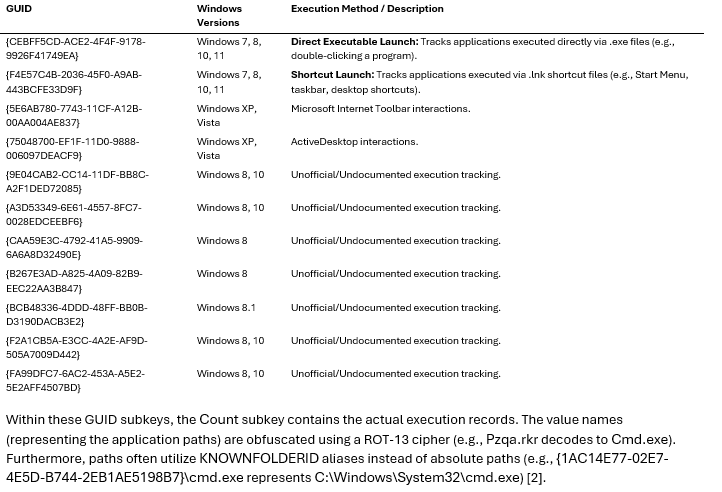
6.2 Binary Structure and Windows Version Differences
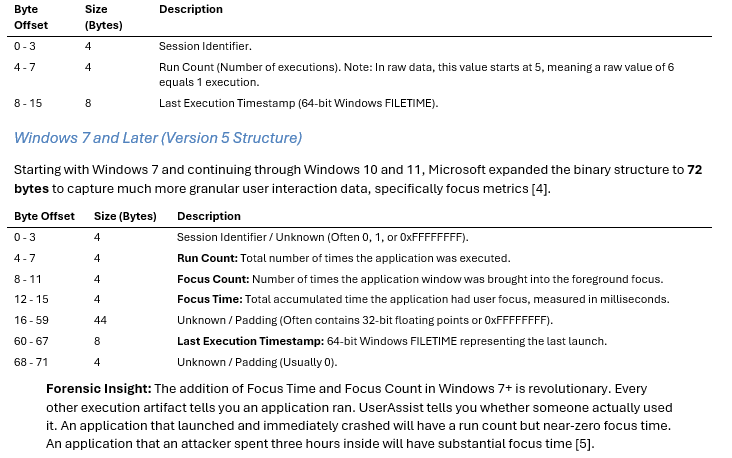
The actual execution data—run count, focus time, and last execution timestamp—is stored as a binary blob within the value data. The structure of this binary data has evolved significantly across Windows versions, making manual parsing a complex endeavor.
Windows XP (Version 3 Structure)
In Windows XP and Windows Server 2003, the UserAssist binary data structure is exactly 16 bytes in size [3].
6.3 Interaction with UAC Elevation Prompts
User Account Control (UAC) plays a subtle but critical role in how UserAssist records data. When a user launches an application that requires administrative privileges, Windows triggers a UAC consent prompt (e.g., consent.exe).
If the user approves the elevation, the application executes in a high-integrity context. From a UserAssist perspective, the execution is still tied to the interactive user who initiated the launch, meaning the artifact will populate in the NTUSER.DAT of the logged-in user, even if the process runs with elevated SYSTEM privileges. However, the UAC prompt itself interrupts the focus chain. The consent.exe process briefly steals focus, which can result in a fragmented focus time calculation for the target application. Furthermore, if an administrator opens an elevated command prompt and launches a GUI tool from within it, the GUI tool will still register in the UserAssist key of the interactive user session, providing a clear link between the human operator and the elevated action [6].
6.4 Anti-Forensics: Tampering and Detection
Because UserAssist is a well-known artifact, sophisticated adversaries actively attempt to clear or manipulate it to hide their tracks. This aligns with MITRE ATT&CK Technique T1070.004 (Indicator Removal: File Deletion) and T1112 (Modify Registry) [7].
Common Anti-Forensic Techniques: 1. Registry Key Deletion: Attackers may use scripts or tools to delete the entire UserAssist key or specific GUID subkeys. 2. Targeted Value Deletion: Tools like CCleaner or custom PowerShell scripts can parse the ROT-13 values and delete specific entries related to malicious payloads. 3. Disabling UserAssist: Attackers can disable tracking entirely by modifying the Settings subkey and setting the NoLog DWORD value to 1.
Detecting Tampering: Detecting UserAssist tampering requires looking for the absence of expected data. * Empty Keys: If a system has been running for months but the UserAssist keys are completely empty, it is a strong indicator of intentional clearing. * Timestamp Anomalies: If the Last Write Time of the UserAssist registry key is very recent, but the entries inside only show executions from that exact timestamp onward, the key was likely cleared just prior. * Event Log Correlation: Deletion of registry keys can be detected if Object Access auditing is enabled (Event ID 4657). Additionally, the execution of the clearing tool itself (e.g., ccleaner.exe or a PowerShell script) might be caught in Prefetch or PowerShell Script Block Logging (Event ID 4104) before the UserAssist key is wiped.
6.5 Correlation with Prefetch and BAM
To build a robust timeline and validate findings, UserAssist must never be analyzed in isolation. It should be cross-referenced with other execution artifacts, primarily Prefetch and the Background Activity Moderator (BAM).
UserAssist vs. Prefetch: While UserAssist tracks GUI applications launched by the user, Prefetch tracks the first 10 seconds of execution for both GUI and command-line applications to optimize load times. * Validation: If UserAssist shows malware.exe was executed, there should be a corresponding MALWARE.EXE-XXXXXXX.pf file in C:\Windows\Prefetch. * Timestamp Alignment: The Last Execution Timestamp in UserAssist (offset 60-67) should closely align with the most recent execution timestamp stored in the Prefetch file. A discrepancy of more than a few seconds could indicate timestomping or tampering. * Scope: If an attacker executes a script via a hidden command prompt, UserAssist will not record it, but Prefetch will capture cmd.exe and potentially the script execution.
UserAssist vs. BAM: The Background Activity Moderator (BAM) is a Windows 10/11 artifact located at SYSTEM\CurrentControlSet\Services\bam\UserSettings\{SID}. It stores the full path and last execution timestamp of executables. * Retention: BAM entries expire after seven days of inactivity, whereas UserAssist entries persist until manually cleared or overwritten by the maximum entry limit. * Correlation: If an entry exists in UserAssist with a timestamp within the last seven days, it should also exist in BAM. If it exists in UserAssist but not BAM, the execution likely occurred more than a week ago, or the BAM entry was manipulated.
6.6 Practical Investigation Workflow
When analyzing a compromised system, a DFIR analyst should follow this structured workflow for UserAssist:
1. Extraction: Extract the NTUSER.DAT hive from the suspect user profile (e.g., C:\Users\TargetUser\NTUSER.DAT).
2. Parsing: Utilize a forensic tool like Registry Explorer (Eric Zimmerman), Cyber Triage, or Magnet AXIOM. These tools automatically decode the ROT-13 obfuscation, resolve KNOWNFOLDERID paths, and parse the 72-byte binary structure into readable columns.
3. Sorting by Last Run Time: Sort the parsed data by the Last Execution Timestamp to identify what GUI applications were launched during the suspected window of compromise.
4. Analyzing Focus Time: Sort by Focus Time to differentiate between applications that were merely launched (e.g., a pop-up that was immediately closed) and applications the attacker actively interacted with (e.g., a remote access trojan interface or a file exfiltration tool).
5. Identifying Anomalies: Look for administrative tools (e.g., regedit.exe, cmd.exe, powershell.exe) executed from unusual locations (e.g., C:\Users\Public\) or by non-administrative users.
6. Cross-Referencing: Take the identified suspicious executables and search for them in Prefetch, BAM, Amcache, and the MFT to confirm execution and build a comprehensive timeline.
6.7 Legal and Evidentiary Considerations
In legal proceedings, UserAssist is frequently presented as user-scoped evidence of GUI execution. It should be used to support attribution when corroborated with Prefetch, BAM, LNK files, Amcache, event logs, or other case-relevant artifacts.
Admissibility and Chain of Custody: To ensure admissibility, the extraction of the NTUSER.DAT hive must follow strict chain of custody procedures, typically involving a forensically sound image of the drive.
Documenting Findings: When presenting UserAssist findings in a report or testimony, the analyst must clearly explain the ROT-13 encoding and the binary structure parsing. Opposing counsel may challenge the reliability of the artifact by pointing out that malware can inject entries into the registry without actual execution. Therefore, the analyst must demonstrate correlation. A UserAssist entry alone is circumstantial; a UserAssist entry corroborated by a Prefetch file, a BAM entry, and a corresponding LNK file in the Recent folder constitutes definitive proof of execution.
[1] Winreg-kb, “User Assist key,” Read the Docs. [2] C. Ray, “UserAssist Forensics 2026,” Cyber Triage, Apr. 2025. [3] D. Stevens, “New Format for UserAssist Registry Keys,” Didier Stevens Blog, Jan. 2010. [4] A. Aljuaid, “Forensic journey: Breaking down the UserAssist artifact structure,” Securelist, Jul. 2025. [5] CyberEngage, “UserAssist: The Registry Key That Watched Everything You Clicked,” CyberEngage Blog, Feb. 2025. [6] Microsoft, “How User Account Control works,” Microsoft Learn, Apr. 2026. [7] MITRE, “Indicator Removal: Clear Windows Event Logs,” MITRE ATT&CK, 2026.
Section 7: DEEP DIVE - USB FORENSICS VIA THE REGISTRY
The forensic analysis of Universal Serial Bus (USB) devices remains one of the most critical, yet complex, endeavors in Digital Forensics and Incident Response (DFIR). Whether investigating intellectual property theft by an insider threat, the initial access vector of an air-gapped network compromise, or the deployment of a destructive wiper, tracing the lifecycle of a USB device is paramount. The Windows Registry serves as the central nervous system for USB device tracking, recording a highly detailed, albeit fragmented, history of device connections, disconnections, and interactions.
This section provides a comprehensive, premium-tier deep dive into USB forensics, mapping the complete artifact ecosystem, detailing the exact connection sequence, exploring anti-forensic techniques, and establishing a rigorous 13-step reconstruction methodology.
7.1 The Comprehensive USB Forensic Artifact Map
When a USB mass storage device is connected to a Windows system, the Plug and Play (PnP) manager orchestrates a complex sequence of events, leaving artifacts scattered across multiple registry hives. A complete forensic analysis requires correlating data from all the following locations.
7.1.1 HKLM
This is the primary repository for USB mass storage device metadata. When a device is connected, a subkey is created using the device class, manufacturer, product name, and revision. * Path: HKLM\SYSTEM\CurrentControlSet\Enum\USBSTOR * Key Structure: Disk&Ven_[Vendor]&Prod_[Product]&Rev_[Revision] * Serial Number Subkey: Beneath the device key lies the serial number subkey. If the second character of the serial number is an ampersand (&), the serial number was generated by the system (meaning the device lacks a unique hardware serial number). If it does not contain an ampersand, it is the unique hardware serial number assigned by the manufacturer [SANS Institute, 2023]. * Critical Values: FriendlyName (the name displayed to the user), HardwareID, and DeviceDesc.
7.1.2 HKLM
This key tracks the actual USB interface and hub connections, rather than the storage volume. It is crucial for identifying non-storage USB devices, such as Human Interface Devices (HIDs) used in BadUSB attacks. * Path: HKLM\SYSTEM\CurrentControlSet\Enum\USB * Key Structure: VID_[VendorID]&PID_[ProductID] * Forensic Value: Identifies the Vendor ID (VID) and Product ID (PID), which can be cross-referenced with online databases (like the USB ID Repository) to determine the exact make and model of the device, even if it does not mount as a storage volume.
7.1.3 HKLM
This key maps the unique device signature or GUID to the DOS drive letter (e.g., \DosDevices\E:) assigned during the connection. * Path: HKLM\SYSTEM\MountedDevices * Binary Format: The data is stored in binary format. For USB devices, the first 12 bytes typically represent the device signature, followed by the device instance ID in UTF-16LE encoding. * Forensic Value: Crucial for linking a specific USB device (via its serial number) to the drive letter it was assigned, which is necessary for correlating with LNK files, Prefetch, and Jump Lists.
7.1.4 HKCU
Located in the user’s NTUSER.DAT hive, this key records the drive letters and volume GUIDs of connected devices per user. * Path: HKCU\Software\Microsoft\Windows\CurrentVersion\Explorer\MountPoints2 * Forensic Value: Because it is located in the user hive, it directly attributes the connection of a specific USB device to a specific user account. The Last Write Time of the specific volume GUID subkey often correlates with the time the user interacted with the device via Windows Explorer.
7.1.5 HKLM
This key contains a series of GUIDs representing different device classes. The most relevant for USB storage is {53f56307-b6bf-11d0-94f2-00a0c91efb8b} (Disk Device Class). * Path: HKLM\SYSTEM\CurrentControlSet\Control\DeviceClasses\{53f56307-b6bf-11d0-94f2-00a0c91efb8b} * Forensic Value: Contains subkeys for every connected device. The Last Write Time of these subkeys can provide highly accurate timestamps for device connection events.
7.1.6 HKLMPortable Devices
This key tracks devices that use the Media Transfer Protocol (MTP) or Picture Transfer Protocol (PTP), such as smartphones, digital cameras, and modern MP3 players. * Path: HKLM\SOFTWARE\Microsoft\Windows Portable Devices\Devices * Forensic Value: Essential for investigating data exfiltration via smartphones, which often do not mount as traditional USB mass storage devices and therefore may not appear in USBSTOR.
7.1.7 HKLMNT
This key is associated with Windows ReadyBoost, a feature that uses USB flash drives as a disk cache. * Path: HKLM\SOFTWARE\Microsoft\Windows NT\CurrentVersion\EMDMgmt * Forensic Value: Even if a user does not explicitly enable ReadyBoost, Windows evaluates the device’s performance upon connection and records the volume name, serial number, and a timestamp in this key. This provides an excellent secondary artifact for proving device connection.
7.2 The USB Device Connection Sequence and Timestamp Mapping
Accurately determining when a device was first connected, last connected, and last removed requires synthesizing timestamps from the Registry and the setupapi.dev.log file.
1. First Connection: When a USB device is connected for the very first time, the PnP manager installs the necessary drivers. This process is meticulously logged in C:\Windows\INF\setupapi.dev.log. The timestamp associated with the Device Install (Hardware initiated) event in this log is the definitive “First Connection” time [Microsoft, 2024].
2. Subsequent Connections: For subsequent connections, the Registry’s Last Write Time becomes the primary indicator. The Last Write Time of the device’s subkey under HKLM\SYSTEM\CurrentControlSet\Enum\USBSTOR typically reflects the “Last Connection” time.
3. Device Removal: Determining the exact time of removal is notoriously difficult using only the Registry. However, the Last Write Time of the Properties subkey under the device’s USBSTOR entry often updates upon graceful removal.
Forensic Insight: The Last Write Time of a registry key only indicates when the key was last modified. It does not explicitly state what modified it. Therefore, relying solely on a single Last Write Time is dangerous. Timestamps must be corroborated across multiple artifacts.
7.3 Windows Version-Specific Differences in USB Tracking
The forensic landscape of USB tracking has evolved significantly across Windows versions.
• Windows 7/8: Relied heavily on the setupapi.dev.log for first connection times and the Registry for subsequent connections. Event logs provided limited visibility unless specifically configured.
• Windows 10/11: Microsoft introduced robust Event Tracing for Windows (ETW) and enhanced Event Logs. The Microsoft-Windows-Partition/Diagnostic (Event ID 1006) and Microsoft-Windows-Storage-ClassPnP/Operational logs now provide highly granular, millisecond-accurate timestamps for device insertion and removal, significantly reducing reliance on the Registry alone [NIST, 2022].
• Windows Server: By default, Windows Server editions often have stricter policies regarding removable media. However, the underlying registry mechanics remain identical to their desktop counterparts.
7.4 Anti-Forensics and Evasion Techniques
Sophisticated adversaries actively attempt to subvert USB forensics. Understanding these techniques is critical for modern DFIR analysts.
• Device Serial Spoofing: Attackers can use specialized tools to reprogram the firmware of a USB controller, altering the hardware serial number, VID, and PID. This can make a malicious device appear as a benign, previously authorized device (e.g., a corporate-issued encrypted drive). Detection: Look for discrepancies between the device description in the Registry and the actual physical device, or analyze the firmware if the physical device is recovered.
• Registry Tampering (Timestomping): Attackers with SYSTEM privileges can directly manipulate the Last Write Time of registry keys or delete specific subkeys under USBSTOR to erase evidence of connection. Detection: Correlate registry timestamps with the MFT (Master File Table) records of the hive files, and cross-reference with Event Logs (which are harder to selectively edit) and the setupapi.dev.log.
• BadUSB / HID Attacks: Devices like the Rubber Ducky or Bash Bunny emulate Human Interface Devices (keyboards) rather than mass storage. They execute pre-programmed keystrokes at superhuman speeds. Detection: These devices will not appear in USBSTOR. Analysts must scrutinize HKLM\SYSTEM\CurrentControlSet\Enum\USB for suspicious VID/PID combinations and look for rapid, anomalous PowerShell or command-line execution in Event Logs immediately following a device connection.
• USBKill: A destructive anti-forensic tool designed to physically destroy the host computer by discharging high voltage through the USB port. Detection: Physical damage to the motherboard and USB controller.
MITRE ATT&CK Mapping: * T1091: Replication Through Removable Media * T1052.001: Exfiltration Over USB Data Transfer * T1056.002: Input Capture: GUI Input Capture (relevant for BadUSB)
7.5 Correlation Guidance: Beyond the Registry
Registry artifacts prove a device was connected, but they do not prove what files were accessed or exfiltrated. To build a complete narrative, analysts must correlate registry data with other forensic artifacts.
1. Event Logs: Cross-reference the connection timestamps with Security.evtx (Event ID 4624 for logons, 4663 for file access if auditing is enabled) and System.evtx (Event ID 7045 for service installations, often associated with driver loading).
2. LNK Files and Jump Lists: If a user opens a file from the USB drive, a Shortcut (LNK) file is created in C:\Users\<User>\AppData\Roaming\Microsoft\Windows\Recent. The LNK file contains the volume serial number and the drive letter, which can be linked back to the MountedDevices registry key.
3. Prefetch: If an executable was run directly from the USB drive, a Prefetch file (.pf) will be generated in C:\Windows\Prefetch. The Prefetch file contains the execution path, including the drive letter.
4. USN Journal ($J): The Update Sequence Number Journal records changes to files on NTFS volumes. While the USB drive itself may be formatted as FAT32 or exFAT, the host system’s USN Journal can reveal files being copied from the host to the USB drive (evidence of exfiltration).
5. ShellBags: Located in USRCLASS.DAT, ShellBags record the user’s folder viewing preferences. If a user navigated through the directories of the USB drive using Windows Explorer, ShellBags will record the folder names and timestamps, proving interactive user access.
7.6 Real-World Case Studies
The forensic analysis of USB artifacts has been pivotal in numerous high-profile incidents.
• Stuxnet (2010): The quintessential example of an air-gapped network compromise. Stuxnet utilized infected USB drives to bridge the air gap. Forensic analysis of the USBSTOR registry keys on the infected engineering workstations was critical in identifying the initial infection vector and tracing the propagation of the worm [Langner, 2011].
• FIN7 / Carbanak (2020): The financially motivated FIN7 threat group mailed physical packages containing malicious USB drives (often disguised as Best Buy gift cards or teddy bears) to target organizations. These drives were BadUSB devices configured to emulate keyboards and inject malicious payloads. Analysts relied heavily on the HKLM\SYSTEM\CurrentControlSet\Enum\USB key to identify the malicious HID devices, as they bypassed traditional mass storage monitoring [FireEye, 2020].
• Insider Threat Data Theft: In countless corporate espionage cases, departing employees exfiltrate proprietary data to personal USB drives. The correlation of USBSTOR connection times with ShellBags navigation history and LNK file creation provides the strong evidentiary chain required for legal prosecution.
7.7 The 13-Step USB Forensic Reconstruction Methodology
To ensure a rigorous, repeatable, and legally defensible investigation, analysts should adhere to the following 13-step methodology:
1. Acquire Evidence: Obtain forensic images of the system drive (and memory, if live). Extract the SYSTEM, SOFTWARE, NTUSER.DAT, and USRCLASS.DAT registry hives.
2. Extract setupapi.dev.log: Parse C:\Windows\INF\setupapi.dev.log to identify all historical device installations and establish the absolute “First Connection” baseline.
3. Parse USBSTOR: Enumerate HKLM\SYSTEM\CurrentControlSet\Enum\USBSTOR to identify all connected mass storage devices, extracting Vendor, Product, Revision, and Serial Numbers.
4. Parse USB: Enumerate HKLM\SYSTEM\CurrentControlSet\Enum\USB to identify non-storage devices (HIDs, network adapters) and extract VID/PID pairs.
5. Identify Drive Letters: Query HKLM\SYSTEM\MountedDevices to map the device signature/serial number to the assigned DOS drive letter.
6. Attribute to User: Parse HKCU\Software\Microsoft\Windows\CurrentVersion\Explorer\MountPoints2 in all user profiles to determine which specific user account was active during the device connection.
7. Establish Timelines: Extract Last Write Times from USBSTOR, DeviceClasses, and EMDMgmt to build a timeline of connection and disconnection events.
8. Correlate with Event Logs: Cross-reference the established timeline with Windows Event Logs (System, Security, and Partition/Diagnostic logs) to validate timestamps and identify associated system events.
9. Analyze LNK Files: Parse the user’s Recent folder for LNK files pointing to the assigned drive letter, proving file interaction.
10. Analyze ShellBags: Parse USRCLASS.DAT to reconstruct the user’s navigation through the USB drive’s directory structure.
11. Analyze Prefetch: Check C:\Windows\Prefetch for evidence of executables launched directly from the USB drive.
12. Investigate Exfiltration: Analyze the MFT and USN Journal for evidence of large file copies or archive creation (e.g., .zip, .rar) immediately preceding the device disconnection.
13. Document Findings: Compile all artifacts, timestamps, and correlations into a cohesive narrative, explicitly noting the source of each timestamp and any discrepancies.
7.8 Legal and Evidentiary Considerations
In legal proceedings, the admissibility of digital evidence hinges on its integrity and the reliability of the methods used to extract it.
• Chain of Custody: The physical host machine and any recovered USB devices must be handled according to strict chain of custody protocols.
• Non-Repudiation: Registry timestamps alone are often insufficient to prove who connected the device, only that the device was connected while a specific user was logged in. Proving intent requires correlating registry data with user-specific artifacts like ShellBags and LNK files.
• Documentation: Every step of the 13-step methodology must be documented. The specific tools used (e.g., Registry Explorer, RegRipper), their versions, and the exact registry paths parsed must be recorded to allow opposing experts to independently verify the findings [SWGDE, 2021].
• Tool Validation: Ensure that the forensic tools used to parse the registry correctly interpret binary data structures and handle timezone conversions (Registry timestamps are stored in UTC) accurately.
Section 8: DEEP DIVE - Registry Run Keys and Adversarial Persistence
The Windows Registry is the undisputed epicenter of adversarial persistence. While initial access vectors often rely on exploiting vulnerabilities or social engineering, maintaining that access—surviving reboots, logoffs, and system updates—almost invariably involves manipulating the Registry. This section provides a comprehensive, premium-tier analysis of registry-based persistence mechanisms, mapping them to the MITRE ATT&CK framework, detailing forensic artifacts, and providing actionable detection engineering guidance.
8.1 The Persistence Landscape: Beyond Run and RunOnce
While the standard Run and RunOnce keys (MITRE ATT&CK T1547.001) are the most recognized persistence locations, sophisticated threat actors frequently leverage more obscure registry mechanisms to evade detection. A comprehensive forensic investigation must examine a wide array of autostart execution points (ASEPs).
8.1.1 Standard Run Keys (T1547.001)
The standard Run keys execute payloads when a user logs in or the system boots. * System-wide (All Users): HKLM\SOFTWARE\Microsoft\Windows\CurrentVersion\Run and RunOnce * User-specific: HKCU\SOFTWARE\Microsoft\Windows\CurrentVersion\Run and RunOnce
Forensic Nuance: The RunOnce keys are particularly challenging for forensic analysts because Windows deletes the registry value before executing the payload. If the system crashes during execution, the payload won’t run again. Attackers exploit this by creating RunOnce keys immediately before system shutdown or user logoff, minimizing the window of opportunity for live response tools to detect the key. Furthermore, attackers can prefix the value data with an exclamation mark (!) to defer deletion until after the payload completes, or an asterisk (*) to force execution even in Safe Mode [Cofense, 2025].
8.1.2 Winlogon Hijacking (T1547.004)
The Winlogon process (winlogon.exe) handles interactive user logons. Its behavior is heavily dictated by the Registry, making it a prime target for persistence. * Path: HKLM\SOFTWARE\Microsoft\Windows NT\CurrentVersion\Winlogon * Key Values: * Userinit: By default, this points to C:\Windows\system32\userinit.exe. Attackers can append malicious executables separated by a comma (e.g., C:\Windows\system32\userinit.exe, C:\Windows\Temp\malware.exe). * Shell: By default, this points to explorer.exe. Attackers can replace this entirely or append a payload. * Notify: Used to load DLLs that receive event notifications from Winlogon. Attackers can register malicious DLLs here.
Case Study: The APT group Dragonfly has historically utilized Winlogon hijacking, specifically modifying the Userinit key, to maintain persistence across compromised industrial control systems (ICS) environments.
8.1.3 AppInit_DLLs (T1546.010)
AppInit_DLLs provide a mechanism to load custom DLLs into any user-mode process that links to user32.dll (which includes almost all GUI applications). * Path: HKLM\SOFTWARE\Microsoft\Windows NT\CurrentVersion\Windows * Key Values: AppInit_DLLs (space-separated list of DLLs) and LoadAppInit_DLLs (must be set to 1).
Forensic Nuance: Starting with Windows 8, Secure Boot must be disabled for AppInit_DLLs to function, and the DLLs must be code-signed if Secure Boot is enabled. This significantly reduces the viability of this technique on modern, properly configured systems, but it remains a critical artifact on legacy or misconfigured endpoints [Elastic, 2025].
8.1.4 Image File Execution Options (IFEO) Injection (T1546.012)
IFEO is a debugging feature designed to allow developers to attach a debugger to an application automatically when it launches. Attackers abuse this by setting the “debugger” to their malicious payload. * Path: HKLM\SOFTWARE\Microsoft\Windows NT\CurrentVersion\Image File Execution Options\<executable_name> * Key Value: Debugger
When the user attempts to launch <executable_name> (e.g., notepad.exe), Windows instead launches the executable specified in the Debugger value, passing the original executable name as an argument.
8.1.5 LSA Authentication Packages (T1547.002)
The Local Security Authority (LSA) manages authentication. Attackers can register malicious authentication packages (DLLs) that are loaded by lsass.exe during boot. This provides SYSTEM-level persistence and the ability to intercept credentials. * Path: HKLM\SYSTEM\CurrentControlSet\Control\Lsa * Key Value: Authentication Packages
Detection Challenge: Because the malicious DLL is loaded into the highly privileged lsass.exe process, it can be difficult to detect and remove without causing system instability.
8.1.6 Component Object Model (COM) Hijacking (T1546.015)
COM is a complex system for inter-process communication. Attackers can hijack COM objects by modifying the Registry to point a legitimate COM Class ID (CLSID) to a malicious DLL. * Paths: HKCU\Software\Classes\CLSID and HKLM\Software\Classes\CLSID
When an application requests the hijacked COM object, the malicious DLL is loaded instead. This technique is highly stealthy because it relies on legitimate applications triggering the execution.
8.1.7 WMI Event Subscription (T1546.003)
While not strictly a Registry key in the traditional sense, Windows Management Instrumentation (WMI) repository data is stored on disk and often manipulated via the Registry or command-line tools. Attackers create WMI Event Filters (the trigger, e.g., system startup or a specific time) and Event Consumers (the action, e.g., executing a script or payload), binding them together. * Artifact Location: C:\Windows\System32\wbem\Repository\
Forensic Nuance: WMI persistence is often “fileless,” with the payload stored directly within the WMI repository, making it invisible to traditional file-based antivirus scanning.
8.2 Advanced Anti-Forensics and Evasion Techniques
Sophisticated adversaries employ numerous techniques to hide their registry-based persistence mechanisms from forensic investigators.
8.2.1 Fileless Persistence via Registry
Attackers increasingly store malicious scripts (PowerShell, VBScript) or even entire executable payloads directly within Registry values, rather than dropping files on disk. A Run key might execute a PowerShell command that reads and executes a massive base64-encoded payload stored in a seemingly innocuous registry key (e.g., HKCU\Software\Classes\CLSID\{Random-GUID}). This technique, often associated with frameworks like Poweliks or Kovter, evades file-system scanning.
8.2.2 Null Byte Injection
Attackers can inject null bytes (\x00) into registry key names. The native Windows Registry Editor (regedit.exe) and many standard API calls terminate string reading at the first null byte. Consequently, a key named MaliciousKey\x00HiddenData will appear simply as MaliciousKey in Regedit, hiding the subsequent data. Specialized forensic tools are required to parse the raw hive files and reveal the hidden content.
8.2.3 Timestamp Manipulation (Timestomping)
Every registry key has a Last Write Time. While attackers frequently timestomp files (modifying the MACB timestamps), timestomping registry keys is more complex but possible using specialized APIs. Investigators must correlate the Registry Last Write Time with other artifacts, such as the USN Journal or Event Logs, to identify discrepancies.
8.3 Detection Engineering and Threat Hunting
Effective detection of registry persistence requires a multi-layered approach, combining endpoint telemetry with robust detection rules.
8.3.1 Sysmon Configuration
System Monitor (Sysmon) is essential for monitoring registry modifications. A robust Sysmon configuration should capture Event IDs 12 (Registry object added or deleted), 13 (Registry value set), and 14 (Registry key and value renamed).
Recommended Sysmon Configuration Snippet:
<Sysmon schemaversion=”4.81”>
<EventFiltering>
<RuleGroup name=”Registry Persistence” groupRelation=”or”>
<RegistryEvent onmatch=”include”>
<TargetObject condition=”contains”>\CurrentVersion\Run</TargetObject>
<TargetObject condition=”contains”>\CurrentVersion\RunOnce</TargetObject>
<TargetObject condition=”contains”>\CurrentVersion\Winlogon\Userinit</TargetObject>
<TargetObject condition=”contains”>\CurrentVersion\Winlogon\Shell</TargetObject>
<TargetObject condition=”contains”>\CurrentVersion\Windows\AppInit_DLLs</TargetObject>
<TargetObject condition=”contains”>\Image File Execution Options</TargetObject>
<TargetObject condition=”contains”>\Control\Lsa\Authentication Packages</TargetObject>
</RegistryEvent>
</RuleGroup>
</EventFiltering>
</Sysmon>
8.3.2 Sigma Rules for Detection
Sigma provides a generic signature format for SIEM systems. The following is an example Sigma rule designed to detect suspicious modifications to the Winlogon Userinit key.
title: Suspicious Winlogon Userinit Modification
id: 1a2b3c4d-5e6f-7a8b-9c0d-1e2f3a4b5c6d
status: experimental
description: Detects modifications to the Winlogon Userinit registry key, a common persistence mechanism.
logsource:
category: registry_set
product: windows
detection:
selection:
TargetObject|contains: ‘\Microsoft\Windows NT\CurrentVersion\Winlogon\Userinit’
filter_legitimate:
Details: ‘C:\Windows\system32\userinit.exe,’
condition: selection and not filter_legitimate
falsepositives:
- Legitimate administrative scripts modifying logon behavior (rare).
level: high
tags:
- attack.persistence
- attack.t1547.004
8.4 Practical Investigation Workflow: The Registry Persistence Playbook
When investigating suspected registry persistence, analysts should follow a structured methodology:
1. Acquisition: Acquire the registry hives (NTUSER.DAT, USRCLASS.DAT, SOFTWARE, SYSTEM, SAM, SECURITY) using a forensically sound method (e.g., KAPE, FTK Imager). Live acquisition is acceptable, but offline parsing of the raw hives is preferred to bypass rootkits and API hooking.
2. Automated Parsing: Utilize tools like RegRipper or Registry Explorer to automatically parse known ASEPs. RegRipper’s autostart plugin is particularly effective for this initial triage.
3. Timeline Analysis: Extract the Last Write Times for all identified persistence keys. Correlate these timestamps with other system events:
– Event Log 4688 (Process Creation): Did a suspicious process execute immediately after the registry key was modified?
– USN Journal: Were any files dropped to disk around the same time?
– AmCache/ShimCache: Is there evidence of the payload executing?
4. Payload Analysis: If the registry key points to an executable, extract and analyze the binary. If the key contains a fileless script, extract the script, decode it (if necessary), and analyze its behavior.
5. Contextualization: Determine the scope of the persistence. Is it user-specific (HKCU) or system-wide (HKLM)? Does it require a reboot, or will it trigger on the next user logon?
8.5 Legal and Evidentiary Considerations
When presenting registry artifacts in a legal context, strict adherence to chain of custody and documentation is paramount.
• Documentation: The exact path, value name, value data, and Last Write Time of the registry key must be meticulously documented.
• Tool Validation: The tools used to parse the registry (e.g., Registry Explorer) must be validated and accepted within the forensic community.
• Volatility: Because the Registry is highly volatile, the method of acquisition (live vs. dead-box) must be recorded, as live acquisition inherently alters the system state.
• Interpretation: The analyst must clearly articulate how the registry key functions and why it indicates malicious intent, avoiding speculative conclusions.
By mastering these advanced registry persistence techniques, DFIR analysts can uncover even the most deeply embedded adversaries, transforming the Registry from a complex database into a definitive timeline of malicious activity.
Section 9: LAST WRITE TIME AND REGISTRY TIMELINE ANALYSIS
The Windows Registry is far more than a static configuration database; it is a dynamic, constantly evolving historical record of system activity. At the heart of this historical record is the Last Write Time timestamp. Every registry key (though notably, not individual values) carries a Last Write Time, functioning much like a file’s “Last Modified” timestamp. For a Digital Forensics and Incident Response (DFIR) analyst, this timestamp is the pivot point for timeline reconstruction, allowing investigators to correlate registry modifications with other system artifacts to build a comprehensive picture of adversarial activity.
9.1 The FILETIME Format and Timezone Considerations
Under the hood, the Windows Registry stores the Last Write Time as a 64-bit FILETIME structure. This binary format represents the number of 100-nanosecond intervals that have elapsed since January 1, 1601, Coordinated Universal Time (UTC) [1].
When parsing registry hives, it is critical to understand that these timestamps are natively stored in UTC. However, the system’s local timezone settings—stored in the SYSTEM hive under ControlSet001\Control\TimeZoneInformation—dictate how these times are displayed to the user. A common pitfall for junior analysts is failing to normalize all timestamps to UTC during timeline creation, leading to disjointed timelines where registry events appear hours out of sync with network logs or file system artifacts.
Forensic Insight: Always ensure your forensic tools are configured to output timestamps in UTC. When correlating registry Last Write Times with artifacts that may store local time (such as certain application logs), explicit conversion is required to maintain timeline integrity.
9.2 The “Dirty Hive” Problem and Transaction Logs
A critical nuance of registry forensics is understanding how Windows commits data to disk. To optimize performance and prevent constant disk thrashing, Windows does not immediately write every registry change to the primary hive file (e.g., NTUSER.DAT or SOFTWARE). Instead, changes are cached in memory and written to transaction log files (typically named .LOG1 and .LOG2) residing in the same directory as the primary hive [2].
This caching mechanism creates what is known as a “dirty hive” state. If a system crashes, loses power, or is seized mid-session, the primary hive file on disk will not contain the most recent changes. The freshest, most forensically relevant data—often the exact actions a threat actor took just before the system was acquired—might only exist in the transaction logs [3].
Investigative Workflow for Dirty Hives: 1. Identify Transaction Logs: Always collect the primary hive file and its associated .LOG1 and .LOG2 files. 2. Replay Logs: Use forensic tools capable of replaying transaction logs into the primary hive. Tools like Eric Zimmerman’s Registry Explorer automatically detect dirty hives and prompt the analyst to load the transaction logs, ensuring a complete and accurate view of the registry state [3]. 3. Analyze Recovered Data: The merged hive will now reflect the true state of the registry at the time of acquisition, including the most recent Last Write Times.
9.3 Building Super-Timelines
The true power of the registry Last Write Time is realized when it is integrated into a super-timeline—a chronological amalgamation of timestamps from various system artifacts. By correlating registry timestamps with other data sources, analysts can reconstruct complex attack chains.
Key Correlation Points: * Master File Table (MFT): Correlate registry Run key modifications (T1547.001) with the $STANDARD_INFORMATION and $FILE_NAME creation timestamps of the referenced executable in the MFT. * Event Logs: Cross-reference registry changes with Security Event ID 4688 (Process Creation) and Sysmon Event IDs 12, 13, and 14 (Registry Event) to identify the specific process responsible for the modification. * Prefetch and Amcache: Link the execution of a malicious payload (evidenced by Prefetch or Amcache) with the subsequent creation of persistence mechanisms in the registry. * System Resource Usage Monitor (SRUM): Correlate registry timestamps with SRUM data to determine network activity associated with a newly executed binary.
Automated Timeline Generation Tools: * Plaso (log2timeline): The industry standard for creating super-timelines. Plaso parses registry hives, event logs, MFT, and numerous other artifacts, outputting a unified timeline that can be filtered and analyzed [4]. * Timeline Explorer: Eric Zimmerman’s Timeline Explorer is an essential tool for viewing and filtering the massive CSV outputs generated by Plaso, allowing analysts to quickly zero in on specific timeframes and artifacts [5].
9.4 Detecting Timestamp Manipulation (Timestomping)
Advanced threat actors are acutely aware of the forensic value of timestamps and frequently employ anti-forensics techniques to obscure their activity. While file timestomping is well-documented, registry timestomping is a more insidious threat.
Threat actors can manipulate the Last Write Time of a registry key using the native Windows API NtSetInformationKey. By passing the KEY_WRITE_TIME_INFORMATION parameter, an attacker can arbitrarily alter the timestamp of a key, making a newly created persistence mechanism appear as though it has existed for years [6].
Detection Techniques: 1. Subkey Discrepancies: For registry keys with nested subkeys (e.g., Uninstall keys), the Last Write Time of the parent key should reflect the timestamp of the most recently modified subkey. If a parent key has a timestamp older than its subkeys, it is a strong indicator of manipulation [6]. 2. API Monitoring: While native event logs (e.g., Event ID 4657) do not trigger on Last Write Time modifications, Endpoint Detection and Response (EDR) solutions can monitor for suspicious calls to NtSetInformationKey combined with NtFlushKey (which immediately writes the manipulated timestamp to disk) [6]. 3. Correlation Failures: If a registry key’s Last Write Time indicates it was created in 2020, but the executable it references was compiled and dropped on the disk in 2023, the discrepancy strongly suggests timestomping.
9.5 Case Study: Unraveling APT Persistence
Consider a scenario where an organization detects beaconing activity from a critical server. The initial triage reveals a suspicious executable, svchost.exe, running from C:\Users\Public\.
1. Initial Discovery: The analyst examines the HKLM\SOFTWARE\Microsoft\Windows\CurrentVersion\Run key and finds an entry pointing to the malicious svchost.exe. The Last Write Time of the Run key is 2021-05-10 14:22:00 UTC.
2. Suspicion Raised: The analyst notes that the server was provisioned in 2022, making the 2021 timestamp impossible. This immediately flags the registry key as timestomped.
3. Log Replay: The analyst ensures the SOFTWARE.LOG1 and SOFTWARE.LOG2 files are merged into the primary hive. While the timestomped value remains, the analyst pivots to other artifacts.
4. Super-Timeline Analysis: Using Plaso, the analyst generates a super-timeline. Filtering around the time the malicious executable was dropped (identified via the MFT), the analyst discovers a Sysmon Event ID 13 (Registry Value Set) occurring at 2023-10-27 09:15:00 UTC. This event records the actual creation of the malicious Run key by a compromised PowerShell process.
5. Conclusion: By correlating the MFT, Sysmon logs, and recognizing the registry timestomping attempt, the analyst successfully identifies the true time of compromise and the mechanism of persistence, defeating the attacker’s anti-forensics efforts.
9.6 Windows Version Nuances and Evidentiary Considerations
While the fundamental structure of the registry remains consistent, behavioral changes across Windows versions impact timeline analysis. For instance, Windows 8 introduced changes to how frequently the registry flushes to disk, increasing the reliance on transaction logs for recent activity [3]. Furthermore, the introduction of Universal Windows Platform (UWP) apps in Windows 10/11 altered how execution artifacts like UserAssist are recorded, requiring updated parsing techniques.
From a legal and evidentiary standpoint, the chain of custody and documentation of analysis methods are paramount. When presenting registry timeline data in a legal setting, analysts must clearly document: * The tools used to parse the hives (e.g., Registry Explorer version X.Y). * Whether transaction logs were replayed and the method used. * The explicit conversion of all timestamps to UTC. * The correlation of registry timestamps with corroborating artifacts (e.g., Event Logs) to substantiate findings.
By adhering to these rigorous standards, DFIR professionals can transform the raw binary data of the Windows Registry into a compelling, defensible narrative of system activity.
References
[1] Microsoft Learn. “FILETIME structure (minwinbase.h)”. [2] Mandiant. “Digging Up the Past: Windows Registry Forensics Revisited”. [3] CyberEngage. “The Registry’s Dirty Little Secret: Transaction Logs”. [4] DFIR Madness. “Case 001 Super Timeline Analysis”. [5] Eric Zimmerman’s Tools. “Timeline Explorer”. [6] Inversecos. “Malicious Registry Timestamp Manipulation Technique”.
9.7 Deep Dive: Internal Data Structures and Byte Offsets
To truly master registry forensics, an analyst must understand the underlying binary structures that store these timestamps. The registry is composed of “cells,” which are the fundamental building blocks of the hive. These cells contain the keys, values, and security descriptors.
The Key Node (nk) Cell is the primary structure representing a registry key. It is within this specific cell that the Last Write Time is stored. When examining a raw registry hive using a hex editor, the nk cell can be identified by its signature: the ASCII characters nk (hex 6E 6B).
The Last Write Time is located at a specific byte offset within the nk cell. Specifically, it is a 64-bit (8-byte) value starting at offset 0x04 from the beginning of the nk cell structure.
Structure of the Key Node (nk) Cell (Partial): * Offset 0x00 (2 bytes): Signature (nk) * Offset 0x02 (2 bytes): Flags (e.g., indicating if it’s a root key) * Offset 0x04 (8 bytes): Last Write Time (FILETIME format) * Offset 0x0C (4 bytes): Access Bits * Offset 0x10 (4 bytes): Parent Key Offset * Offset 0x14 (4 bytes): Number of Subkeys
Understanding these offsets is crucial when dealing with corrupted hives or when developing custom parsing scripts. If a commercial tool fails to parse a damaged hive, an analyst armed with a hex editor and knowledge of these offsets can manually extract the Last Write Time of a critical key. This level of technical depth separates a tool-runner from a true forensic expert.
Furthermore, the FILETIME structure itself requires careful interpretation. As a 64-bit integer representing 100-nanosecond intervals since January 1, 1601, it is stored in little-endian format on disk. For example, a Last Write Time of 2023-10-27 09:15:00 UTC would be represented as a specific 8-byte hex sequence. Analysts manually decoding these values must remember to reverse the byte order before converting the integer to a human-readable date.
9.8 Advanced Correlation: ETW Traces and the USN Journal
While Event Logs and the MFT are standard correlation points, advanced investigations often require pivoting to more volatile or obscure artifacts to corroborate registry timestamps.
Event Tracing for Windows (ETW): ETW is a high-performance, low-overhead tracing facility built into the Windows kernel. It provides unparalleled visibility into system activity, including registry operations. The Microsoft-Windows-Kernel-Registry ETW provider logs detailed information about registry key creation, modification, and deletion.
When a registry key’s Last Write Time is suspected of being manipulated, analysts can parse ETW traces (if available, typically captured via EDR or active tracing sessions) to find the corresponding NtSetInformationKey event. ETW traces often contain the true timestamp of the operation, bypassing the manipulated value stored in the hive. This correlation is particularly effective against sophisticated APTs that attempt to scrub their tracks from standard Event Logs.
Update Sequence Number (USN) Journal: The USN Journal ($Extend\$UsnJrnl) records changes made to files on an NTFS volume. While it doesn’t track registry keys directly, it tracks changes to the registry hive files themselves (e.g., NTUSER.DAT, SOFTWARE).
By correlating the Last Write Time of a specific registry key with the USN Journal records for the corresponding hive file, analysts can determine when the hive was actually modified on disk. If a key’s Last Write Time is 2021, but the USN Journal shows the hive file was heavily modified in 2023 at the exact time a malicious payload was executed, the discrepancy provides strong evidence of timestomping or delayed flushing via transaction logs.
9.9 The Role of the Registry in Incident Response Triage
In fast-paced Incident Response (IR) scenarios, full disk imaging and comprehensive super-timeline generation may be too time-consuming. Instead, responders rely on targeted triage, where the registry Last Write Time plays a pivotal role.
Triage Workflow: 1. Targeted Acquisition: Use tools like KAPE (Kroll Artifact Parser and Extractor) to rapidly collect critical registry hives (SYSTEM, SOFTWARE, NTUSER.DAT) and their transaction logs, rather than imaging the entire drive. 2. Automated Parsing: Process the collected hives using tools like RegRipper or RECmd (Registry Explorer Command Line). These tools can be configured with specific plugins or batch files to extract known persistence mechanisms (e.g., Run keys, Services, Scheduled Tasks). 3. Timestamp Filtering: Filter the extracted registry data based on the Last Write Time, focusing on the timeframe surrounding the suspected incident. This rapidly narrows the scope of the investigation from thousands of keys to a manageable handful of recently modified entries. 4. Pivot and Expand: Once a suspicious key is identified within the relevant timeframe, pivot to other artifacts (e.g., Prefetch, Amcache) to determine what executed and how it arrived on the system.
This triage approach, heavily reliant on the accurate interpretation of the Last Write Time, allows IR teams to identify the scope of a compromise and begin containment efforts within hours, rather than days.
9.10 Conclusion: The Registry as a High-Value Corroborated Evidence Source
The Windows Registry, with its intricate structure and pervasive tracking of system activity, remains one of the most critical evidence sources in digital forensics when collected and interpreted correctly. The Last Write Time timestamp is the linchpin that connects isolated registry artifacts into a cohesive narrative of adversarial behavior.
By mastering the technical nuances of the FILETIME format, understanding the implications of dirty hives and transaction logs, and employing advanced correlation techniques, DFIR analysts can unlock the full potential of the registry. Whether unraveling APT persistence or detecting sophisticated timestomping attempts, registry analysis is strongest when paired with transaction logs, event logs, file-system artifacts, memory evidence, and endpoint telemetry. Properly collected and corroborated registry evidence can provide the defensible narrative required to secure networks and support attribution decisions.
Section 10: Recommended Tooling and Methodology
The successful extraction, parsing, and analysis of Windows Registry artifacts require a rigorous methodology supported by specialized tooling. Because the Registry is a complex, binary database that is constantly modified by the operating system, forensic analysts must understand not only the tools at their disposal but also the underlying data structures, anti-forensics techniques, and legal considerations that govern digital evidence. This section provides a comprehensive guide to registry forensics tooling, automated workflows, and investigation methodologies.
10.1 The Anatomy of the Registry: Internal Data Structures and Binary Formats
To effectively utilize forensic tools, analysts must first understand the binary structure of the Registry. The Registry is not a flat file; it is a hierarchical database composed of “hives.” Each hive file begins with a base block (header) that is exactly 4,096 bytes (0x1000) in size. The base block contains the regf magic number (signature) at byte offset 0x00, the primary sequence number at offset 0x04, and the secondary sequence number at offset 0x08 [Microsoft, 2021]. If the sequence numbers do not match, the hive is considered “dirty,” indicating that data in the transaction logs (.LOG1, .LOG2) has not yet been committed to the primary hive file.
Following the base block, the hive is divided into “bins” (hbins), which are typically 4,096 bytes in size. Each bin starts with the hbin signature. Bins are further subdivided into “cells,” which contain the actual registry data, including key nodes (nk), value nodes (vk), subkey lists (lf, lh, ri, li), and data cells. The nk cell contains the Last Write Time timestamp, which is a critical pivot point for timeline reconstruction.
Key Insight: Understanding the binary structure is essential for recovering deleted registry keys. When a key is deleted, its cell is marked as unallocated, but the data remains intact until overwritten. Advanced tools can carve these unallocated cells to recover deleted artifacts, a technique crucial for detecting anti-forensics activity.
Windows Version-Specific Differences: The behavior of registry transaction logs has evolved significantly. In Windows 7, the OS primarily used a single .LOG file. Starting with Windows 8.1 and continuing through Windows 10, Windows 11, and modern Server editions, Microsoft introduced a dual-log system (.LOG1 and .LOG2) to improve reliability. Forensic analysts must ensure their tools properly merge these transaction logs (“replay the logs”) before parsing the hive; otherwise, recent and highly relevant artifacts will be missed [SANS Institute, 2022].
10.2 Major Registry Forensics Tools: A Detailed Comparison
The DFIR community relies on a mix of open-source, free, and commercial tools to parse and analyze registry hives. Each tool has specific strengths and use cases.
Open-Source and Free Utilities
• Registry Explorer / RECmd (Eric Zimmerman): Registry Explorer is the gold standard for GUI-based registry analysis. It automatically replays transaction logs, recovers deleted keys from unallocated space, and features built-in plugins to parse complex binary values (e.g., ShellBags, UserAssist, AppCompatCache). RECmd is its command-line counterpart, ideal for automated batch processing and searching across multiple hives using regular expressions.
• RegRipper (Harlan Carvey): A Perl-based, open-source tool that uses a plugin architecture to extract specific artifacts. RegRipper is highly extensible and excels at rapid triage. It translates raw binary data into human-readable formats, making it invaluable for extracting Run keys, USB device history, and user activity.
• KAPE (Kroll Artifact Parser and Extractor): While not exclusively a registry tool, KAPE is essential for automated triage. It rapidly collects registry hives (and other artifacts) from live systems or mounted images, bypassing file locks using raw disk reads. KAPE can then automatically execute tools like RECmd and RegRipper against the collected data, significantly reducing time-to-analysis.
Commercial Forensic Suites
• Autopsy: An open-source platform that integrates registry parsing modules. It is excellent for correlating registry artifacts with file system data, though it may lack the deep parsing capabilities of dedicated tools like Registry Explorer.
• X-Ways Forensics: A highly efficient, resource-light commercial suite. X-Ways provides raw hex viewing and template-based registry parsing. It is particularly powerful for manual carving and examining the exact byte offsets of registry cells.
• EnCase: A legacy commercial suite widely used in law enforcement. EnCase provides robust registry parsing and reporting features, with a strong emphasis on maintaining chain of custody and generating court-ready documentation.
Memory-Resident Registry Analysis
• Volatility: When analyzing memory dumps (RAM), Volatility is the premier tool. The windows.registry.hivelist and windows.registry.printkey plugins allow analysts to extract registry keys that were loaded in memory at the time of acquisition. This is critical for detecting fileless malware and advanced persistent threats (APTs) that modify the registry in memory without writing to disk.
10.3 Custom Parsing and Scripting
For specialized investigations, analysts often need to build custom parsers or automate repetitive tasks.
• Python Libraries: python-registry (developed by Will Ballenthin) and regipy (developed by Martin G. Korman) are powerful Python libraries for parsing offline registry hives. regipy is particularly notable for its ability to replay transaction logs and recover deleted cells programmatically. These libraries allow analysts to write custom scripts to hunt for novel persistence mechanisms or extract proprietary application data.
• PowerShell Forensic Scripts: In live response scenarios, PowerShell scripts like Kansa or PowerForensics can query the active registry via WMI or the .NET framework. While querying the live registry does not recover deleted data or bypass rootkits, it is highly effective for rapid enterprise-wide hunting (e.g., querying HKLM\Software\Microsoft\Windows\CurrentVersion\Run across 10,000 endpoints).
10.4 Automated Triage Workflows and Remote Acquisition
Modern enterprise environments require remote acquisition and automated triage capabilities.
• Cloud and Remote Acquisition: For Azure AD joined devices and Intune-managed endpoints, traditional physical acquisition is often impossible. Analysts must leverage Live Response capabilities built into Endpoint Detection and Response (EDR) platforms like Microsoft Defender for Endpoint (MDE) or CrowdStrike Falcon. These platforms allow analysts to remotely pull registry hives or execute custom PowerShell scripts to extract specific keys.
• Virtualized Environments: In virtualized environments (VMware, Hyper-V), analysts can acquire registry hives by capturing virtual machine snapshots. VMware .vmdk (disk) and .vmem (memory) files, or Hyper-V .avhdx files, can be mounted and parsed using tools like Arsenal Image Mounter. This approach preserves the exact state of the registry, including memory-resident artifacts, without alerting the adversary.
10.5 Anti-Forensics Awareness and Detection
Adversaries actively attempt to tamper with registry artifacts to evade detection. Analysts must be aware of these techniques and know how to detect them.
• Registry Modification and Deletion (MITRE ATT&CK T1112, T1070): Attackers frequently delete Run keys or clear MRU (Most Recently Used) lists to hide their tracks. Detection relies on parsing unallocated registry space to recover the deleted cells. Additionally, analysts should cross-reference registry deletions with the NTFS USN Journal, which records modifications to the hive files themselves.
• Timestomping: Advanced adversaries may attempt to alter the Last Write Time of registry keys to disrupt timeline analysis. However, timestomping the registry is significantly more difficult than timestomping the NTFS Master File Table (MFT). Discrepancies between a key’s Last Write Time and the timestamps of associated files in the MFT or Prefetch artifacts often indicate tampering.
• Fileless Persistence: Attackers may store malicious payloads directly within registry values (e.g., PowerShell scripts stored in WMI event consumers or custom registry keys). This technique, famously used by the Poweliks trojan, evades traditional file-based antivirus. Analysts must search for unusually large registry values or high-entropy data indicative of obfuscated code or base64-encoded payloads.
10.6 Correlation Guidance: Cross-Referencing Artifacts
Registry artifacts rarely exist in isolation. To build a comprehensive timeline, analysts must correlate registry data with other forensic artifacts.
• Event Logs: Correlate registry Run key creation with Windows Event Log 4688 (A new process has been created) and Sysmon Event ID 12/13/14 (Registry Event). This provides the process context—identifying exactly which executable created the persistence mechanism.
• MFT and USN Journal: When analyzing UserAssist or AppCompatCache (which track application execution), cross-reference the executable paths with the MFT and USN Journal to determine when the file was created, modified, or deleted on disk.
• Prefetch and Amcache: Combine registry execution artifacts with Prefetch files and Amcache.hve to confirm that an application was actually executed, rather than just installed or configured.
• ETW Traces: Event Tracing for Windows (ETW) provides real-time telemetry of registry operations. Correlating offline registry analysis with ETW traces (if captured) can reveal the exact sequence of API calls made by malware.
10.7 Complete Investigation Methodology Flowchart
A rigorous investigation methodology ensures consistency and defensibility. The following workflow outlines the standard procedure for registry forensics:
1. Preparation and Scoping: Define the objectives of the investigation (e.g., identify persistence, track lateral movement). Identify the target endpoints.
2. Acquisition:
– Live System: Use KAPE or EDR Live Response to acquire the active hives (SYSTEM, SOFTWARE, SAM, SECURITY, NTUSER.DAT, USRCLASS.DAT, Amcache.hve) and their associated transaction logs (.LOG1, .LOG2).
– Dead Box/Image: Mount the forensic image (E01/RAW) as a read-only volume. Extract the hives and logs.
– Memory: Capture RAM using DumpIt or Belkasoft RAM Capturer for Volatility analysis.
3. Preparation for Analysis:
– Verify cryptographic hashes (MD5/SHA-256) of the acquired hives to maintain chain of custody.
– Use tools like Registry Explorer or regipy to merge the transaction logs into the primary hives. Never analyze a dirty hive without replaying the logs.
4. Automated Triage: Run RegRipper or RECmd batch scripts to extract high-value artifacts (Run keys, UserAssist, USBSTOR, Shimcache).
5. Deep Dive Analysis:
– Manually inspect anomalous findings using Registry Explorer.
– Carve unallocated space for deleted keys.
– Correlate findings with the MFT, Event Logs, and Prefetch.
6. Timeline Reconstruction: Export all registry Last Write Times and merge them into a master timeline (e.g., using Plaso/Log2Timeline) alongside file system and event log timestamps.
7. Reporting: Document all findings, tool versions, and methodologies. Ensure the report meets evidentiary standards.
10.8 Legal, Evidentiary, and Expert Witness Considerations
In legal proceedings, the methodology used to extract and analyze registry data is often scrutinized as heavily as the data itself.
• Documentation and Standards: Investigations must adhere to recognized standards, such as ISO/IEC 27037 (Guidelines for identification, collection, acquisition, and preservation of digital evidence), NIST SP 800-86 (Guide to Integrating Forensic Techniques into Incident Response), and the ACPO guidelines. Every step, from the command used to acquire the hive to the specific version of RegRipper used for parsing, must be documented.
• Chain of Custody: The chain of custody must demonstrate that the registry hives analyzed are exact, unaltered copies of the original evidence. This requires cryptographic hashing at the time of acquisition and before analysis.
• Admissibility and Expert Testimony: When presenting registry evidence in court, expert witnesses must be prepared to explain complex binary structures to a lay jury. For example, explaining how a Last Write Time timestamp is generated, or how a deleted key was recovered from unallocated space, requires clear, jargon-free analogies. The analyst must also be prepared to defend their methodology against claims of tampering or tool error.
10.9 Real-World Case Studies
The critical nature of registry forensics is best illustrated through real-world incidents.
• APT29 (Cozy Bear) and Registry Persistence: In numerous campaigns, APT29 has utilized WMI event consumers and custom registry keys to maintain fileless persistence. By storing base64-encoded PowerShell payloads directly in the registry, they evaded traditional file scanning. Forensic analysts successfully detected this activity by hunting for unusually large registry values and correlating them with anomalous PowerShell execution in Event Log 4104 [Mandiant, 2020].
• Turla and COM Hijacking: The Turla group frequently employs Component Object Model (COM) hijacking for persistence and privilege escalation (MITRE ATT&CK T1546.015). By modifying the InprocServer32 registry keys under HKCU\Software\Classes\CLSID, they force legitimate Windows processes to load malicious DLLs. Detecting this requires meticulous analysis of the USRCLASS.DAT hive and cross-referencing the CLSIDs with known good configurations [ESET, 2019].
• SolarWinds Sunburst: During the SolarWinds supply chain attack, the threat actors meticulously cleaned up their tracks, deleting registry keys associated with their temporary persistence mechanisms. Incident responders relied heavily on carving unallocated registry space and analyzing transaction logs to recover the deleted keys and reconstruct the attack timeline [FireEye, 2020].
By mastering the internal structures of the registry, leveraging advanced tooling, and adhering to a rigorous, defensible methodology, forensic analysts can uncover the most sophisticated adversarial activity and provide critical intelligence during incident response operations.
Sory no speaker englich, me Android is CONRONPU totalement no possibilité traduction pour communiquer avec vous
L'homme de l'ombre créateur révélateur
Belgique liège oupeye 4684