The Windows Event IDs That Actually Matter in an Investigation

This publication is a field reference for incident response, SOC, and DFIR practitioners. It is not a threat assessment and does not issue intelligence judgments about specific actors. Where the document offers operational opinions (e.g., what is normal versus suspicious, what to monitor first, where vendor defaults are misleading), those judgments are grounded in primary Microsoft documentation and clearly distinguished from sourced fact.
WHY FOCUSED TELEMETRY BEATS TOOL SPRAWL
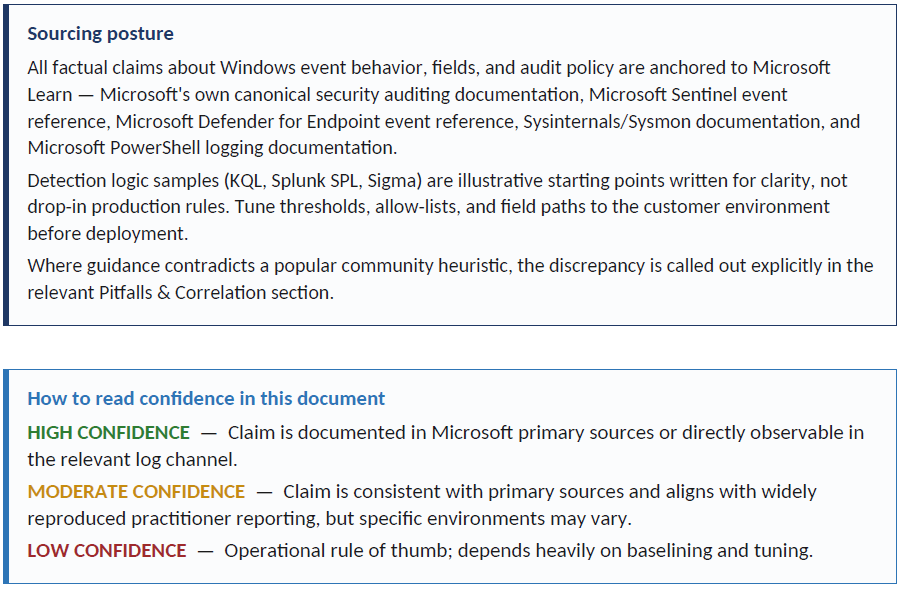
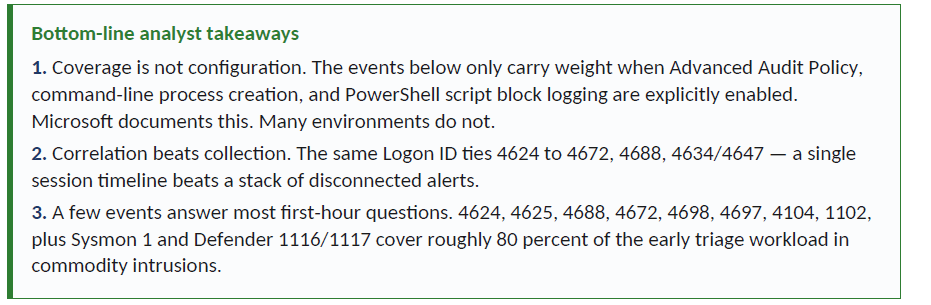
Windows investigations rarely fail because analysts have too few dashboards. They fail because the right questions are asked against the wrong logs, or because the right logs were never enabled in the first place. Microsoft’s current guidance reflects that reality: Windows logging defaults vary by version and edition, many audit-related Group Policy settings are not explicitly configured by default, and organizations are expected to tune Advanced Audit Policy and related settings to capture the events that matter to their security objectives. Microsoft Sentinel makes the same point operationally by offering All, Common, Minimal, and Custom security event sets instead of assuming every environment should ingest everything.
That design choice is revealing. Microsoft describes the Minimal set as a small collection of events that might indicate successful breach activity, not a full audit trail, and notes that most of its volume consists of sign-in events and process creation event 4688. In other words, a comparatively small set of event IDs can answer the most important first-hour questions in a compromise investigation, provided the team knows how to read them and how to correlate them.
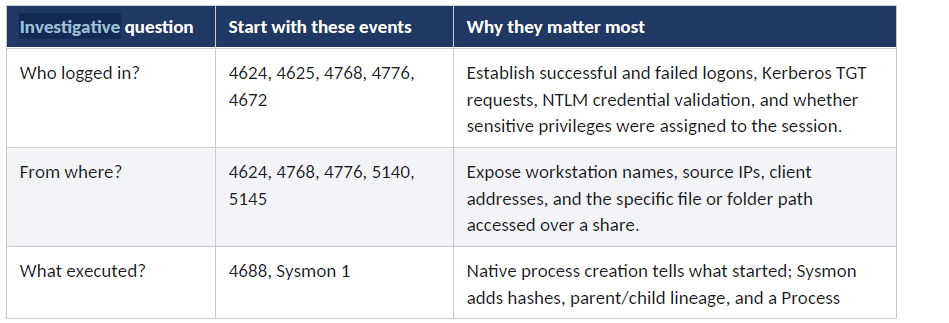
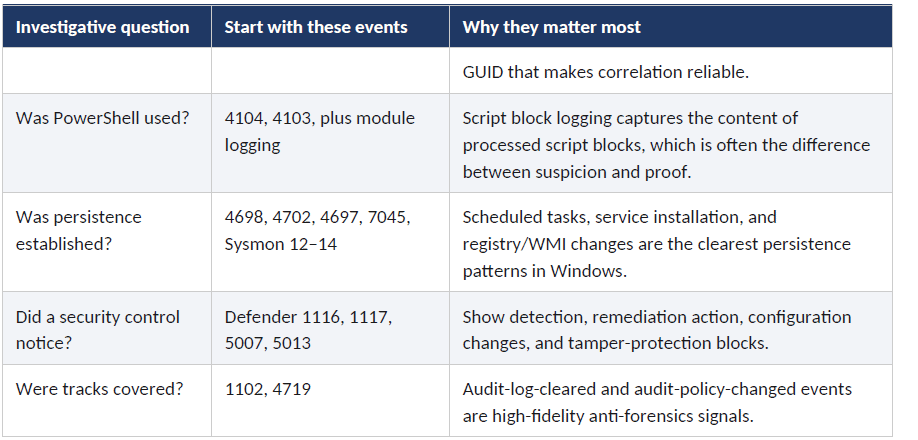
This reference is built around that judgment. Rather than a catalog of every possible event ID, it covers the events that, in practice, do the heaviest lifting during an active investigation, organized by the questions investigators actually have to answer: Who logged in? From where? What executed? Was PowerShell used? Was persistence established? Did a security control notice?
The first questions every incident must answer
The fastest way to make Windows logs useful is to organize them around investigative questions rather than around product names or log channels. The matrix below is the practical starting point used throughout the rest of this reference. It is grounded in Microsoft’s Windows security auditing, PowerShell, Sysmon, and Defender documentation.
PART 1 — IDENTITY AND AUTHENTICATION
If the first task is to understand how an actor got in, authentication events are the anchor point. This section profiles the five authentication events that, together, will reconstruct most successful intrusions: 4624 (successful logon), 4625 (failed logon), 4768 (Kerberos TGT request, domain controllers only), 4776 (NTLM credential validation), and 4672 (special privileges assigned to a new logon).
Event 4624 — Successful Logon
MITRE ATT&CK: T1078 (Valid Accounts) · T1021.001 (Remote Desktop Protocol) · T1550 (Use Alternate Authentication Material)
Profile
Event ID 4624 records every successful authentication attempt to a local or domain-joined Windows machine, capturing critical details about who logged in, from where, and how. For DFIR analysts, this event is the cornerstone of tracking user activity, lateral movement, and unauthorized access. By analyzing the Logon Type and source network information, investigators can differentiate between a user physically typing at a keyboard, a remote desktop session, or a service account executing a scheduled task.
Microsoft documents 4624 with Logon Type, Workstation Name, Source Network Address, Source Port, Authentication Package, and a Logon ID that can be used to correlate with other events such as 4672. Microsoft also notes a critical nuance: depending on the protocol and context, some network fields may be missing, so analysts should not over-interpret blank workstation or IP fields.
Key forensic fields
LogonType — Integer indicating how the user logged on. Crucial values: 2 (Interactive/Keyboard), 3 (Network/Share access), 4 (Batch/Scheduled Task), 5 (Service), 7 (Unlock), 8 (NetworkCleartext/IIS), 9 (NewCredentials, often Pass-the-Hash or RunAs /netonly), 10 (RemoteInteractive/RDP), 11 (CachedInteractive/Offline).
TargetUserName / Account Name (New Logon) — The account that successfully authenticated and created the new session.
TargetDomainName / Account Domain — Domain or local computer name where the account resides.
TargetLogonId / Logon ID — Locally unique hexadecimal identifier for the logon session. The critical pivot key to 4634/4647 (logoff), 4672 (privilege assignment), and 4688 (process creation).
IpAddress / Source Network Address — IP address of the originating machine. May be 127.0.0.1 for local logons or blank in some Kerberos scenarios.
WorkstationName — Hostname of the originating machine.
LogonProcessName — Trusted process that submitted the logon request (e.g., User32, Advapi, NtLmSsp, Kerberos).
AuthenticationPackageName — Protocol used: Negotiate, Kerberos, or NTLM.
RestrictedAdminMode (Win 8.1/10+) — Yes/No flag indicating an RDP session (Logon Type 10) used Restricted Admin mode to prevent credential exposure.
ElevatedToken (Win 10+) — Yes/No flag indicating the logon session was created with administrative privileges (split token via UAC).
Normal vs. suspicious
Normal
Logon Type 2 (Interactive) from expected users during business hours.
Logon Type 3 (Network) from known administrative subnets or file servers.
Logon Type 5 (Service) for known service accounts (e.g., NT AUTHORITY\SYSTEM) starting at boot.
Logon Type 10 (RDP) originating from authorized jump boxes or VPN IP ranges.
Suspicious
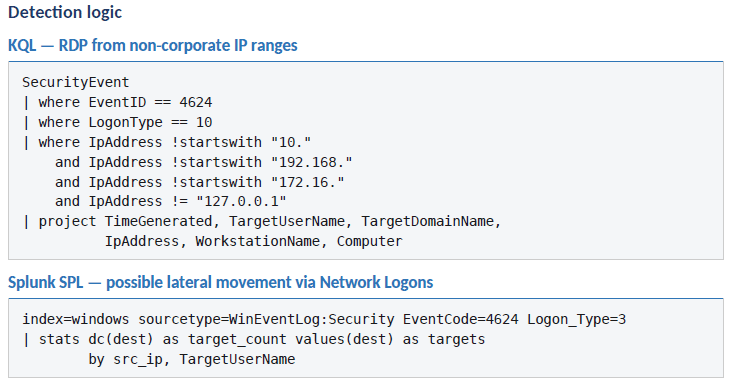
Logon Type 10 (RDP) from unexpected external IPs, non-administrative subnets, or outside business hours.
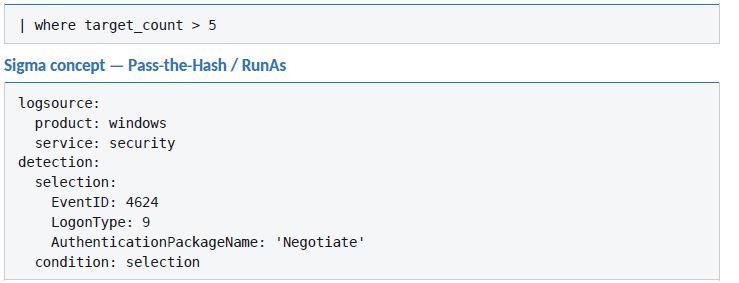
Logon Type 3 (Network) from a standard user workstation to multiple other workstations (lateral movement or scanning).
Logon Type 4 (Batch) under a high-privilege account such as Domain Admin (malicious scheduled task persistence).
Logon Type 9 (NewCredentials), commonly associated with Pass-the-Hash or RunAs /netonly activity.
Administrative accounts (Domain Admins) logging into standard user workstations (tiering violation).
Multiple Logon Type 3 events using NTLM instead of Kerberos in a modern domain.
Logon Type 10 with a 127.0.0.0 loopback source — possible RDP tunneling indicator.
Pitfalls & correlation
Blank or misleading IPs — IpAddress may be blank or 127.0.0.1 for local logons, or missing in certain Kerberos authentications because the protocol does not strictly require it.
Volume overload — 4624 is extremely noisy. Service logons (Type 5) and Network logons (Type 3) to file shares or DCs generate thousands of events per minute. Filter known service accounts and machine accounts (ending in $).
Subject vs. Target — SubjectUserName is the account requesting the logon (often SYSTEM or a service). TargetUserName / New Logon Account Name is the actual user who logged in. They are not the same.
Logon GUID mismatch — LogonGuid is intended to correlate a workstation logon (4624) with a DC Kerberos service ticket (4769), but in practice these GUIDs often do not match, making cross-host correlation unreliable.
UAC split tokens — When an admin logs in interactively with UAC enabled, Windows generates two 4624 events: a standard token and an elevated token (ElevatedToken = Yes). They are tied together via TargetLinkedLogonId.
Recommended pivots
→ 4634 / 4647 via TargetLogonId to determine session duration.
→ 4672 via TargetLogonId to see if the session was granted administrative rights (e.g., SeDebugPrivilege).
→ 4688 via TargetLogonId to see exactly what commands and executables ran during the session.
→ 4625 via TargetUserName or IpAddress to see if the successful logon was preceded by failed attempts.
Pitfalls & correlation
Blank or misleading IPs — IpAddress may be blank or 127.0.0.1 for local logons, or missing in certain Kerberos authentications because the protocol does not strictly require it.
Volume overload — 4624 is extremely noisy. Service logons (Type 5) and Network logons (Type 3) to file shares or DCs generate thousands of events per minute. Filter known service accounts and machine accounts (ending in $).
Subject vs. Target — SubjectUserName is the account requesting the logon (often SYSTEM or a service). TargetUserName / New Logon Account Name is the actual user who logged in. They are not the same.
Logon GUID mismatch — LogonGuid is intended to correlate a workstation logon (4624) with a DC Kerberos service ticket (4769), but in practice these GUIDs often do not match, making cross-host correlation unreliable.
UAC split tokens — When an admin logs in interactively with UAC enabled, Windows generates two 4624 events: a standard token and an elevated token (ElevatedToken = Yes). They are tied together via TargetLinkedLogonId.
Recommended pivots
→ 4634 / 4647 via TargetLogonId to determine session duration.
→ 4672 via TargetLogonId to see if the session was granted administrative rights (e.g., SeDebugPrivilege).
→ 4688 via TargetLogonId to see exactly what commands and executables ran during the session.
→ 4625 via TargetUserName or IpAddress to see if the successful logon was preceded by failed attempts.
Event 4768 — Kerberos TGT Requested
MITRE ATT&CK: T1558 (Steal or Forge Kerberos Tickets) · T1558.004 (AS-REP Roasting) · T1558.003 (Kerberoasting)
Profile
Event ID 4768 records the initial step of Kerberos authentication, specifically when a Key Distribution Center (KDC) issues or fails to issue a Ticket Granting Ticket (TGT) to a requesting account. Microsoft is explicit that 4768 is logged only on domain controllers and is generated every time the KDC issues a TGT. For investigators, it is a foundational artifact for tracking initial domain logons, identifying source IPs of authentication attempts, and detecting credential-based attacks such as AS-REP roasting or brute-force attempts. Because it captures the encryption types and pre-authentication status, it is critical for spotting anomalous authentication behaviors and legacy protocol usage.
Key forensic fields
TargetUserName — Logon name of the account requesting the TGT. Computer accounts end with $.
IpAddress — Source IP where the authentication originated. The best single field for answering ‘which machine asked for the ticket?’
Status — Success (0x0) or specific failure. Notable codes: 0x6 (client not found / bad username), 0x12 (account disabled/locked/expired), 0x17 (password expired), 0x18 (pre-authentication failed — bad password).
TicketEncryptionType — Encryption algorithm. 0x17 = RC4 — weak; often used by attackers for offline cracking (Kerberoasting/AS-REP).
PreAuthType — 0 (or ‘-’) means pre-authentication was disabled or bypassed — primary indicator of an AS-REP roasting attempt.
Normal vs. suspicious
Normal
4768 events from workstations as users sign in throughout the day, with TicketEncryptionType AES (0x12 or 0x11).
Computer accounts ($-suffixed) requesting TGTs on boot.
Suspicious
TicketEncryptionType 0x17 (RC4) for user accounts in environments otherwise standardized on AES — Kerberoasting precursor.
PreAuthType 0 for accounts that should require pre-authentication — AS-REP roasting target enumeration.
4768 failures with Status 0x6 in volume from a single IP — username enumeration.
4768 success for a privileged account from an unusual source IP (e.g., a standard workstation).
Pitfalls & correlation
DC-only — 4768 is generated only on the KDC (domain controller). Forwarding from DCs is mandatory; member-server logs will never carry these.
Pair with 4769 — 4768 is TGT issuance; 4769 is service-ticket issuance. Kerberoasting investigations typically need both.
Recommended pivots
→ 4624 on the resource machine — did the ticket actually result in logon?
→ 4769 for service tickets issued to the same client.
→ 4776 if NTLM was used as fallback.
Event 4776 — NTLM Credential Validation
MITRE ATT&CK: T1110 (Brute Force) · T1078 (Valid Accounts) · T1187 (Forced Authentication)
Profile
Event 4776 captures NTLM credential validation. Microsoft documents two distinctions that matter for investigators: it explicitly shows the Source Workstation and Error Code, and it presents the source system, not the destination system. That second point is easy to misread and matters during lateral movement analysis — 4776 tells you where the credential came from, not where it was going.
In a modern Kerberos-first environment, NTLM is meaningful by exception. Frequent 4776 events for the same user, especially against legacy protocols or with workstation names that do not match the user’s primary host, often indicate misconfigured legacy applications, downgrade attacks, or relay activity.
Key forensic fields
■ TargetUserName — Account whose credentials were validated.
■ Workstation — Source workstation that submitted the credentials. This is the field that recovers source identity when 4625 is blank.
■ Error Code — 0x0 = success; other values map to NTLM-specific failure conditions (bad password, account restrictions, etc.).
Suspicious patterns
■ High volume of 4776 events with non-zero Error Codes for one account from one workstation — NTLM brute force.
■ 4776 for highly privileged accounts originating from workstations that should never authenticate as that user.
■ NTLM authentication originating from systems that should be Kerberos-only — possible downgrade or relay.
Pitfalls
■ Source not destination — Microsoft is explicit: 4776 shows the source system. Treating it as ‘where the access went’ is a common analyst mistake.
■ Logged on the validator — 4776 is logged on the system that validated the credentials. For domain accounts, that is a domain controller; for local accounts, it is the local system.
Event 4672 — Special Privileges Assigned to New Logon
MITRE ATT&CK: T1078 (Valid Accounts) · T1134 (Access Token Manipulation) · T1068 (Exploitation for Privilege Escalation)
Profile
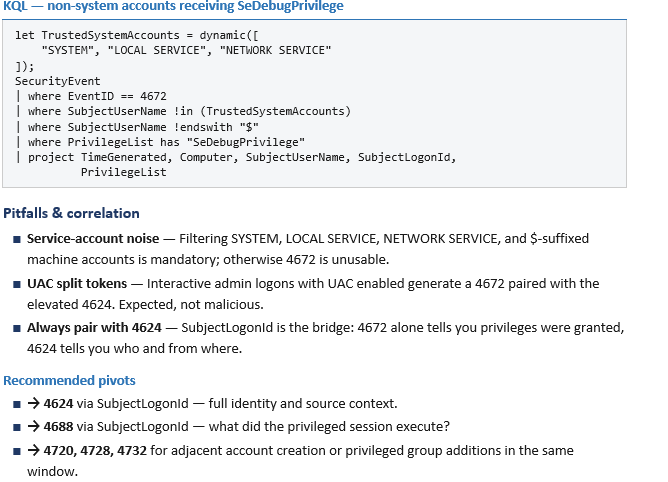
Once a session exists, 4672 tells you whether especially sensitive privileges were assigned to it. Microsoft documents a privileges list that includes rights such as SeDebugPrivilege, SeBackupPrivilege, SeRestorePrivilege, SeTakeOwnershipPrivilege, and SeTcbPrivilege. It acts as a high-fidelity indicator of a ‘super user’ or highly privileged account authenticating to a system. While it generates noise for legitimate system services, filtering out benign accounts makes 4672 an invaluable pivot for detecting unauthorized privilege escalation, lateral movement by compromised admins, and the initial stages of credential dumping.
Key forensic fields
■ SubjectUserSid — SID of the account assigned the special privileges.
■ SubjectUserName — Account logon name of the user or service receiving the privileges.
■ SubjectDomainName — Domain or local computer name where the account resides.
■ SubjectLogonId — Hex value uniquely identifying the logon session between reboots. The critical pivot to the corresponding 4624.
■ PrivilegeList — Exact privileges assigned. Notable: SeDebugPrivilege (LSASS dump), SeBackupPrivilege / SeRestorePrivilege (ACL bypass), SeTakeOwnershipPrivilege (object ownership), SeTcbPrivilege (act as part of the OS).
Normal vs. suspicious
Normal
■ 4672 generated by SYSTEM, LOCAL SERVICE, NETWORK SERVICE, DWM-*, or machine accounts ($-suffixed) during routine background tasks.
■ Legitimate IT administrators authenticating to jump servers or DCs during approved maintenance windows.
■ Service accounts executing batch jobs (Logon Type 4) or starting services (Logon Type 5) that require elevated rights, from known static IPs.
Suspicious
■ 4672 triggered by a standard user account that should not possess admin-equivalent rights, especially SeDebugPrivilege.
■ A known admin account generating 4672 from an unexpected source IP, a standard workstation, or outside business hours.
■ A single account generating 4672 across many endpoints in rapid succession (30+ hosts in 5 minutes) — lateral movement.
■ 4672 immediately following 4720 (account creation) — backdoor account created and immediately escalated.
Detection logic
PART 2 — EXECUTION AND PERSISTENCE
If identity events tell you who obtained access, execution events tell you what they actually did. This section covers process creation (4688), scheduled task lifecycle (4698/4702), service installation (4697 and System log 7045), and the anti-forensics event analysts should treat as a near-certain incident indicator: 1102.
Event 4688 — Process Creation
MITRE ATT&CK: T1059 (Command and Scripting Interpreter) · T1059.001 (PowerShell) · T1059.003 (Windows Command Shell) · T1218 (System Binary Proxy Execution / LOLBins)
Profile
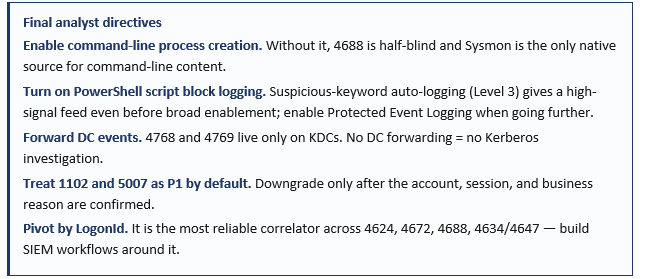
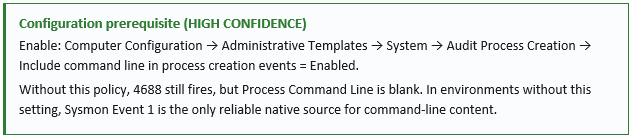
Event 4688 remains one of the most important Windows native events because it records new process creation and can be correlated by process ID with other records. The critical caveat is that the most useful field — Process Command Line — is not populated unless the policy ‘Include command line in process creation events’ is enabled. Microsoft is explicit on this point: without that setting, the field is empty by default. That single configuration detail often separates an investigation that identifies a malicious LOLBin command from one that produces only a process name and guesswork.
Key forensic fields
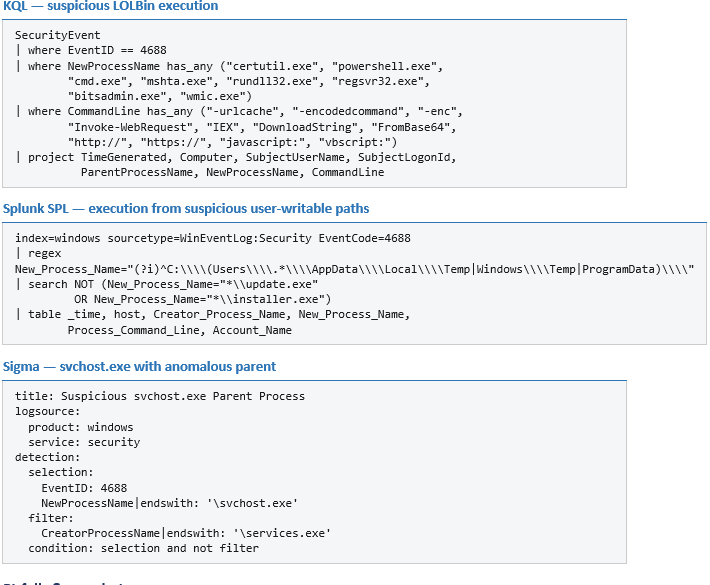
■ New Process Name — Full file path of the executable that was launched.
■ Process Command Line — Exact arguments passed to the executable. Requires GPO enablement.
■ Creator Process Name (Win 10/2016+) — Full file path of the parent process.
■ Creator Process ID — Hex PID of the parent. Correlate with the parent’s own 4688.
■ New Process ID — Hex PID assigned to the new process.
■ SubjectUserName — Account that started the process.
■ SubjectLogonId — Hex logon session — pivot to 4624.
■ Token Elevation Type — %%1936 (Type 1, full token / UAC disabled or built-in admin); %%1937 (Type 2, elevated via Run-as-administrator); %%1938 (Type 3, standard user).
■ Mandatory Label — Integrity level: Low, Medium, High, System.
Detection logic
Pitfalls & correlation
■ Empty CommandLine — If the GPO above is not enabled, all hunting that depends on arguments fails silently.
■ Hex PIDs — Process IDs in 4688 are hexadecimal. Many SIEM tools store them as strings; convert to decimal carefully when correlating with non-Windows sources.
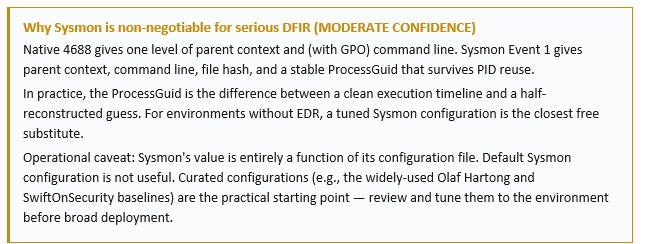
■ Parent chain limits — 4688 gives one level up (Creator Process). Reconstructing deeper ancestry requires correlation across multiple 4688 events or, more efficiently, Sysmon ProcessGuid.
Events 4698 & 4702 — Scheduled Task Lifecycle
MITRE ATT&CK: T1053.005 (Scheduled Task) · T1078 (Valid Accounts for persistence) · T1546 (Event Triggered Execution)
Profile
Windows scheduled tasks deserve high priority because they are both common administration mechanisms and common persistence mechanisms. Microsoft documents 4698 for task creation, 4699 for deletion, 4700/4701 for enable/disable, and 4702 for task updates, and recommends monitoring them broadly — especially on critical systems. The reason is not merely that they indicate a task exists; these events can include Task Name and Task Content in XML form. Microsoft specifically calls out <LogonType>Password</LogonType> in task content as alert-worthy because the password for the run-as account can be stored in Credential Manager in recoverable form for an administrator.
Key forensic fields
■ SubjectUserSid / SubjectUserName — Account that requested the task operation.
■ SubjectLogonId — Pivot to the 4624 that started the session.
■ TaskName — Task path and name relative to the Task Scheduler Library root.
■ TaskContent — Raw XML defining the task. Inspect <Command>, <Arguments>, <UserId>, <RunLevel> (LeastPrivilege vs. HighestAvailable), and <Hidden>.
■ ClientProcessId / ParentProcessId (Win 10 1903+) — PIDs that initiated the task creation/modification.
Normal vs. suspicious
Normal
■ Tasks created by known system processes (svchost.exe) or legitimate installers (Google Update, Adobe Updater) in expected paths.
■ Tasks under standard user accounts for user-specific applications.
■ Task names that align with documented software conventions.
Suspicious
■ Tasks created in the root of the Task Scheduler Library (\TASK_NAME) rather than a vendor-specific subfolder.
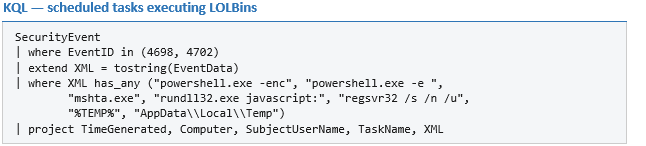
■ Tasks executing binaries from temporary directories (%TEMP%, C:\Windows\Temp, C:\Users\*\AppData\Local\Temp).
■ Tasks running as NT AUTHORITY\SYSTEM (HighestAvailable) created by non-standard administrative accounts.
■ Task Content XML with obfuscated commands, PowerShell encoded commands (-enc), or calls to LOLBins (cmd.exe, powershell.exe, mshta.exe, rundll32.exe).
■ Tasks with <Hidden>true</Hidden> set.
■ Randomly-generated or deceptive task names (\WindowsUpdate at the root instead of \Microsoft\Windows\WindowsUpdate).
Detection logic
Pitfalls & correlation
■ Both channels matter — Microsoft-Windows-TaskScheduler/Operational records 106 / 140 / 141 for task creation/update/delete with different fields. In some environments, that channel is the only place task content lives.
■ Pivot to 4688 — ClientProcessId in 4698 (1903+) links directly to the 4688 that created the task. That parent is often the actual evidence of intent.
Events 4697 & 7045 — Service Installation
MITRE ATT&CK: T1543.003 (Windows Service) · T1569.002 (Service Execution) · T1078 (Valid Accounts)
Profile
Service-based persistence belongs in the same top tier as scheduled tasks. Microsoft’s native security auditing page for 4697 shows why: it logs the Service File Name, Service Type, Service Start Type, and Service Account, and Microsoft recommends special attention to driver-like service types, boot or system start modes, unexpected locations outside %windir% or Program Files, and user-context service accounts. Many defenders also watch the System log’s 7045 (”A service was installed in the system”) in parallel. Used together, these answer both ‘was a service added?’ and ‘what exactly was configured to run?’
Key forensic fields (4697)
■ SubjectUserSid / SubjectUserName — Account that installed the service.
■ SubjectLogonId — Pivot to 4624.
■ ServiceName — Internal system name of the newly installed service.
■ ServiceFileName — Full path and executable (with parameters) used to start the service. The critical field for identifying suspicious binaries.
■ ServiceType — 0x1 (Kernel Driver), 0x2 (File System Driver), 0x10 (Win32 Own Process), 0x20 (Win32 Share Process).
■ ServiceStartType — 0 (Boot start), 1 (System start), 2 (Auto start), 3 (Demand/Manual), 4 (Disabled).
■ ServiceAccount — Security context the service will run under (LocalSystem, NT AUTHORITY\NetworkService, etc.).
Suspicious patterns
■ Kernel or file system driver service types (0x1, 0x2) installed by user accounts.
■ Boot or System start types (0, 1) for services in non-standard locations.
■ ServiceFileName paths outside %windir%, %systemroot%\System32, or Program Files.
■ Service accounts running under LocalSystem with binary paths in user-writable directories — classic PsExec-style and commodity malware persistence.
■ Single-letter or randomly-generated service names installed near a lateral movement event.
Correlation
■ Pair with 7045 — 4697 lives in Security; 7045 lives in System. Both fire on service installation. Cross-check both channels and pivot to 4688 to see which process created the service.
■ Watch for PsExec — PsExec installs a temporary service (default name PSEXESVC) on the remote host. 7045 entries for PSEXESVC or similarly named services from a remote source are a high-signal lateral movement indicator.
Event 1102 — Audit Log Cleared
MITRE ATT&CK: T1070.001 (Indicator Removal: Clear Windows Event Logs) · T1562.001 (Impair Defenses: Disable or Modify Tools)
Profile
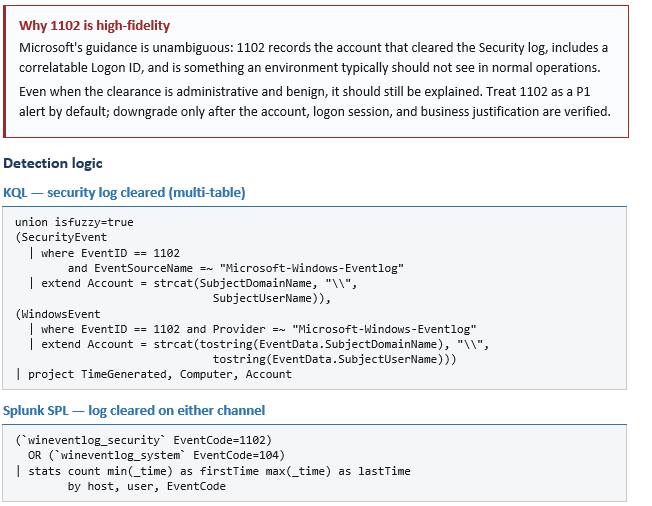
Event 1102 is generated whenever the Windows Security audit log is cleared, regardless of the system’s audit policy. It is highly critical for investigators because clearing the Security log is a classic anti-forensics technique. While the attacker may successfully delete historical logs, 1102 itself cannot be hidden and serves as a definitive indicator that the log was wiped, recording the account and logon session responsible for the action.
Pitfalls & correlation
■ Companion event 104 — System log event 104 records the equivalent for other event logs (e.g., System, Application). Real adversaries clear multiple channels; build detections that cover both.
■ Account validation — Compare the SID/account against your privileged-access list. Service accounts and standard users should never trigger 1102.
■ Always pivot to 4624 — Use the Logon ID to determine source IP, workstation, and adjacent execution. The minutes around a 1102 are the highest-value forensic window in the incident.
PART 3 — TELEMETRY THAT UPGRADES CONTEXT INTO EVIDENCE
Native security events answer a surprising amount, but some questions need richer telemetry. This section profiles three telemetry sources that, in practice, are the difference between suspicion and proof: PowerShell script block logging (4104), Sysmon’s correlation-grade process artifacts (notably Event 1), and Microsoft Defender Antivirus’s detection-and-action stream (1116/1117/5007/5013).
PowerShell Event 4104 — Script Block Logging
MITRE ATT&CK: T1059.001 (PowerShell) · T1027 (Obfuscated Files or Information) · T1140 (Deobfuscate/Decode Files or Information)
Profile
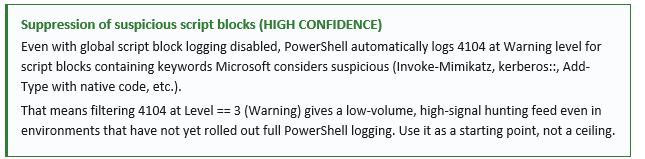
Microsoft’s PowerShell logging documentation explains that script block logging records the content of commands, functions, script blocks, and scripts — whether invoked interactively or via automation. For Windows PowerShell 5.1, Microsoft explicitly documents Event ID 4104 for script block logging in the Microsoft-Windows-PowerShell/Operational log. Microsoft also warns that script logging can capture sensitive information, which is why Protected Event Logging is recommended when organizations raise PowerShell visibility beyond pure diagnostics.
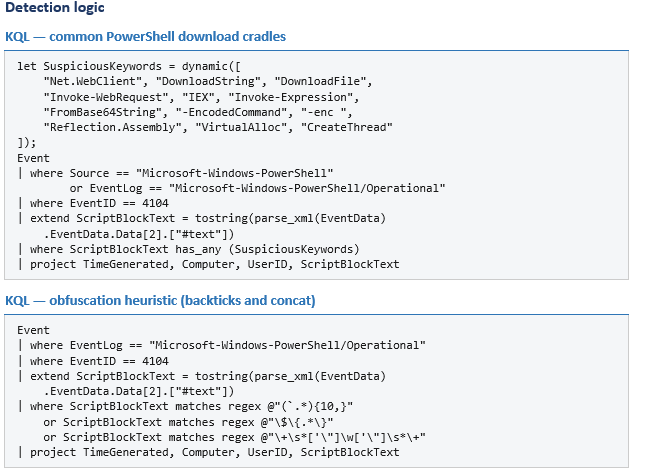
Event 4104 captures the raw code of scripts, including those executed entirely in memory or via encoded commands (e.g., Base64), which bypass traditional process command-line logging. The practical takeaway is simple: if 4688 tells you powershell.exe ran, 4104 often tells you what code it processed.
Key forensic fields
■ ScriptBlockText — Actual content of the PowerShell script block being compiled and executed. The most critical field.
■ ScriptBlockId — Unique GUID assigned to the script block. Crucial for reconstructing large scripts split across multiple 4104 events.
■ MessageNumber / MessageTotal — Sequence number and total for fragmented scripts.
■ Path — Full file path to the executed script, if it was run from disk. Empty for in-memory or interactive execution.
■ Level — Severity. Level 3 (Warning) indicates the script matched Microsoft’s internal suspicious-keywords list and was auto-logged.
■ Execution ProcessID — PID of the PowerShell host process that compiled the script block.
■ Security UserID — SID of the user under which the script executed.
Pitfalls & correlation
■ Fragmentation — Large scripts are split across multiple 4104s. Always reassemble by ScriptBlockId/MessageNumber/MessageTotal before judging content.
■ Encoded payloads — -EncodedCommand contents are visible in 4104 after decode by the engine; do not assume Base64 obfuscation hides them.
■ 4103 module logging — Where 4104 shows the script as compiled, 4103 shows pipeline invocation. Both have value; 4104 typically wins for detection, 4103 for execution context.
■ Protected Event Logging — Microsoft recommends Protected Event Logging where 4104 may capture secrets. Enable it before broadening collection.
Sysmon — The Correlation Force Multiplier
MITRE ATT&CK: T1059 / T1218 / T1055 (Process Injection) / T1071 (App Layer Protocol — Sysmon 3) / T1071.004 (DNS — Sysmon 22) / T1547 (Boot or Logon Autostart — Sysmon 12–14)
Profile
Sysmon turns generic execution into behavior chains. Microsoft describes Sysmon as a system monitor that logs detailed activity to the Windows event log, including process creation, network connections, and file creation time changes, and emphasizes that the events become meaningful when correlated as sequences. The high-value starting points are: Event ID 1 (Process Create) with full command line, parent process, hashes, and a globally unique Process GUID; Event ID 3 (Network Connect); Event ID 22 (DNS Query); Event ID 11 (File Create); Event ID 7 (Image Load); and Event IDs 12–14 (Registry Events).
Sysmon Event 1 — Process Create
Sysmon Event ID 1 records process creation with extensive context that native Windows logging often lacks: full command line, parent process, cryptographic hashes (MD5, SHA1, SHA256, IMPHASH), and a unique Process GUID for tracking across the lifecycle. Nearly all attacker actions — from initial access and persistence to credential dumping and lateral movement — require executing code as a process. By analyzing Event ID 1, defenders can reconstruct execution chains, identify renamed malware, and spot malicious commands hidden within legitimate system utilities.
Key fields
■ ProcessGuid — Unique Sysmon-generated identifier. Correlates precisely across other Sysmon events even if the OS reuses the PID.
■ Image — Full file path of the executable.
■ CommandLine — Exact arguments. Captures encoded PowerShell, LOLBin abuse, and obfuscation natively (no GPO required).
■ OriginalFileName — Internal name extracted from the PE header. Detects renamed system utilities (e.g., powershell.exe → update.exe).
■ Hashes — MD5/SHA1/SHA256/IMPHASH for threat-intel lookup.
■ ParentImage / ParentCommandLine — Full file path and invocation of the parent process. Essential for execution-tree anomaly detection (e.g., Word spawning cmd.exe).
■ User — Security context the new process runs under.
■ IntegrityLevel — Low / Medium / High / System — useful for spotting UAC bypass and privilege escalation.
High-value companion events
■ Event 3 — Network Connection. Process-to-destination IP/port mapping that 4688 cannot give you.
■ Event 7 — Image Load. Detects DLL sideloading and unsigned modules loading into trusted processes.
■ Event 11 — File Create. Drop-site visibility for malware staging.
■ Events 12–14 — Registry events. Run-key, AppInit_DLLs, IFEO debugger, and other registry-based persistence.
■ Event 22 — DNS Query. Process-to-domain mapping, including resolution of attacker C2 domains by the responsible process.
Microsoft Defender Antivirus — Detection and Action Stream
MITRE ATT&CK: Defensive telemetry, not adversary techniques; supports detection of T1059, T1027, T1055, T1562 (Impair Defenses), and related categories.
Profile
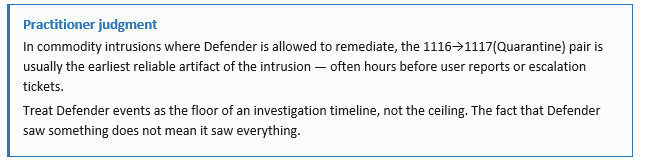
Microsoft Defender Antivirus adds another layer that many investigations underuse. Microsoft’s current event reference shows 1116 for malware detected, 1117 for action taken, 5007 for configuration changed, and 5013 when tamper protection blocked a change. Detection sources include AMSI, which is especially relevant for PowerShell and VBS-focused investigations. That gives analysts a compact but powerful flow: 1116 says detection occurred, 1117 says what action was taken, 5007 may show if Defender settings changed unexpectedly, and 5013 shows when Defender successfully blocked unauthorized modification. In environments using Microsoft Defender XDR, the DeviceEvents table extends that story with process, account, network, and initiating-process fields for security-control events.
Key forensic fields
■ Name — Microsoft-assigned threat name (e.g., HackTool:Win64/Mimikatz.A, Trojan:Win32/Emotet). Indicates family and expected behavior.
■ ID / Severity / Category — Threat ID, severity level (Low/Moderate/High/Severe), and classification (Tool, Trojan, Ransomware, PUA).
■ Path — File path or memory location of the detected artifact.
■ Detection Source — How identified: Real-Time Protection, AMSI, System, User, IOAV. AMSI is the critical source for malicious PowerShell / VBScript.
■ Process Name — Process (PID) that dropped, accessed, or executed the malicious file.
■ Action (1117/1118/1119) — Remediation: Clean, Quarantine, Remove, Allow, Block, No action. ‘Allow’ or ‘No action’ means the threat was not stopped.
■ Error Code (1118/1119) — HRESULT explaining why remediation failed (e.g., file locked by another process).
How to read the sequence
■ 1116 then 1117(Quarantine) — detection followed by clean remediation. Investigate but typically resolved.
■ 1116 then 1117(Allow) or 1117(No action) — detection but not stopped. Treat as active compromise and pivot immediately to 4688/Sysmon 1 to see what ran next.
■ 5007 — Defender configuration changed. Confirm against change management. Untracked changes during an incident window are a strong indicator of attempted defense evasion.
■ 5013 — Tamper protection blocked a modification. The attacker tried, the control held. Pivot to 4688/Sysmon 1 to identify the process that attempted the change.
PART 4 — BUILDING A PRACTICAL SOC PRIORITY MODEL
A workable SOC baseline does not need to start with every Windows event channel. A high-value baseline can begin with successful and failed logons (4624, 4625), process creation (4688), privileged logons (4672), account and group changes (4720, 4728, 4732), scheduled task creation or change (4698, 4702), Kerberos and NTLM authentication visibility (4768, 4776), share-access telemetry (5140, 5145), anti-forensics (1102), PowerShell script block logging (4104), and a carefully selected Sysmon configuration. That priority model lines up closely with Microsoft’s own Minimal and Common event-set philosophy for Sentinel and with Microsoft’s guidance that many important audit events require deliberate policy configuration.
Field-level reading order
The field-level reading order matters as much as the event list. The table below is the order this reference recommends an analyst use when working a fresh suspected intrusion.
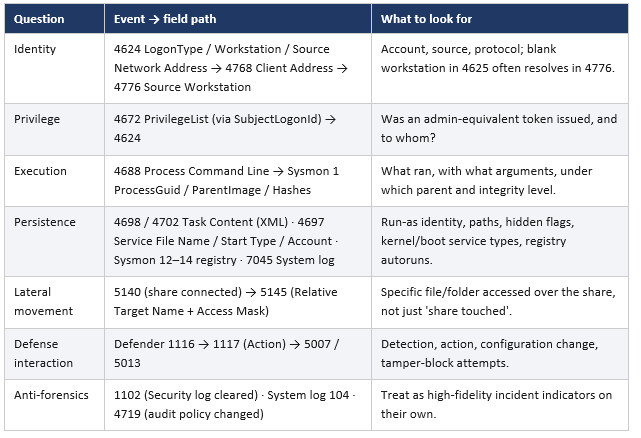
The deeper lesson
Windows investigations do not become faster because a team buys more tooling. They become faster when analysts can move from a question to the right event family, from the right family to the decisive fields, and from those fields to a timeline that explains access, execution, persistence, and defense interaction. Microsoft’s own guidance now points in that direction: prefer curated sets over indiscriminate collection, correlate events rather than reading them in isolation, and elevate a small number of event IDs from ‘things we ingest’ to ‘things we truly understand.’