Networking Fundamentals
Read like an analyst. Every packet is a witness. Most networking courses teach you what a protocol is. This one teaches you what a protocol tells you when something goes wrong

Networking is the substrate. Investigation is the job.
An alert is never the whole story — it is a pointer. Behind every alert sit six facts that, assembled correctly, turn a vague signal into a defensible conclusion. Master the network and these six become second nature.

Part I · The Journey of a Packet
Follow one request from a user’s click to the server that answers it. Every stop on the way is a place where the network writes something down — and where an attacker might be hiding. Learn the stops, and the logs stop being noise.
1.0 From a click to a server, narrated
A user types
https://intranet.corp.local
and presses enter. What looks instantaneous is a relay race across the stops below. Read it once as a story; you’ll spend the rest of the manual learning to read each baton-pass as evidence.
1. The Internet / the request
A request is born. The host needs to turn a human-friendly name into something the network can route. Nothing can happen until it knows where to go.
2. DNS udp/53 · tcp/53
DNS translates the name into an IP address. SOC relevance: this is the most under-monitored protocol on the network and a favorite covert channel — exfiltration, C2, and domain-generation algorithms all hide here.
3. IP Address
The destination IP is the postal address of the conversation. It tells you who — and, with enrichment, whether that “who” is a corporate server, a cloud tenant, a residential ISP, or a known-bad host.
4. Port
An IP is a building; a port is the door. 443 is the front desk for HTTPS; 3389 is the remote-desktop door; 445 is file sharing. The door chosen tells you what the conversation is supposed to be.
5. TCP / UDP
The transport decides the manners. TCP is a phone call with confirmations; UDP is a postcard, fire-and-forget. The handshake (or its absence) is one of the richest signals an analyst has.
6. Server
The service receives the request, does the work, and answers. SOC relevance: the server is the prize. Watch who reaches it, from where, on which port, at what hour.
7. Logs
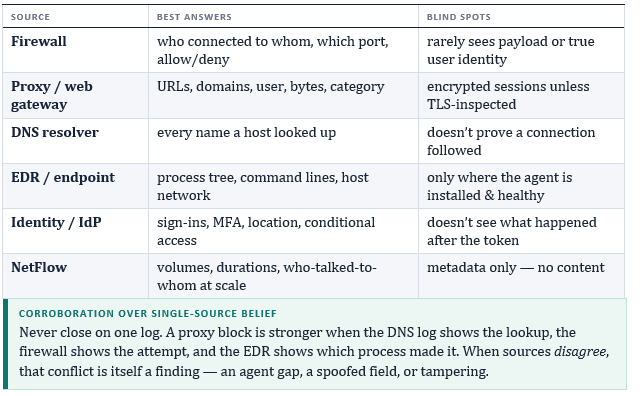
Every stop above leaves a trace — firewall, proxy, DNS resolver, endpoint, identity provider. The logs are the network’s memory. They don’t lie, but they are incomplete; know what each can and cannot prove.
8. The SOC Analyst
You. The chain ends not with a packet but with a person who decides: benign, suspicious, or confirmed. Everything in this manual exists to make that decision faster and more defensible.

1.1 IP addressing & what an address reveals
An IP address identifies an interface on a network. Two families are in use: IPv4 (e.g. 192.168.1.10, 32 bits, four octets 0–255) and IPv6 (e.g. 2001:db8::8a2e:370:7334, 128 bits, hexadecimal). IPv6 matters more than juniors expect — credential-spray and beaconing campaigns increasingly ride IPv6 precisely because monitoring there is thinner.
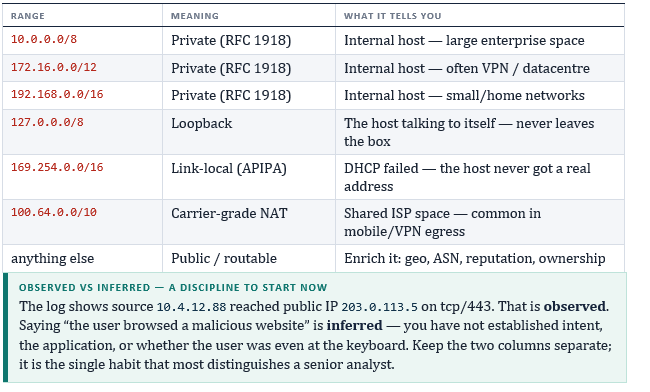
Public vs private — the first question to ask any address
When you see an IP in a log, your first instinct should be: is it routable on the internet or internal-only? Private ranges (RFC 1918) never appear on the public internet, so a private source talking to a private destination is internal; a private host talking to a public IP went outbound.
NAT, and why the IP you see may not be the IP that acted
Network Address Translation lets many private hosts share one public address outbound. A firewall log may show your whole office as a single public IP, while the proxy log shows the true internal source. Behind a load balancer or CDN, the real client often hides in an X-Forwarded-For header. Always ask: is this the originator, or a translator standing in front of them?
1.2 Subnetting & CIDR for analysts
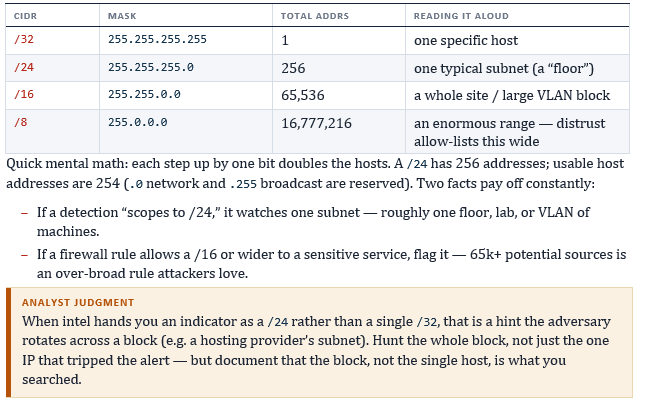
You don’t need to subnet by hand under pressure, but you must read CIDR fluently — allow-lists, firewall rules, intel feeds, and detection scopes are all written in it. CIDR notation (10.4.12.0/24) says “the first 24 bits are the network, the rest identify hosts inside it.”
1.3 DNS — the network’s phone book & its blind spot
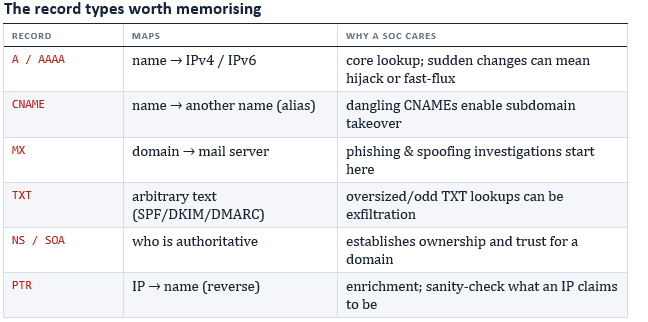
DNS turns names into addresses. Most resolution is recursive: your machine asks a recursive resolver, which (if it doesn’t know) walks the hierarchy — root → TLD → authoritative server — and returns the answer, caching along the way.
Why DNS is the protocol attackers love
DNS is allowed out of almost every network because it has to be, and it is frequently unlogged or under-inspected. That makes it ideal for:
– DNS tunnelling / exfiltration — data smuggled inside subdomain labels or TXT responses. Tell-tale: long, high-entropy hostnames and abnormal query volume to one domain.
– Command-and-control beaconing — regular, low-volume lookups to a newly-registered domain at fixed intervals.
– Domain-generation algorithms (DGA) — malware querying hundreds of random names, producing a spike in NXDOMAIN responses.
– Fast-flux — a single name resolving to many rotating IPs with very low TTLs, hiding the real infrastructure.

1.4 Ports & protocols you must know cold
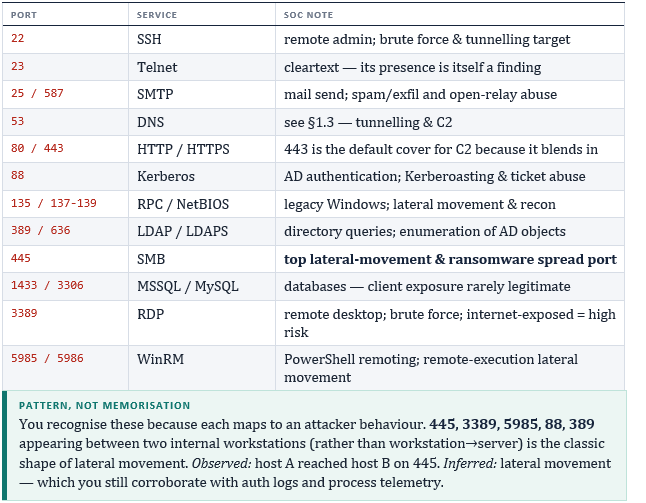
A port number (0–65535) plus the IP and protocol identifies a specific service. Ports 0–1023 are the well-known ports. You won’t memorise all of them — but the set below should be reflex, because they define both normal business traffic and the lateral-movement / remote-access patterns attackers reuse.
1.5 TCP vs UDP & the handshake
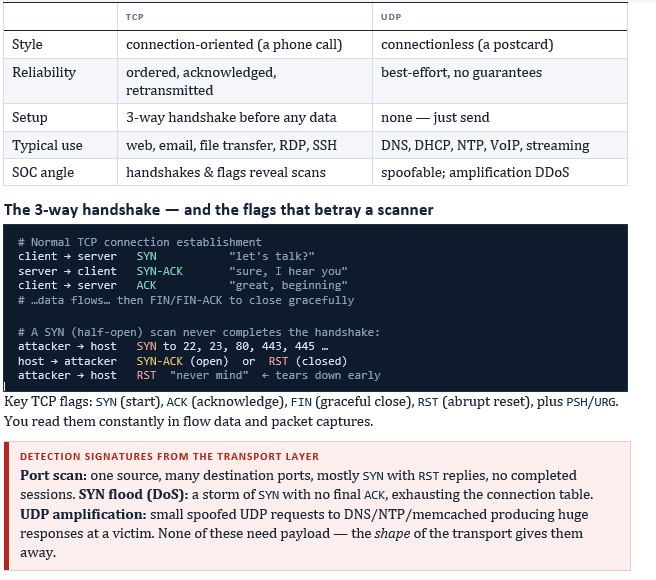
Both carry data between ports, but their manners differ — and the manners are evidence.
1.6 LAN, WAN, DMZ & segmentation
Where a host sits changes what its traffic means.
– LAN (Local Area Network) — one site/building, high speed, under your control. Internal east-west traffic lives here.
– WAN (Wide Area Network) — links sites across distance (internet, MPLS, SD-WAN). Branch-to-HQ and cloud egress are WAN concerns.
– DMZ (demilitarised zone) — a screened subnet between internet and internal network where public-facing services live. A DMZ host should reach the internet and a few backends, never roam the internal LAN.

Segmentation is a detection asset
Segmentation divides the network into zones (user VLAN, server VLAN, OT, guest, DMZ) with rules about who may talk to whom. For an analyst this is gold: a workstation-VLAN host suddenly speaking SMB to a database VLAN, or a DMZ host initiating a connection inward to a domain controller, is anomalous by design of the architecture.

Part II · The SOC Lens
Part I taught you the terrain. Part II teaches you to read it operationally — which logs answer which questions, which commands pull which facts, and how to assemble the six elements into a verdict you can defend.
2.0 Logs — where the network confesses
Every stop on the packet’s journey writes a record somewhere. Knowing which source proves which fact is most of the job.
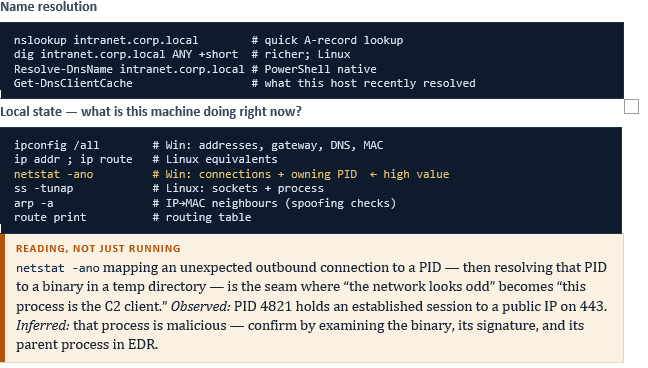
2.1 The analyst’s command toolkit
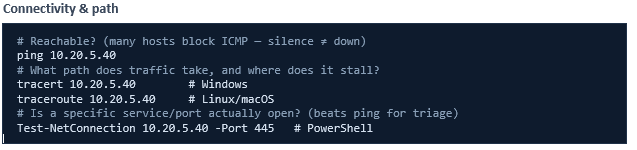
These turn a question into a fact. Know what each proves, not just its syntax.
2.2 Troubleshooting & triage method
Whether fixing connectivity or triaging an alert, the same disciplined order beats guessing. Work the layers bottom-up, and write down what you ruled out, not just what you found.
1. Define the question precisely. “Can host A reach service X on port Y at time T?” — not “is the network broken?”
2. Layer 1–2 (physical/link): link up? correct VLAN? valid MAC/ARP?
3. Layer 3 (IP): valid address & gateway? routable? ping/tracert path.
4. Name resolution: does the name resolve, to the right address? (nslookup)
5. Layer 4 (transport): is the port open and the handshake completing? (Test-NetConnection)
6. Layer 7 (application/policy): proxy category, firewall rule, authentication, certificate.
7. Conclude with evidence. State the fault (or verdict) and the single observation that proves it.

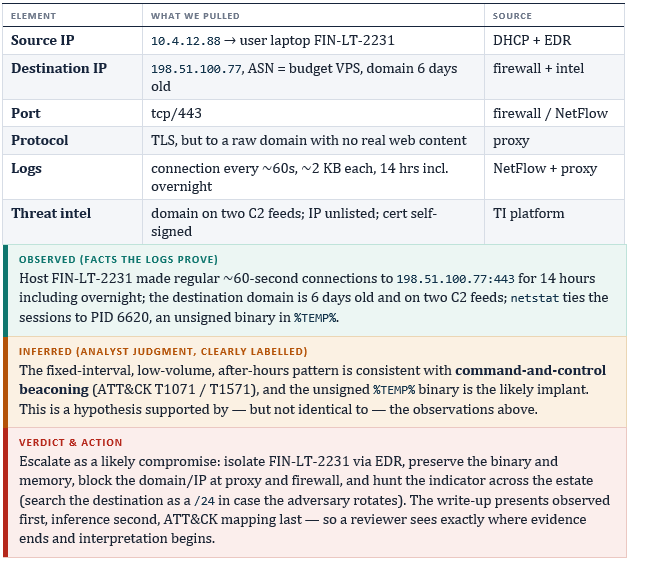
2.3 The formula in action: a worked alert
The whole manual in one investigation. The SIEM fires: “Internal host beaconing to a low-reputation external domain.” We assemble the six elements and keep observed and inferred strictly apart.
2.4 The SOC analyst workflow
Investigations ride a repeatable loop. Internalise it and you stay oriented even when the queue is on fire.
1. Detect — an alert fires from SIEM/EDR/IDS, or a hunt surfaces an anomaly.
2. Triage — is it real and is it urgent? Dedupe, check severity, scope the blast radius.
3. Investigate — assemble the six elements; separate observed from inferred.
4. Contain — isolate hosts, disable accounts, block indicators, preserve evidence.
5. Eradicate & recover — remove the foothold, restore clean state, validate.
6. Document & learn — timeline, ATT&CK mapping, and a detection/hardening change so it’s caught earlier next time.

Part III · Mastery
Two things separate people who know this material from people who can use it under pressure: explaining it crisply, and recalling it instantly. Here are both.
3.0 Interview questions, answered like an analyst
Q Walk me through what happens when you type a URL and press enter.
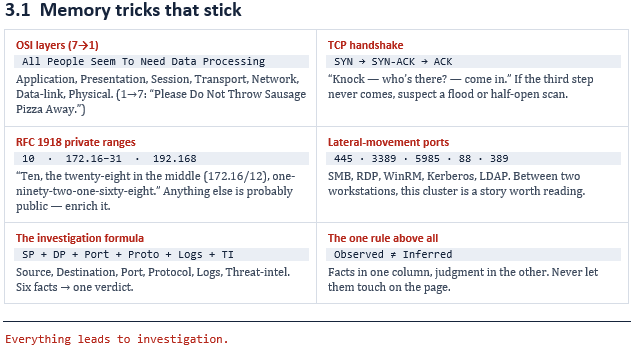
A Trace the chain: resolve the name via DNS (recursive resolver → root → TLD → authoritative), get an IP, open a TCP connection to the right port (443 for HTTPS) via the 3-way handshake, negotiate TLS, then exchange HTTP. Add the SOC framing: each step writes a log, and each is a place a defender watches.
Q TCP or UDP — when and why?
A TCP when you need reliability and ordering (web, file transfer, RDP); UDP when speed beats guarantees (DNS, NTP, VoIP, streaming). For detection, TCP gives you handshakes and flags to read; UDP is spoofable and shows up in amplification attacks.
Q How would you spot a port scan in logs?
A One source touching many destination ports in a short window, dominated by SYN packets with RST responses and no completed sessions. Confirm the source isn’t a legitimate vulnerability scanner before escalating.
Q Why is DNS a security concern if it just resolves names?
A Because it’s allowed everywhere and often under-logged, so it’s abused for tunnelling/exfiltration, C2 beaconing, and DGA. Red flags: long high-entropy hostnames, NXDOMAIN spikes, regular low-volume queries to newly-registered domains, very low TTLs (fast-flux).
Q Internal host connecting to another internal host on port 445 — concerned?
A Depends on baseline. SMB workstation-to-server is normal (file shares); workstation-to-workstation, or a sudden fan-out to many hosts, is the shape of lateral movement or ransomware spread. Corroborate with auth logs and endpoint process telemetry — observed connection first, then the inference.
Q Difference between a public and a private IP, and why it matters in an investigation?
A Private (RFC 1918) ranges aren’t internet-routable, so they identify internal hosts; public IPs are. It tells me the direction of a conversation, and because NAT means the public IP I see may not be the host that acted, I check for the real source behind translators and X-Forwarded-For.
Q How do you keep an investigation defensible?
A Separate what the logs show from what I conclude, cite the source for each fact, corroborate across at least two log sources, preserve evidence, and map findings to MITRE ATT&CK so the reasoning is auditable. A reviewer should always see where evidence ends and interpretation begins.