MFA Is Not Enough: The Device Code Phishing Threat Defenders Can't Ignore
A deep-dive intelligence brief for security practitioners and decision-makers | June 2026

The Uncomfortable Truth About Your MFA
You enabled multi-factor authentication. You trained your users. You passed the compliance audit. You slept a little better.
Now attackers are stealing active sessions from Microsoft 365 tenants without ever knowing a single user’s password — and your MFA prompt fires, succeeds, and shows “Compliant” in the logs.
This is not science fiction. It is the operational reality of identity-layer attacks in 2026, and the FBI confirmed it in May 2026 with a public advisory about Kali365 — a phishing-as-a-service platform selling device code token theft for roughly $250 per month on Telegram. The Cloud Security Alliance documented the same attack pattern hitting over 340 Microsoft 365 organizations in a single documented campaign wave. At RSAC 2026, Huntress researchers presented live attack demos showing how this technique escalates to Primary Refresh Tokens (PRTs) — credentials powerful enough to survive password resets and session revocations.
Business Email Compromise (BEC) — the downstream objective of most of these compromises — cost U.S. businesses $3.05 billion in reported losses in 2025 alone, up 9.9% from the prior year, and remained the most financially damaging single fraud category for the seventh consecutive year. Phishing losses grew 208% year-over-year in the same reporting period.
MFA is necessary. It is not sufficient. And the gap between those two statements is where organizations are bleeding right now.
What Actually Happens in a Device Code Attack
To understand why this is dangerous, you need to understand how Microsoft’s OAuth device code flow works — because the attack abuses a legitimate feature, not a vulnerability.
The device code flow was designed for input-limited devices: smart TVs, conference room displays, IoT hardware — environments where a full web-based login isn’t practical. The flow works like this: a device requests a short-lived code from Microsoft, displays that code to the user, and asks them to visit login.microsoftonline.com/devicelogin on another device to enter it and authenticate. The original device polls Microsoft until authentication completes, then receives OAuth access and refresh tokens.
Attackers realized something crucial: anyone who controls the original device request — and tricks a user into entering the generated code — receives those tokens. The victim authenticates on a real Microsoft page, completes their real MFA challenge, and hands an attacker a valid session — without either party “doing anything wrong” from a protocol perspective.
Here is the exact attack flow, step by step:
The attacker initiates a device code flow request against Microsoft Entra ID, generating a user code (e.g.,
HBDZ-MXQP) and a polling session on their infrastructureThe attacker crafts a phishing lure — typically impersonating a SharePoint file share, a DocuSign signature request, a Teams meeting invitation, or a voicemail notification
The victim opens the email, clicks the link, and is directed to
login.microsoftonline.com/devicelogin— a real, legitimate Microsoft URLThe victim enters the attacker-supplied code and completes their normal authentication, including MFA
Microsoft issues OAuth access and refresh tokens to the attacker’s polling session, not the victim’s browser
The attacker has immediate, authenticated API access to Exchange Online, Microsoft Graph, SharePoint, OneDrive, and Teams — without ever learning the victim’s password
The most chilling part: everything looks clean. The login page is legitimate. MFA fires and succeeds. Conditional Access may show “Satisfied.” No spoofed domain. No malicious attachment. No credential theft signal in your DLP tools.
The Persistence Problem: Primary Refresh Tokens
If token theft were the end of the story, containment would be straightforward — revoke the session, done. But sophisticated actors go further, and this is where the real danger lives.
Within minutes of capturing an OAuth refresh token, attackers can use it to register a new device in Microsoft Entra ID. That device registration, when combined with the right client ID (the “Microsoft Authentication Broker” app), allows the attacker to request a Primary Refresh Token (PRT).
A PRT is a long-lived, device-bound credential that provides silent single sign-on to every Microsoft 365 service. Normally, PRTs are tied to managed corporate devices protected by TPM chips. When an attacker generates one from a stolen refresh token, they get:
Silent SSO to every M365 app — Outlook, Teams, SharePoint, OneDrive, Azure Management, and more
Survival through password resets — because the PRT is bound to the device registration, not the password
Auto-renewal — the PRT refreshes indefinitely as long as the rogue device remains registered in Entra ID
The ability to derive new access tokens for any resource, with no MFA prompts, from any attacker-controlled hardware
At RSAC 2026, researchers demonstrated that in some cases, attackers went even further — escalating a PRT into a Windows Hello for Business (WHfB) key, a hardware-bound credential that can recreate the PRT even if that token is explicitly revoked.
Defender Implication: Revoking sessions after a device-code compromise may not terminate access if a PRT has already been issued. You must also identify and remove the rogue device registration from Entra ID. Check for newly registered devices with names matching
DESKTOP-followed by 6–8 hex characters — a pattern associated with automated device registration tooling like ROADtx.
This was compounded in February 2026 when Microsoft confirmed CVE-2026-0012, dubbed the “Ghost Token” flaw — a logic error in the Microsoft Graph API’s token refresh mechanism allowing OAuth tokens granted with offline_access and high-privilege scopes (like Mail.ReadWrite or Files.Read.All) to survive full password resets and “Revoke All Sessions” commands. Microsoft began patching backend systems, but warned that tokens generated before the patch were not automatically revoked, leaving thousands of tenants exposed.
Why MFA “Bypass” Is Slightly Misleading — And Why That Matters
The term “MFA bypass” is technically imprecise here, and that imprecision matters for how defenders model the threat.
This is not a cryptographic defeat of your authentication protocol. TOTP algorithms aren’t broken. Push authentication isn’t broken. What is happening is more subtle: the attacker tricks the user into completing a legitimate MFA challenge for an attacker-controlled session.
MFA worked exactly as designed. The user authorized the wrong session.
This distinction is important because it means:
Traditional credential monitoring will not catch it — no password was stolen
Your email gateway may not flag the lure — the link goes to a real Microsoft domain
Your Conditional Access policy may show “Satisfied” — because it was
Your DLP tools see nothing — there’s no data leaving your perimeter until the attacker begins post-access activity
Detection often happens only after suspicious mailbox rules, forwarding changes, or internal phishing begins — by which point, dwell time has already accumulated
This places the entire defensive burden on post-authentication behavioral detection rather than pre-authentication controls. Organizations that have invested heavily in perimeter security and MFA enforcement but have not built post-auth monitoring are flying blind.
The Threat Actors Exploiting This Right Now
Device code phishing has been adopted across both nation-state and financially-motivated threat actor groups — a rare cross-sector convergence.
Storm-2372 — tracked by Microsoft with medium confidence as Russia-aligned — ran large-scale device code phishing campaigns targeting government, NGO, defense, telecommunications, health, and energy sector organizations across Europe, North America, Africa, and the Middle East beginning in August 2024. Operatives first built rapport with targets via WhatsApp, Signal, and Teams — posing as prominent figures relevant to the target’s work — before delivering fake meeting invitations containing the phishing lures.
UNK_AcademicFlare, tracked by Proofpoint since September 2025, used compromised government and military email accounts to target think tanks, universities, and Ukrainian government and energy organizations in the U.S. and Europe via device code phishing. The campaign leveraged the Graphish phishing kit and red-team tooling like SquarePhish to automate token capture at scale.
Kali365, a commercially available PhaaS platform first observed in April 2026 and officially flagged by the FBI in May 2026, lowered the barrier of entry dramatically — providing non-technical attackers with AI-generated phishing lures, automated campaign templates, real-time victim tracking dashboards, and OAuth token capture capabilities for roughly $250/month via Telegram. The platform targets Outlook, Teams, OneDrive, and SharePoint, granting persistent access via captured refresh tokens.
EvilTokens, a related PhaaS kit that emerged in February 2026, was confirmed by researchers to be responsible for hundreds of account compromises per day before widespread detection. Like Kali365, it automates the device code flow abuse cycle end-to-end.
The convergence of nation-state tradecraft with commercially available crimeware is accelerating adoption. APT29, UTA0304, and UTA0307 have all been attributed device code phishing activity.
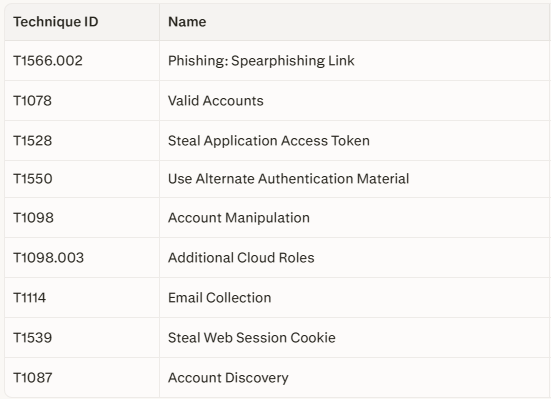
The MITRE ATT&CK Mapping
Understanding where this attack lands on the ATT&CK framework is critical for detection engineering and purple team exercises:
What Defenders Must Monitor
The monitoring gap in most organizations is correlation — individual signals exist but are not stitched together into a coherent detection chain. The following represents a prioritized monitoring framework for Microsoft Entra / M365 environments.
Priority Data Sources
Entra ID Sign-In Logs — filter on
authentication_protocol = deviceCode; flag interactive device-code sign-insEntra ID Audit Logs — device registrations, MFA method changes, OAuth consent grants
Microsoft 365 Unified Audit Log — Exchange, SharePoint, OneDrive, Teams activity
Exchange Online Audit Logs — inbox rule creation, forwarding rules, delegate changes, message search/export
Defender for Cloud Apps — anomalous file access, bulk download, unusual session behavior
OAuth App Consent Logs — new application permissions granted, high-privilege scope approvals
Conditional Access Results — policy outcome per sign-in event
EDR Telemetry — browser session anomalies, suspicious refresh token usage on endpoints
Critical Log Fields to Preserve
UserPrincipalName | SourceIP | ASN/ISP | Country/Region | UserAgent | DeviceID | SessionID | ClientApp | ApplicationID | ResourceID | AuthenticationProtocol | ConditionalAccessResult | MFAResult | CorrelationID
High-Value Detection Logic
Detection A — Successful Device-Code Sign-Ins (Baseline)
Flag any successful Entra ID sign-in where:
authentication_protocol = deviceCodeSource IP is unfamiliar or outside expected geography
Target resource is Exchange Online, Microsoft Graph, SharePoint, OneDrive, or Teams
Interactive sign-in flag is true
No matching managed/compliant device in the tenant
This alone is a strong investigation lead when device-code flow is rare in your tenant.
Detection B — Microsoft Authentication Broker + Office Resources (Elastic Rule Pattern)
Elastic’s public detection logic surfaces this specific high-confidence pattern:
Successful Entra ID sign-in
authentication_protocol = deviceCode
client_app = “Microsoft Authentication Broker”
resource = Exchange Online OR Microsoft Graph OR SharePoint
interactive = true
This combination is particularly suspicious because the Microsoft Authentication Broker client is the pathway to PRT escalation.
Detection C — Device-Code Flow Followed by Mailbox Activity
Correlate device-code sign-ins with Exchange audit events within a defined time window (recommend 30–60 minutes):
New inbox rule creation
External mail forwarding enabled
Delegate mailbox permission changes
Message search or export operations
Large read volume (automated bulk harvesting)
Outbound mail matching internal phishing patterns
Detection D — Device-Code Flow Followed by Graph Enumeration
Alert when a device-code sign-in is followed by Microsoft Graph API activity involving:
mail.readormail.readwriteoperationsFile listing or bulk download from SharePoint/OneDrive
users.read.allorgroup.read.alldirectory enumerationTeams message reading (where logs are available)
Application permission listing
Detection E — Refresh Token to PRT Escalation Chain
Flag the sequence:
Device-code sign-in → refresh token captured
New device registration in Entra ID (within 10–60 minutes)
Microsoft Authentication Broker client signs in on new device
PRT issued to new device
That device accesses multiple M365 resources without additional MFA
This chain — documented in RSAC 2026 presentations — represents full adversary persistence being established.
Detection F — “Clean” Authentication with Behavioral Anomaly
This is the hardest to catch with rules alone, and where behavioral AI delivers its highest value. Flag when a user session satisfies all of the following simultaneously:
Device-code sign-in
New IP/ASN/country not seen in user’s 30-day baseline
MFA satisfied
Conditional Access policy result: Allowed
No matching managed or compliant device
Immediate access to cloud data resources post-sign-in
This combination can look entirely clean to MFA-centric controls. Behavioral baseline modeling is required to surface it.
Defensive Controls: Prioritized Action Plan
Priority 1 — Audit and Block Device Code Flow
Microsoft now recommends that organizations “get as close as possible to a unilateral block on device code flow”. In February 2025, Microsoft began automatically rolling out a managed Conditional Access policy to block device-code flow for tenants that had not used it in the past 25 days — initially in report-only mode, with at least 45 days before enforcement.
If you have not already confirmed this policy is enforced in your tenant, treat this as Priority 1 today.
Step-by-step Conditional Access block:
Sign in to
entra.microsoft.comas Conditional Access AdministratorNavigate to Entra ID > Conditional Access > Policies > New Policy
Users: Include All Users; Exclude break-glass accounts only (audit this list quarterly)
Target Resources: All cloud apps
Conditions > Authentication Flows: Enable, select Device code flow
Grant: Block access
Enable policy: Set to Report-only first
Monitor report-only results for 7–14 days to identify legitimate dependencies (conference rooms, IoT)
Document exceptions, create narrow scope policies for legitimate use cases
Move to Enforcement mode
For tenants that legitimately need device-code flow for specific devices (e.g., Android conference room endpoints), scope the exception to specific network locations or device platforms.
Priority 2 — Enforce Phishing-Resistant MFA for High-Value Roles
Move administrators, finance users, executives, IT staff, and remote access users to FIDO2/passkeys or certificate-based authentication. FIDO2 credentials are cryptographically origin-bound — an AiTM proxy on a lookalike domain will fail authentication because the credential won’t resolve to the spoofed origin. This makes FIDO2 resistant to both the device-code and AiTM proxy attack variants.
Standard push MFA and TOTP are not phishing-resistant and remain vulnerable to device-code abuse (the user completes the MFA challenge on behalf of the attacker), AiTM real-time proxy interception, and MFA fatigue bombing.
Priority 3 — Session Hardening
Reduce session token lifetimes for sensitive applications via Entra ID token configuration
Enable Continuous Access Evaluation (CAE) to revoke sessions mid-session when device or location context changes unexpectedly
Block Authentication Transfer policy in Conditional Access — prevents cross-device session transfer, another OAuth abuse vector
Restrict OAuth app consent — prevent users from granting consent to third-party apps without admin approval; review and restrict high-privilege OAuth grants (
Mail.ReadWrite,Files.ReadAll,offline_access) quarterly
Priority 4 — Post-Compromise Monitoring and Behavioral AI
Signature-based controls and MFA enforcement alone will not catch device-code compromises in progress. Organizations need:
Behavioral baseline monitoring on authentication patterns, communication behavior, file access, and device history — flagging deviations in real time
Automated alert-to-action playbooks: session revocation, forced password reset, account lockdown, mailbox rule audit, and OAuth grant review on confirmed anomalies
Post-auth correlation rules linking sign-in events to mailbox and file activity (Detections C and D above)
Priority 5 — User Education (Targeted, Specific)
Generic phishing awareness training is insufficient here. Users need to specifically understand:
“Microsoft will never ask you to enter a code at
login.microsoftonline.com/deviceloginunless you personally initiated a login on a TV, kiosk, or legacy device. If you receive an email asking you to enter a code at that URL — do not enter it, even if the link and page look real.”
Kali365 and similar kits most commonly impersonate: SharePoint file shares, DocuSign signature requests, Teams meeting invitations, and voicemail notifications. These should be explicitly called out in awareness training.
Incident Response Playbook: Suspected Device Code Phishing
Phase 1 — Initial Validation (Before Any Containment)
Preserve raw logs first. Never contain before you have preserved evidence.
Key questions to answer in the first 30 minutes:
Does
authentication_protocol = deviceCodeappear in the sign-in logs for the flagged user?Was MFA satisfied? What method was used?
What was the Conditional Access policy result?
Is the source IP, ASN, user-agent, country, and device familiar for this user?
What cloud resource was accessed immediately after sign-in?
Was a new device registered in Entra ID within 60 minutes of the sign-in?
User interview questions:
Did you recently enter a code at a Microsoft login page?
Did you receive a document share, invoice, meeting invite, or signature request?
Did you complete an MFA prompt unexpectedly?
Have you scanned any QR codes recently?
Phase 2 — Scope (First 2 Hours)
Expand the investigation across these dimensions:
Same user across ±24 hours (or full available log retention)
Same source IP/ASN across all users — identify campaign scope
Same app ID / client ID / resource combination — identify phishing kit fingerprint
Mailbox rules, forwarding rules, delegate permissions — check Exchange audit logs
OAuth consent grants — new application permissions added to the user account
SharePoint/OneDrive/Teams/Graph access — what data was touched?
Outbound mail from compromised account — look for internal phishing sent from the account
Similar lures in other mailboxes — did others receive the same campaign?
Phase 3 — Containment (After Evidence Preservation and Approval)
Execute in this order:
Revoke user sessions and refresh tokens via Entra ID (
Revoke all user sessions)Identify and remove rogue device registrations — check Entra ID devices registered by the user; look for
DESKTOP-[6–8 hex chars]naming patternsRevoke malicious OAuth grants — remove any consent grants added post-compromise
Remove malicious mailbox rules and forwarding — check Exchange admin center and audit logs
Reset user password — even if no password was stolen, this invalidates certain session paths
Require MFA re-registration for the affected user
Temporarily restrict account if active adversary activity is suspected
Block malicious sender domains, URLs, and IPs identified in the campaign
Quarantine similar phishing emails tenant-wide
Critical Caveat: Microsoft has confirmed that access tokens may remain valid briefly even after session revocation. Continue active monitoring for 24–48 hours after containment. If PRT escalation occurred, token access paths may persist until rogue device registration is also removed.
Phase 4 — Post-Containment
Confirm no Windows Hello for Business key was provisioned by the attacker
Confirm CVE-2026-0012 “Ghost Token” exposure has been evaluated — review any
offline_access-scoped grantsNotify affected business stakeholders, particularly if finance, executive, or admin accounts were involved
Document findings for threat intelligence feedback and detection rule tuning
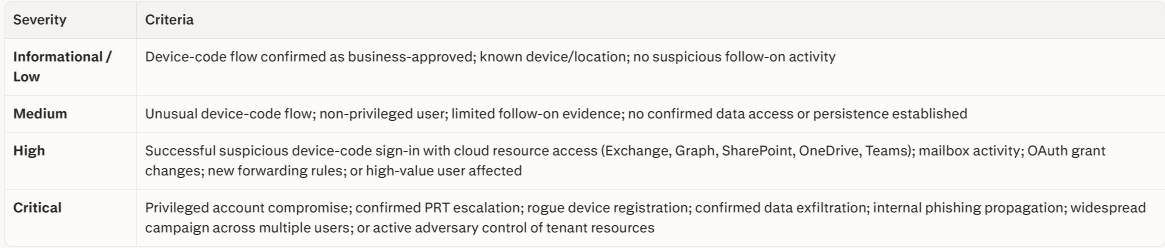
Severity Guidance for SOC Triage
The Bigger Picture: Identity Is the New Perimeter
The shift this attack class represents is not a temporary trend — it is a structural change in how attackers approach enterprise environments.
When attackers no longer need to breach your network, defeat your endpoint controls, or even steal credentials — when all they need is to trick a user into pressing “approve” on a real Microsoft login page — the entire security model built around perimeter defense, credential hardening, and MFA enforcement requires re-evaluation.
The 2025 IC3 report logged over $20.8 billion in total cybercrime losses — the first year losses surpassed $20 billion — with BEC and phishing combining for over $4 billion of that figure. Behind much of that financial damage is exactly this class of attack: identity compromise through legitimate authentication flows, followed by BEC wire fraud, data exfiltration, or ransomware staging.
The organizations that will weather this threat model are not those with the most MFA prompts — they are those with:
Conditional Access policies blocking unauthorized authentication flows before tokens can be issued
Phishing-resistant credentials (FIDO2/passkeys) for high-value roles
Post-authentication behavioral monitoring that treats token issuance as the beginning of threat detection, not the end
Correlated detection linking authentication events to cloud resource behavior in near real-time
Mature incident playbooks that include token revocation, device deregistration, and OAuth grant review as standard steps — not afterthoughts
MFA is necessary. It is not sufficient. The organizations that internalize that distinction — and build their detection and response architecture around it — are the ones that will stop these attacks before the wire transfer is approved.